Field Service Ver. 1.0 Aug. 2005 7. Mechanical adjustment
23
DF-605Adjustment / Setting
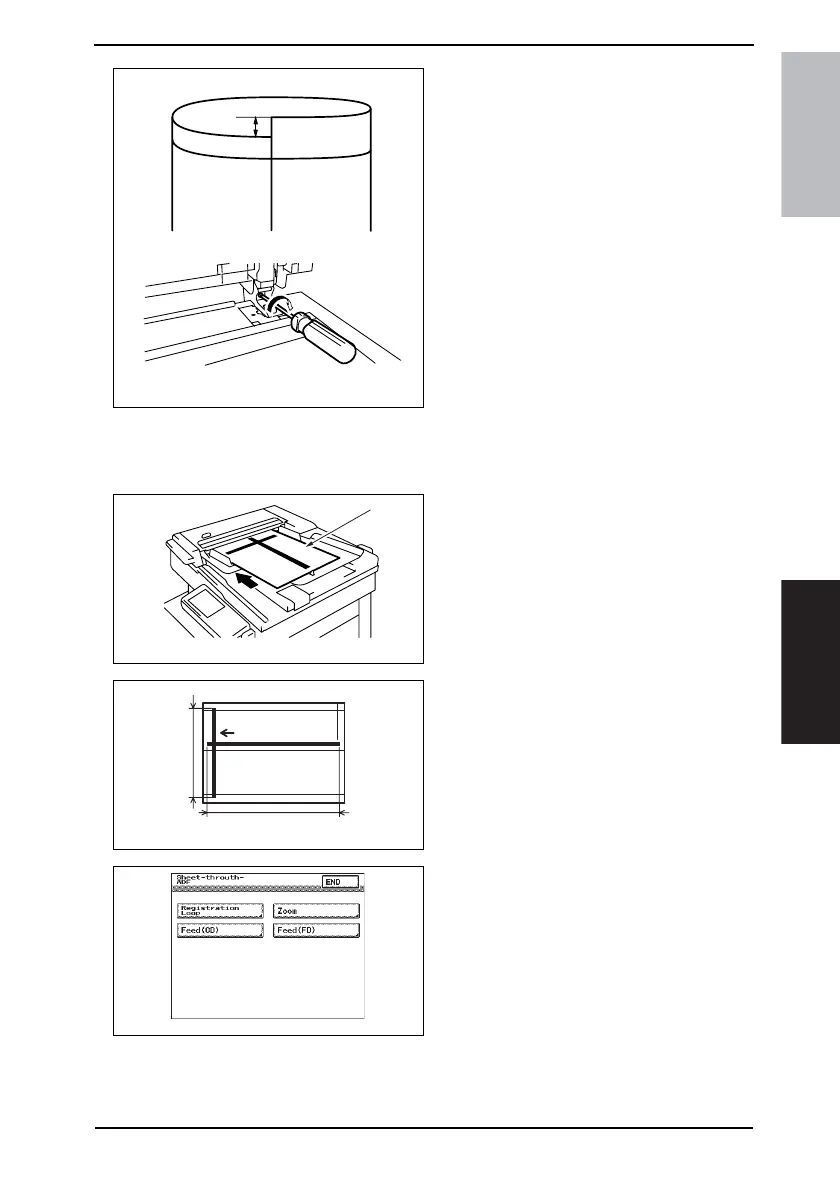
6. If there is a deviation as shown on
the figure, turn the screw clockwise
to adjust it.
7. After the adjustment procedure has
been completed, tighten the decora-
tive screw and the nut which has
been loosened in step 4.
7.2 Adjustment of the Scanning Zoom Ratio in the Main and Sub-
Scanning Directions
1. Load the test chart [1] in the Reverse
Automatic Document Feeder and
make a full-size copy.
2. Check that the lengths of the refer-
ence lines reproduced on the copy, A
(CD) and B (FD), meet the following
specifications.
Specification:
A (CD): 250 ± 2.5 mm (± 1.0 %)
B (FD): 400 ± 6.0 mm (± 1.5 %)
3. If the length of the line reproduced
on the copy falls outside the speci-
fied range, select Tech. Rep. Mode
→ [Tech. Rep. Choice] → [Sheet-
through-ADF] → [Zoom].
4344F3C504DA
4344F3C501DA
[1]
4344F3C505DA
A
B
4344F3E520DA











 To Next Page