12. Troubleshooting Field Service Ver. 1.0 Aug. 2005
168
FK-503
Troubleshooting
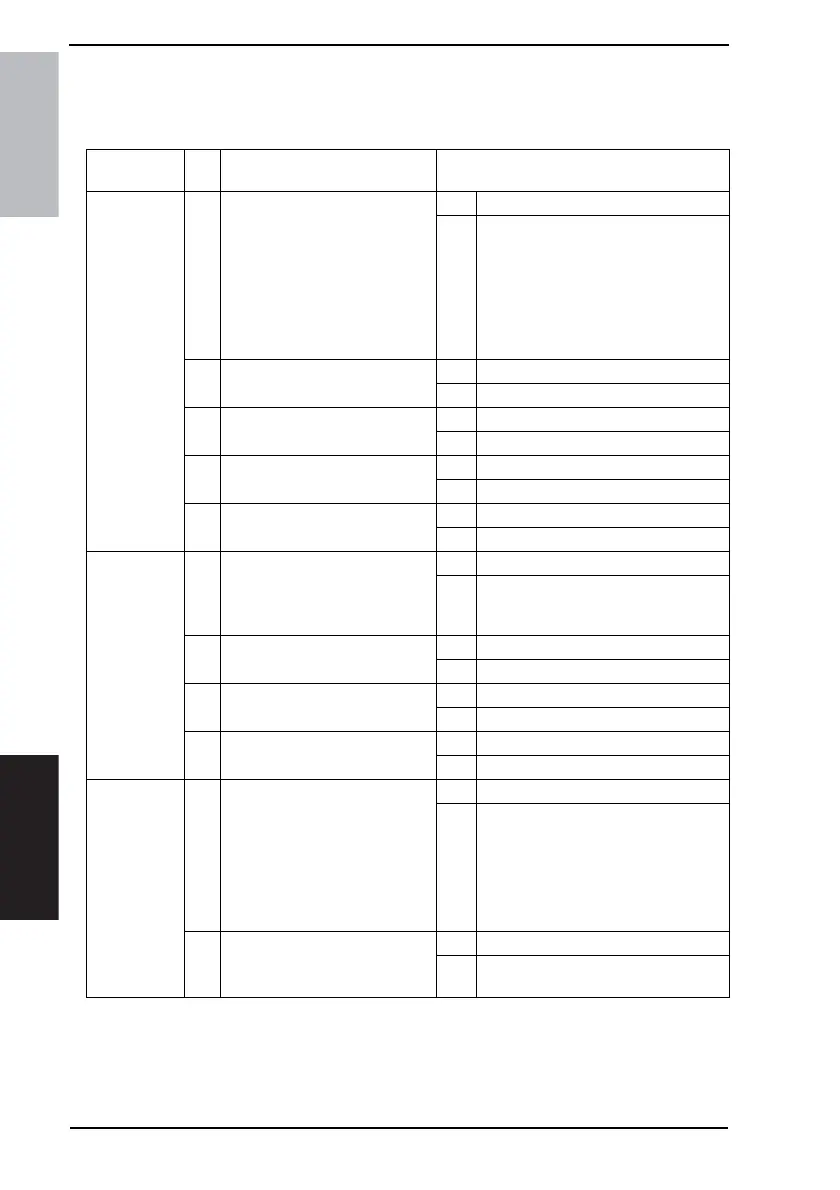
12.3 Diagnosis by Symptoms
• Possible causes of various problems and their remedies are shown below. Carry out
troubleshooting according to this table.
Symptom
Item
No.
Cause Remedy
Received
image is
stretched with
ADF
1 Printed image is excessively
stretched in the copy mode?
NOTE
• The following causes may be
possible (improper docu-
ment handling): special
paper such as very thick
paper, non-carbon print
paper, carbon print paper.
YES Go to item 2.
NO Failure in remote terminal (improper
document handling, error in the trans-
mission unit of the remote terminal).
2 Is an image from the service cen-
ter also stretched?
YES Go to item 3.
NO Go to item 4.
3 Any improvement after replacing
MFBS board?
YES Replace MFBS board.
NO Replace the PWB-A
4 Is the contact of feed roller gears
OK?
YES Go to item 5.
NO Replace the feed roller gear unit.
5 Any paper dust on feed rollers or
pick-up rollers?
YES Clean up rollers.
NO Replace the leaf spring.
Received
image is
shrunk too
much.
1 Printed image is excessively
shrunk in the copy mode?
YES Go to item 2.
NO Failure in the remote terminal (improper
document handling, error in the trans-
mission unit of the remote terminal).
2 Is an image from the service cen-
ter also shrunk?
YES Go to item 4.
NO Go to item 3.
3 Any improvement after checking
the reading unit?
YES END
NO Go to item 4.
4 Any improvement after replacing
MFBS board?
YES Replace MFBS board.
NO Replace the PWB-A
Received
image is too
light or faded.
1 Are copied image or a test image
also too light or faded?
NOTE
• The following causes may be
possible (improper setting of
document contrast): a docu-
ment with small blue charac-
ters or file lines
YES Go to item 2.
NO Failure in the remote side (improper
setting of document contrast, improper
document handling, poor line condi-
tion, and error in the transmission unit
of the remote terminal).
2 Any improvement after replacing
the imaging unit?
YES Replace the imaging unit.
NO For details see Main service manual
“Image quality problem”.











 To Next Page