9. Utility/Counter Mode Field Service Ver. 1.0 Aug. 2005
112
bizhub 200/250/350
Adjustment / Setting
9. Utility/Counter Mode
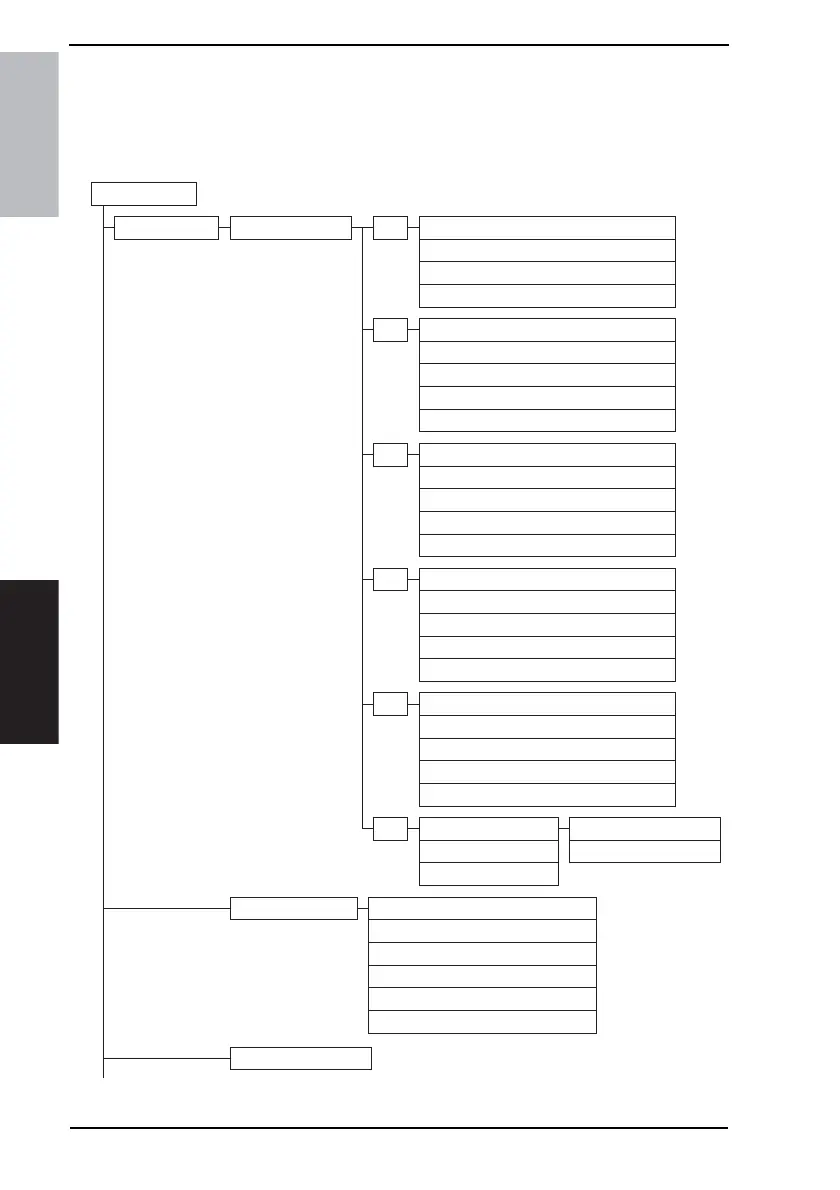
9.1 Utility/Counter Mode function tree
• The function tree is shown to comply with the format displayed on the screen.
Utility/Counter
User Setting User's Choice
E-mail Input
Mixed Original Detection
Language Selection
Measurement Unit Setting
Machine Authentication PW Change
1/6
Default Setting Simplex/Duplex
Auto Paper/Auto Zoom
PriorityTray
Special Paper Setting
Zoom Ratio for Combine Booklets
2/6
Low Power Mode
Sleep Mode
LCD Back-Light OFF
Auto Reset
Auto Reset when Account is changed
3/6
4in1 Copy Order
Default Quality/Density Modes
Default Copy Density Levels
Print Density
Default Finishing Mode
4/6
Default Screen
Default Device
Image Quality (ADF)
Default LCD Screen
Default E-Mail Screen
6/6
Sort/Non-Sort Auto Change
Output Tray Settings
Auto Paper Select for Small Original
Dehumidify Scanner
Crease/Center Staple
One-Touch
Index
E-Mail Program
Domain Name
Bulletin
Conf. Box
5/6
*1
*1
*1
*1
*2 *3
*1
*1
Store Overlay
*1
*2
4040F3E544DA











 To Next Page