2. Periodical check Field Service Ver. 1.0 Aug. 2005
6
PC-102/PC-202
Maintenance
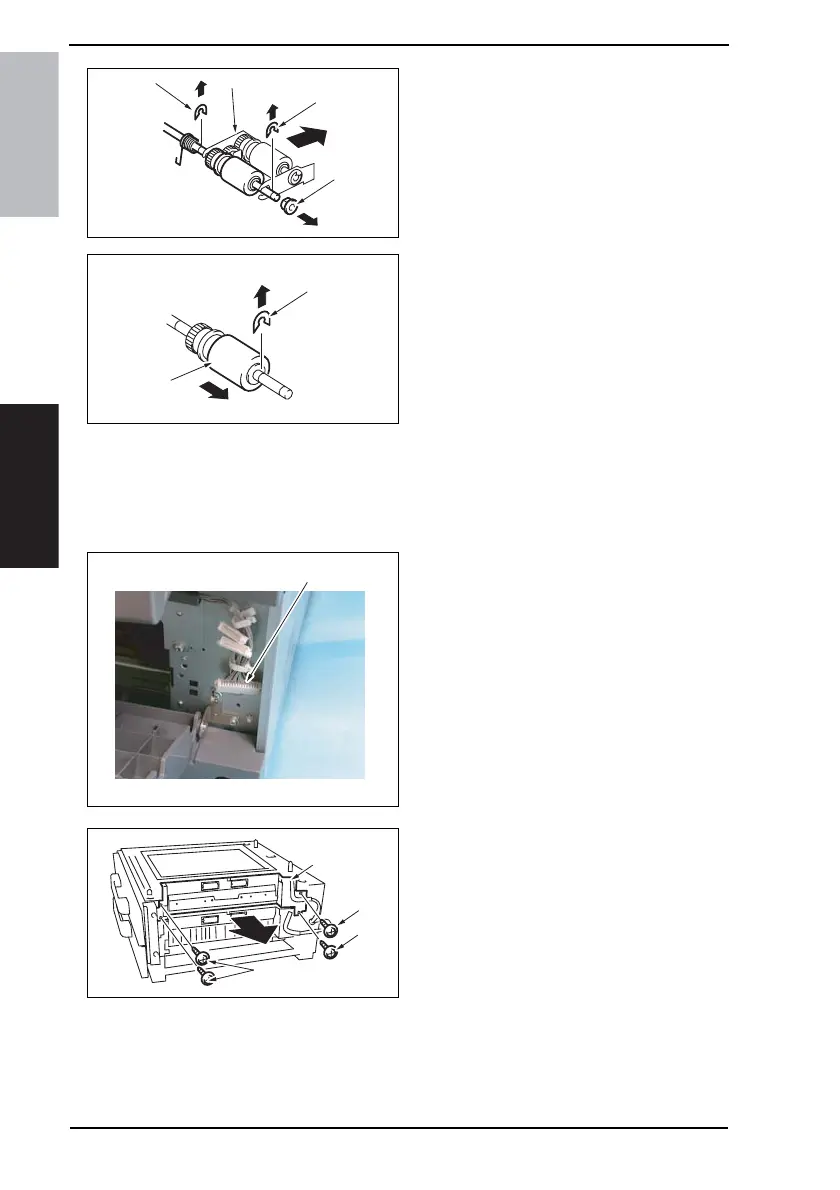
11. Remove two E-rings [16] and the
bushing [17], and remove the Pick-
up Roller Fixing Bracket Assy [18].
12. Remove the C-ring [19] and remove
the Paper Take-up Roller [20].
13. Repeat steps 1 to 12 similarly for the
4th Drawer.
NOTE
• Replace the Separation Roller Assy, Paper Take-up Roller and Pick-up Roller at the
same time.
2.1.3 Replacing the Pick-up Roller
1. Remove the Rear Right Cover.
(Remove the Right Lower Cover for
4th row.)
☞ 10
2. Remove the Tray3.(Remove the
Tray4 from 4th row.)
3. Remove the Paper Separation Roller
Mounting Bracket Assy.
☞ See steps 1 to 3 of “Replacing the
Separation Roller Assy” on p. 3.
4. Disconnect the connector [1] and
remove the harness from two wire
saddles.
5. Remove four screws [2] and remove
the Paper Take-up Unit [3].
4348fs2609c0
[16]
[16]
[17]
[18]
4348fs2610c0
[19]
[20]
4348F2C502DA
[1]
4348fs2603c0
[2]
[3]
[2]
[2]











 To Next Page