Field Service Ver. 1.0 Aug. 2005 7. Mechanical adjustment
25
DF-605Adjustment / Setting
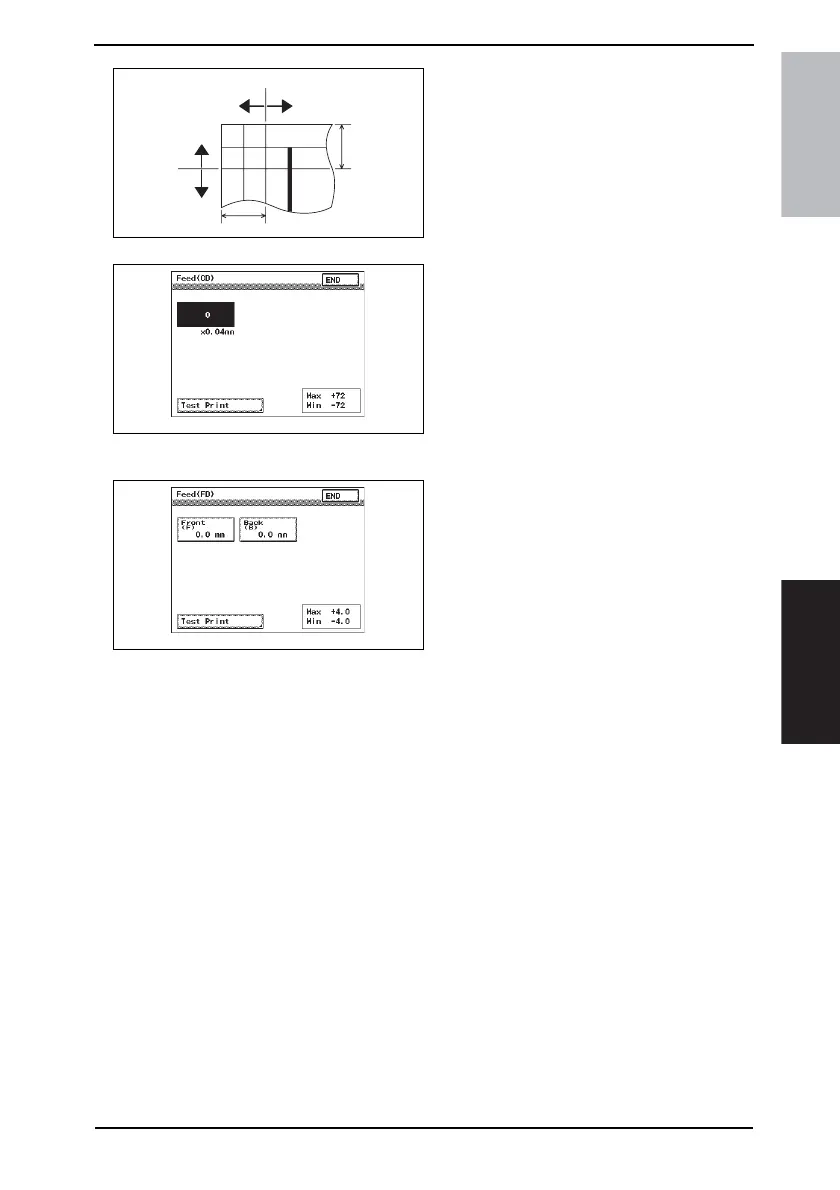
5. By referring to the left figure, select
[Feed (CD)] or [Feed (FD)] to adjust
the deviation.
• If the deviation is in the - direction with
respect to the reference line:
Adjust in the + direction.
• If the deviation is in the + direction with
respect to the reference line:
Adjust in the - direction.
In the case of Feed (CD)
6. Press the Clear key.
7. Enter the numeric value from the 10-
Key Pad.
(1 mm = 24 dot)
Adjustment Range:
Max +72
Min -72
Press the ✽ key to change the sign to
select either + or -.
In the case of Feed (FD)
8. Select [Front (F)] or [Back (B)].
9. Press the Clear key.
10. Enter the numeric value from the 10-
Key Pad.
(0.1 mm increments)
Adjustment Range:
Max +4.0 mm (F), +4.0 mm (B)
Min -4.0 mm (F), -4.0 mm (B)
11. Touch the [END].
12. Make another copy and check the
error.
4344F3C510DA
Copy
- direction
FD direction
CD direction
+ direction
- direction
+ direction
4344F3E522DA
4344F3E523DA











 To Next Page