4. Firmware upgrade Field Service Ver. 1.0 Aug. 2005
16
DF-605
Maintenance
4. Firmware upgrade
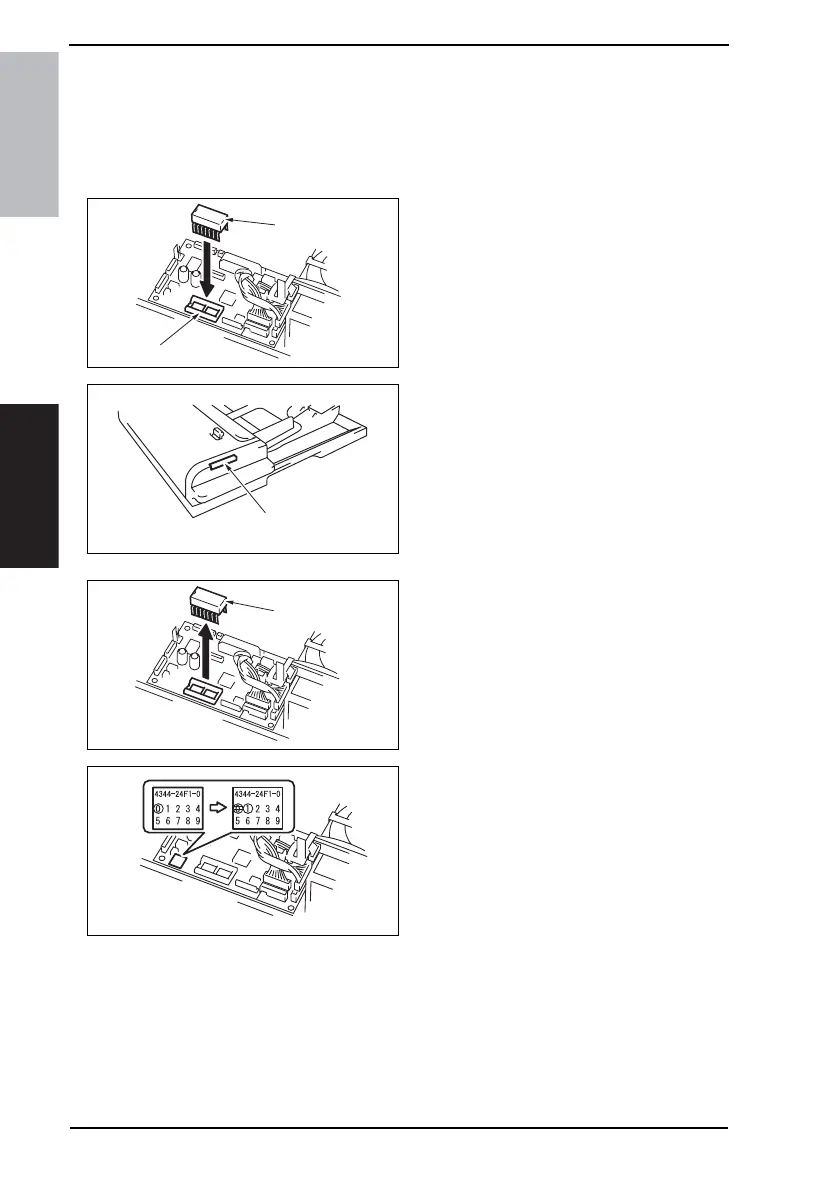
1. Prepare the firmware upgrade EP-ROM.
2. Turn OFF the Main Power Switch.
3. Remove the Rear Cover.
☞ 11
4. Insert the prepared EP-ROM [2] to
the IC socket section [1] of the Main
Control Board.
NOTE
• Ensure that the EP-ROM is installed
in the correct direction.
5. Turn ON the Main Power Switch.
6. Check the firmware update status at
the Print Lamp Display Section [3] of
the Duplexing Document Feeder.
Updating: Green and red light up alter-
nately.
Successful completion: Blinks in green.
Failure: Blinks in red.
• If failure occurs, redo the procedure
from step 4.
7. After the firmware has been
upgraded successfully, turn OFF the
Main Power Switch and remove the
EP-ROM [4] that was attached at
step 4.
8. Turn ON the Main Power Switch.
9. Display Tech. Rep. Mode.
10. Touch the [ROM Version] and check
the ADF ROM version.
11. Correct the version indication on the
ROM label on the Main Control
Board using a pen or other similar
means.
12. Reinstall the Rear Cover.
4344F2C515DA
[2]
[1]
4344F2C516DA
[3]
4344F2C517DA
[4]
4040F2C750DA











 To Next Page