7. Other Field Service Ver. 1.0 Aug. 2005
82
bizhub 200/250/350
Maintenance
<Rear>
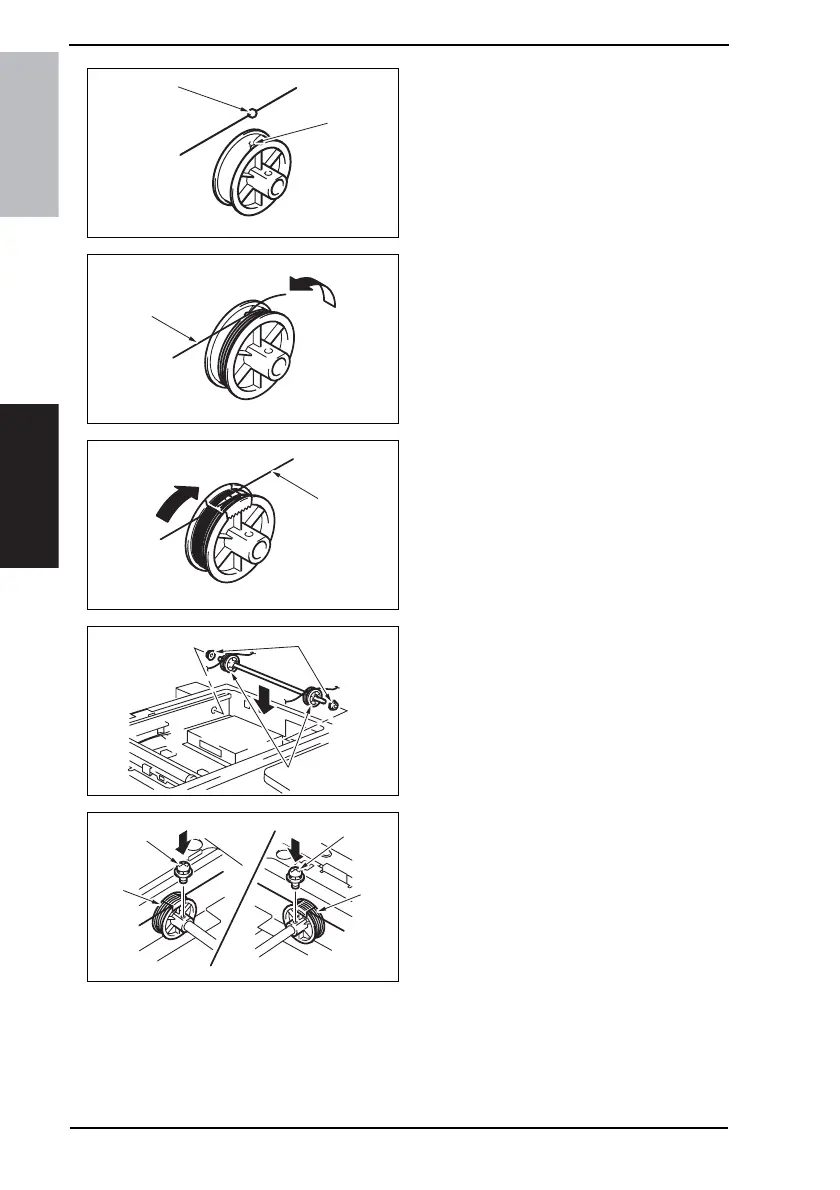
4. Position the round bead [5] of the
Scanner Drive Cable in the slit [6] in
the pulley.
NOTE
• Make sure that the bead snugly
rests in the slit in the pulley.
5. Wind Scanner Drive Cable 3 [7]
around the pulley four turns counter-
clockwise, from the rear toward the
front side.
NOTE
• Make sure that no part of the cable
rides on the other.
6. Wind Scanner Drive Cable 4 [8] four
turns clockwise from the rear to the
front side. Then, secure the cable
with tape.
NOTE
• Make sure that no part of the cable
rides on the other.
7. Install two pulleys (front and rear) [9]
to the shaft.
8. Attach two bushings [10] to the shaft.
9. Secure the front and rear pulleys [11]
using one screw each [12].
4040F2C718DA
[6]
[5]
4040F2C719DA
[7]
4040F2C720DA
[8]
4040F2C721DA
[10]
[9]
4040F2C722DA
[12]
[12]
[11]
[11]











 To Next Page