7. Other Field Service Ver. 1.0 Aug. 2005
90
bizhub 200/250/350
Maintenance
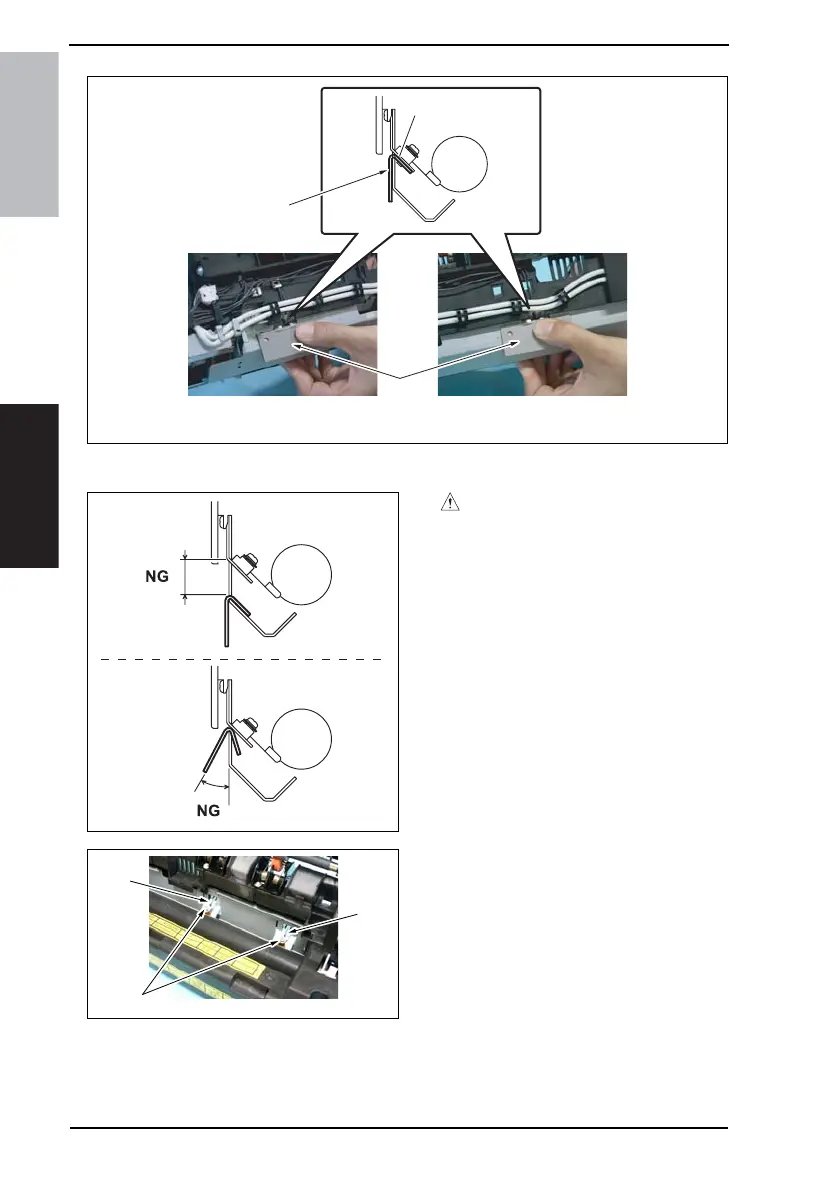
6. Press the Thermistor Holding/Check Jig [9] up against the bracket and fix it in position.
CAUTION
• Press the Thermistor Holding/
Check Jig squarely so as to elimi-
nate no gap between the bracket
that supports the thermistor and
the jig.
7. Remove two screws [10], the Fusing
Roller Thermistor [11], and Fusing
Roller Sub Thermistor [12].
Precautions for mounting the ther-
mistors
• When reinstalling the thermistors,
use the Thermistor Holding/Check
Jig.
• After installation, use the jig to
make sure that the bracket is not
bent.
4040F2E753DA
[9]
[9]
Bracket
Fusing Roller Sub Thermistor side Fusing Roller Thermistor side
4040F2C733DA
4040F2C732DA
[12]
[11]
[10]











 To Next Page