9. Tech. Rep. Mode Field Service Ver. 1.0 Aug. 2005
34
FK-503
Adjustment / Setting
C. TX Condition
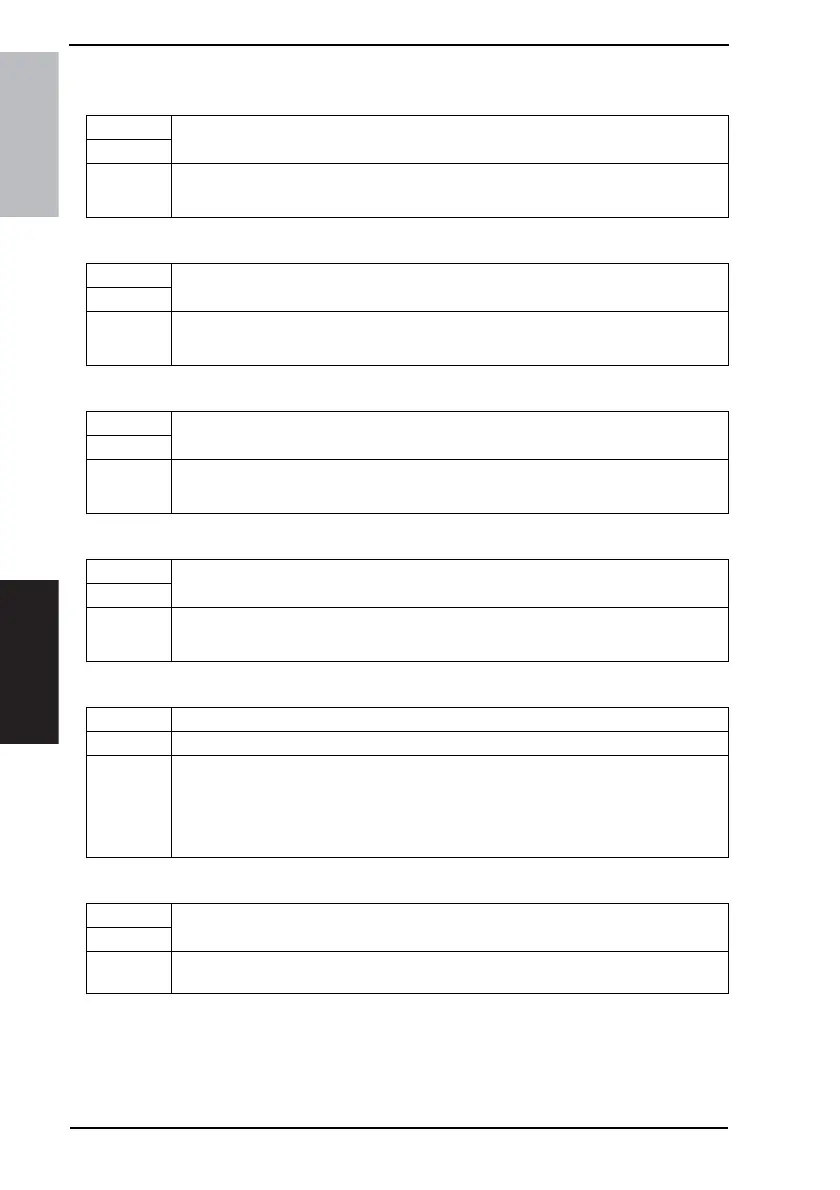
(1) Prints
(2) Toner Empty
(3) Drum Life
(4) Malfunction
D. Transmission Method
E. Service FAX Number
Functions
• Service call for exceeding specified number of papers.
Use
Setting/
Procedure
• The default setting is “ON”.
“ON” OFF
Functions
• Service call for empty toner.
Use
Setting/
Procedure
• The default setting is “ON”.
“ON” OFF
Functions
• Service call for reaching life cycle of drum.
Use
Setting/
Procedure
• The default setting is “ON”.
“ON” OFF
Functions
• To set whether or not to make a service call when a machine failure occurs.
Use
Setting/
Procedure
• The default setting is “ON”.
“ON” OFF
Functions • To set the transmission method.
Use • When changing the transmission method
Setting/
Procedure
• The default setting is “Data”.
Report “Data” E-Mail
• Select [Report] for fax transmission, [Data] for data transmission, and [E-Mail] for e-mail
transmission.
Functions
• Enters the Fax number on a report when a notification to the call center fails.
Use
Setting/
Procedure
1. Touch [Service FAX Number] and enter the telephone number.




 To Next Page