Field Service Ver. 1.0 Aug. 2005 11. Soft Switch List
69
FK-503Adjustment / Setting
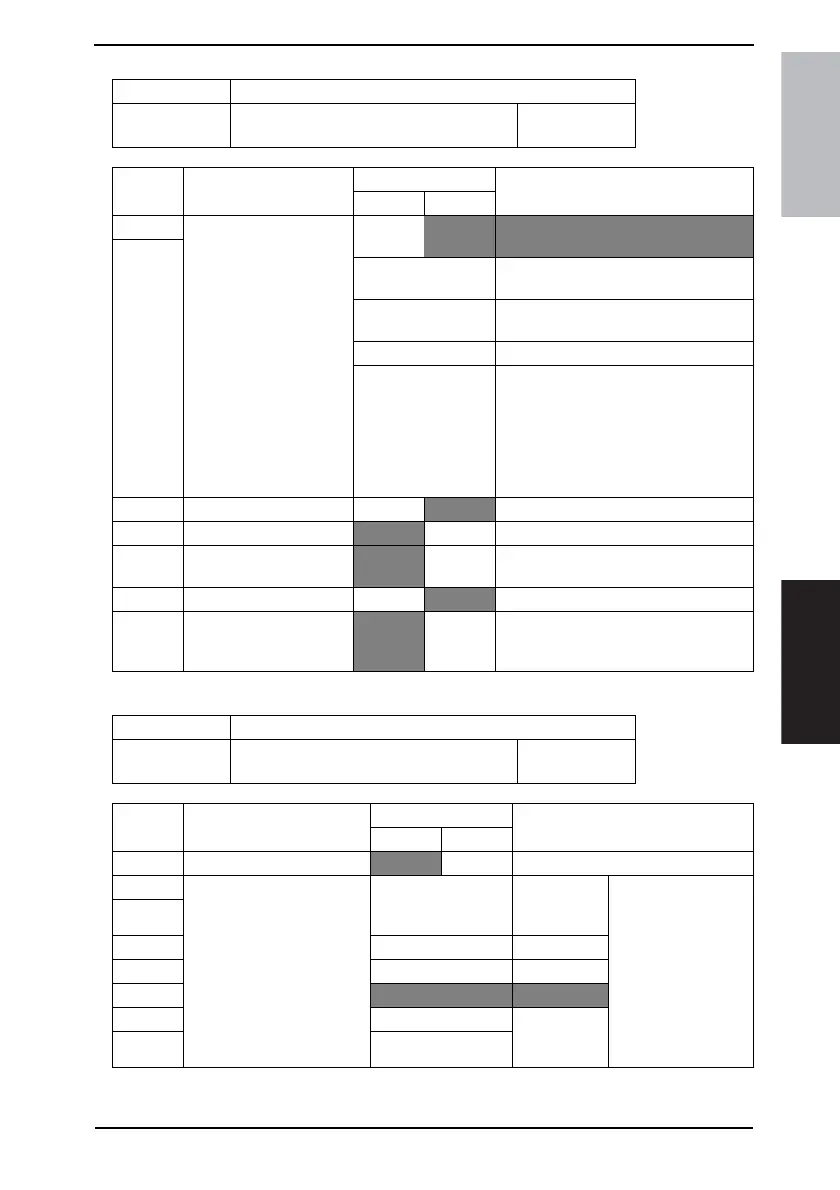
MODE Factory setting bit
027
Bit: 7654 3210
0010 0100
HEX:24
Bit Feature
Logic
Description
01
7 Select ID display order:
Specifies priority order of
destination ID for printing
report/ displaying on
screen.
Bit 7-6:
00
Pattern 1:
1
→
2
→
3
→
4
→
5
→
6
6
01 Pattern 2:
4
→
5
→
6
→
1
→
2
→
3
01 Pattern 3:
4
→
5
→
1
→
2
→
3
→
6
11
1: Name registered in one-touch button
2: Destination # registered in one-touch
button
3: Phone # of destination dialed
4: Destination phone # by TSI
5: Extended ID
6: Standard ID (# of TSI/CIG)
5 Display anti-dew button. No
Yes
4 Process drum dry button.
No Ye s
3 Secure comm. with N-
method.
No Ye s
2 F code function. No
Yes Need for G3 communications.
1 Assign non-reduction TX
for 2in1 scan.
No Yes Specifies whether 2in1 TX will be sent
by A4 always or by appropriate size to
receiver’s capability.
MODE Factory setting bit
028
Bit: 7654 3210
0110 0011
HEX:63
Bit Feature Logic Description
01
7 Select remote print protocol.
F CODE N method Fixed to “0”, valid at TX
6 Select restricted number of
prints of remote multi copy.
Bit 6-0: 0000000 Not available
(Same as 1
copy)
5
4 0000001 1 copy
3|
2
1100011 99 copies
1 Not available
(Same as 99
copies)
0











 To Next Page