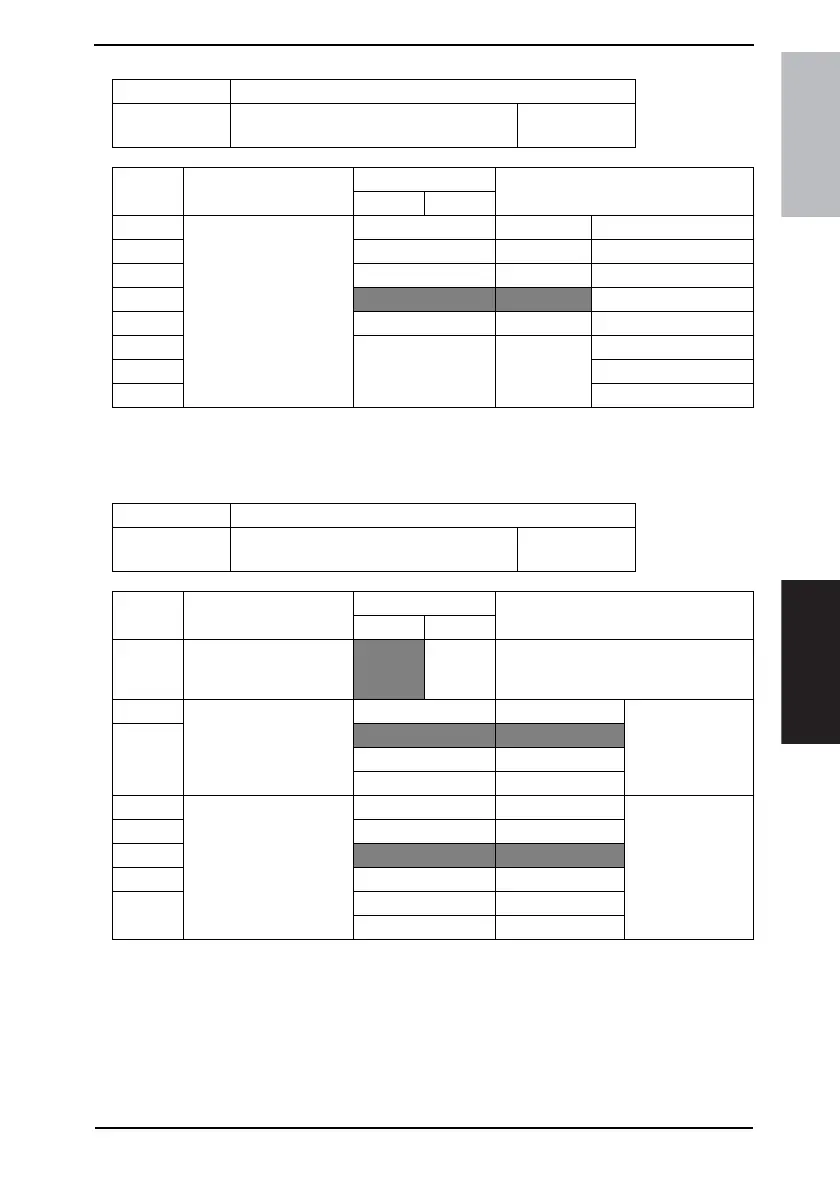
Field Service Ver. 1.0 Aug. 2005 11. Soft Switch List
101
FK-503Adjustment / Setting
NOTE
• The features with (*) are settable by users. *: Screen setting
MODE Factory setting bit
314
Bit: 7654 3210
0000 0011
HEX:03
Bit Feature
Logic
Description
01
7 Display time of reserva-
tion completion screen *
Bit 7-0: 00000000 Not closed
6 00000001 1 sec
5|
4
00000011 3 sec
3|
2 11111111 255 sec
1
0
MODE Factory setting bit
315
Bit: 7654 3210
0100 1100
HEX:4C
Bit Feature
Logic
Description
01
7 Select buzzer ring pattern
(JBMS). *
Normal JBMS-
corre-
sponding
Specify whether to set the buzzer ring
pattern to normal pattern or JBMS-cor-
responding patern
6 Sound level of buzzer * Bit 6-5: 00 Low
5
01 Normal
10 High
11 Not available
4 Normal completion sound
(JBMS-correspondin) *
Bit 4-2: 00000 0 Set the sound vol-
ume.
3 |
2
01100 3
1 |
0 10100 5
Others Not available











 To Next Page