Field Service Ver. 1.0 Aug. 2005 11. Soft Switch List
141
FK-503Adjustment / Setting
NOTE
• The features with (*) are settable by users. *: Screen setting
NOTE
• The features with (*) are settable by users. *: Screen setting
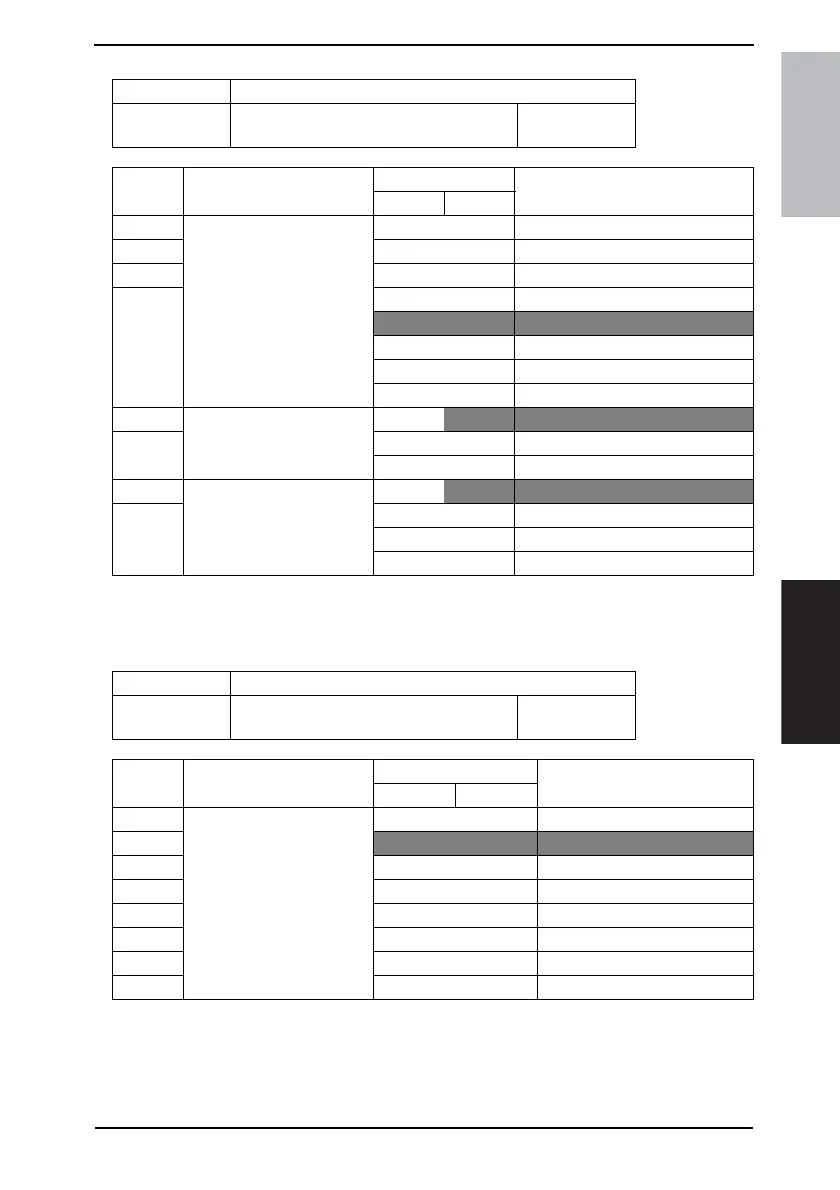
MODE Factory setting bit
441
Bit: 7654 3210
1000 0000
HEX: 80
Bit Feature
Logic
Description
01
7 Select a paper feeder cas-
sette to use when using PC
printer function *
Bit 7-4: 0000 Tray 1
6 0001 Tray 2
5 0010 Tray 3
4 0011 Tray 4
1000 Auto
1010 Bypass
1100 LCT
Others Not available
3 Select a paper orientation to
set when using PC printer
function *
Bit 3-2:
00 Portrait
2 01 Landscape
Others Not available
1 Select a print method to use
when using PC printer func-
tion *
Bit 1-0:
00 1-sided print
0 01 2-sided print for short-edge binding
10 2-sided print for long-edge binding
11 Not available
MODE Factory setting bit
442
Bit: 7654 3210
0000 0001
HEX: 01
Bit Feature
Logic
Description
01
7 Select # (last 8 bits) of copies
to print by PC printer *
Bit 7-0: 00000000 Not available
6
00000001 1
5|
4 11100111 999
3|
2 11111111
1
0











 To Next Page