Field Service Ver. 1.0 Aug. 2005 6. Mechanical adjustment
21
PC-402Adjustment / Setting
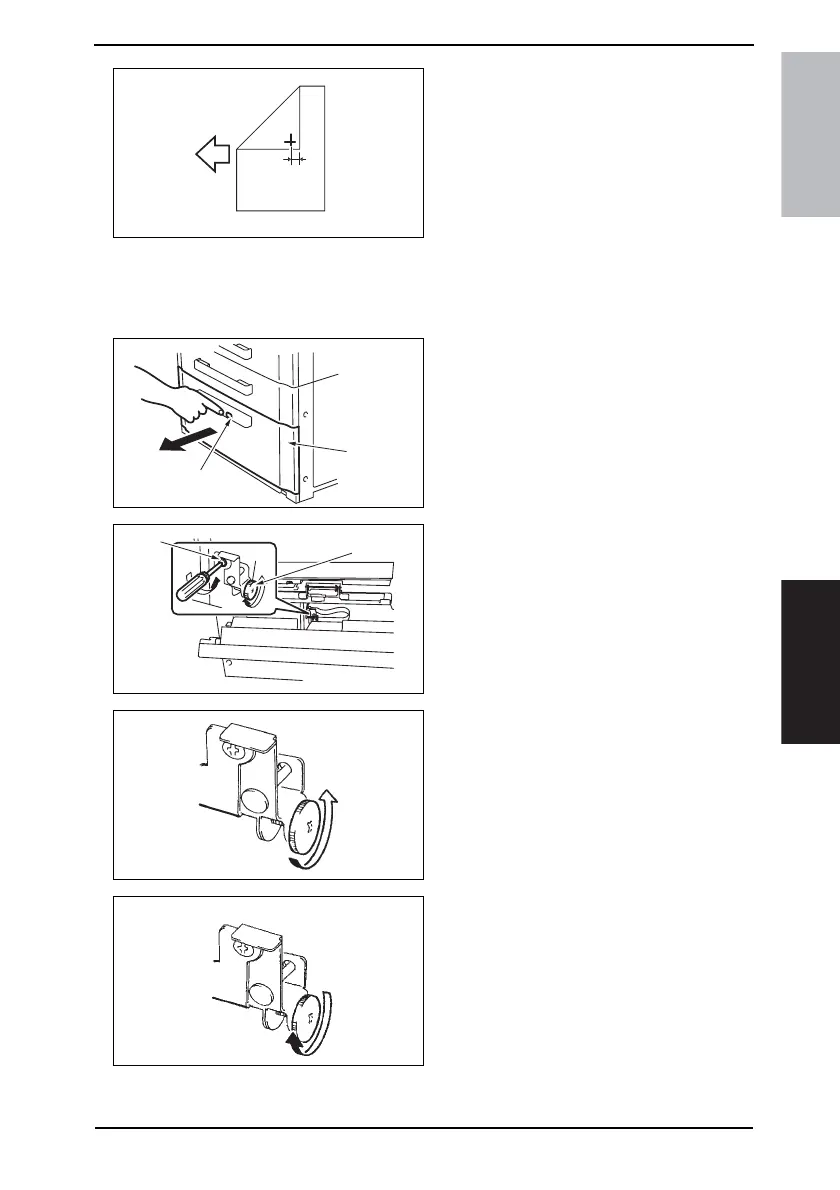
8. Measure the width of printed refer-
ence line A.
Specification: 10 mm ± 2.0 mm
9. If the measured width A falls outside
the specified range, enter the correc-
tion value.
10. Produce another test print and check
to see if width A falls within the spec-
ified range.
• If adjustment cannot be completed
only by inputting numeric value,
perform adjustment according to
the following procedure.
11. Press the Drawer Release button [1]
and then slide out the drawer [2]
from the Paper Feed Cabinet.
12. Open the Right Door.
13. Loosen the adjustment screw [3] and
turn screw D [4] to make the adjust-
ment.
NOTE
• Do not damage the passage surface
of the Right Door.
• If width A is greater than the specified
value: Turn screw D counterclockwise.
• If width A is smaller than the specified
value: Turn screw D clockwise.
14. Perform another test print and check the reference deviation.
15. Tighten the adjustment screw.
4061F3C513DA
A
4348fs3510c0
[2]
[1]
4348fs3511c0
[4]
[3]
4348fs3512c0
4348fs3513c0











 To Next Page