10. Media Picker 207
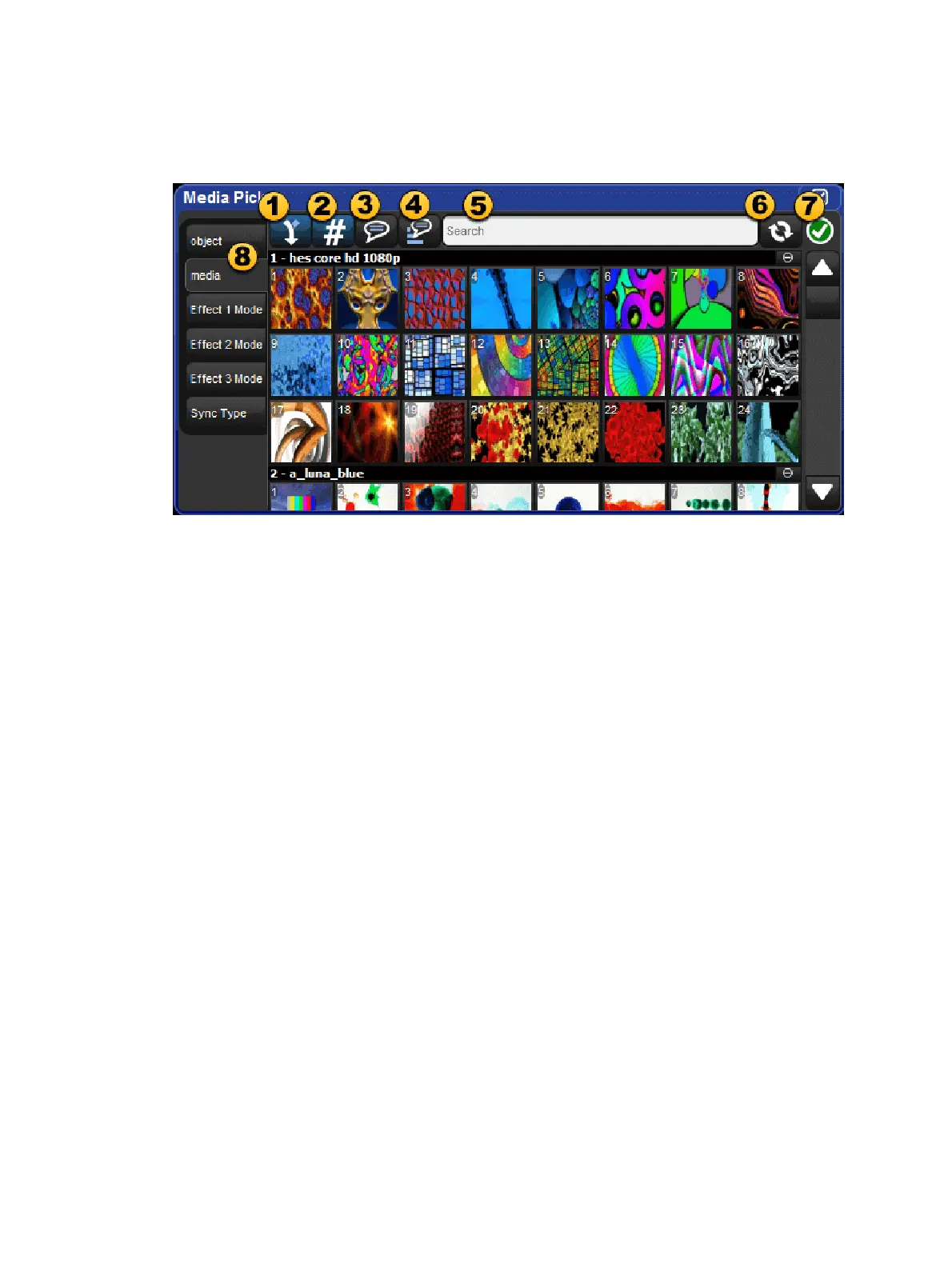
10.2 Media Picker Window Options
The media picker has several options for how previews are displayed in the window:
1. Merged Different (default on) : when this option is turned on the media picker
window merges previews for content across the current fixture selection even if the
preview images do not match. When in this mode a "page turn" icon will appear in the
upper right corner for preview that is not the same across the entire fixture selection.
2. Show/hide DMX value (default on) : shows and hides the DMX value of the
previews displayed in the media picker.
3. Show/hide name : shows and hides the preview names in the media picker.
4. Reverse Display Order : reversed the order in which the previews are displayed in
the media picker.
5. Search Filter : input text to filter the contents of the media picker window.
6. Preview Refresh Button : click the refresh button to obtain the latest library defined
media previews for the selected fixtures; most commonly used for refreshing media
patched CITP fixtures.
7. Package Status Icon : icon indicating the health status of the preview package for the
current fixture selection. Click on the icon for a detailed view of all running and
completed preview package tasks.
8. Function Tabs : fixture functions such as gobo wheels, color wheels, media indexes,
etc. are grouped into selectable tabs for easy navigation.











 To Next Page