17. Playback 343
Tip: Road Hog 4, HedgeHog 4, and Nano Hog 4 do not have a dedicated DBO key, however
the DBO can still be engaged/disengaged by holding pig and pressing the GM key.
17.10.3 Flash key below the Grand Master
The Flash key below the Grand Master fader is a non-latching key that can be assigned in
the user preferences window to send the grand master's level to zero, to full, or to whichever
value is opposing the grandmaster's current fader position.
The flash key below the grandmaster indicates the state of the Grand Master using its red
LED:
Off: Grand Master is at 100%.
Fast Flashing: Grand Master fader is below 100%
17.11 Group Masters
Group Masters (sometimes referred to as inhibitive sub-masters) can be used to inhibit the
intensity of a group of fixtures throughout the entire system. There are two types of group
masters:
Physical Group Masters: created by assigning a group to a physical master.
Virtual Group Masters: groups in the group directory (not attached to a physical
master on the current page). The intensity level of a Virtual Group Master is adjusted by
holding down a group's cell in the group directory and dialing the fifth (or fourth) main
encoder.
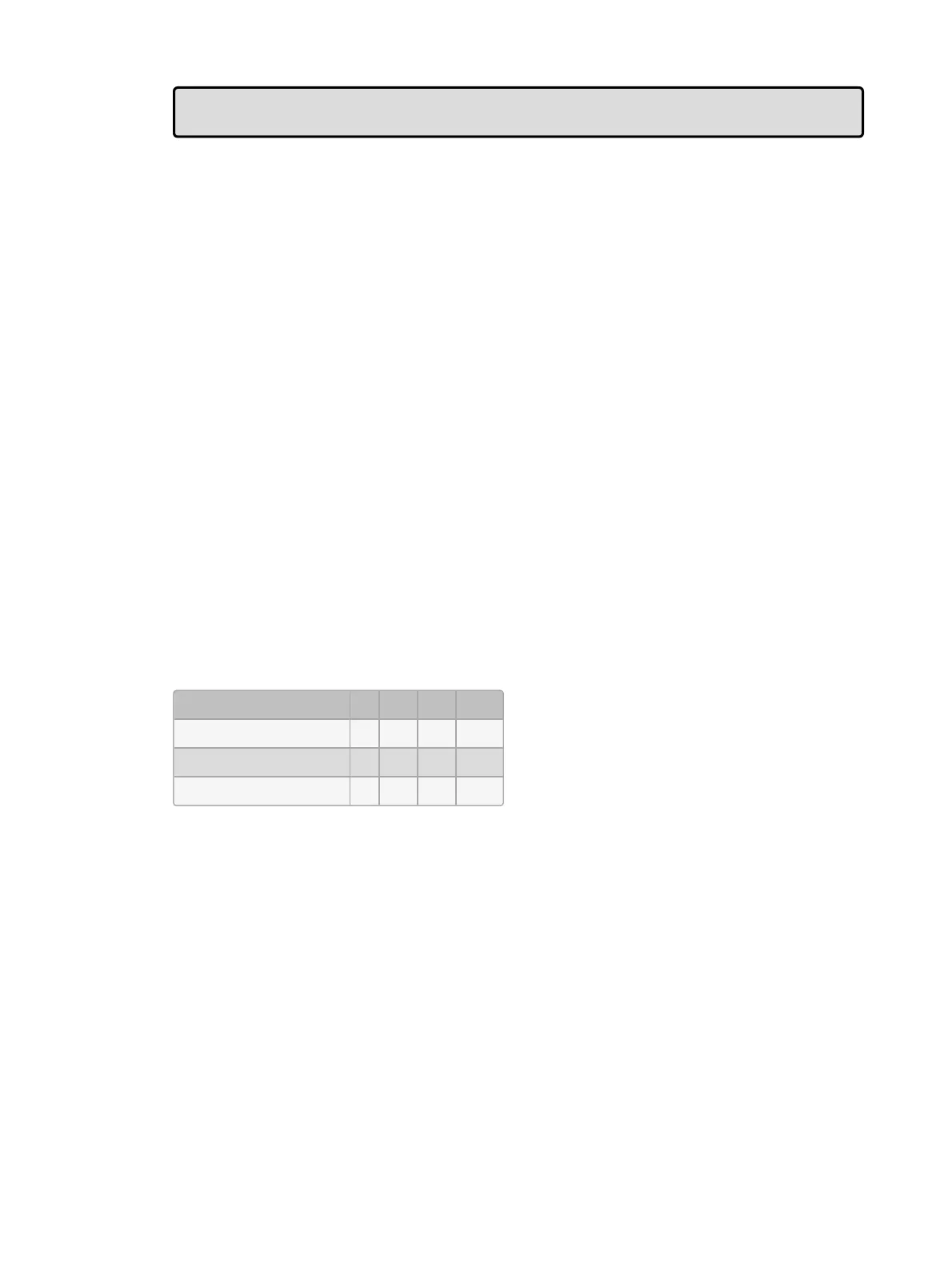
When a group master's level is inhibited it proportionally reduces the intensities of the
fixtures within the group through the entire show (playback, editors, etc). For example, if
fixtures 1<4 are in the programmer with intensities at 0%, 50%, 80% and 100%, then
inhibiting a group that contains these fixtures will affect the intensity output as the fixtures as
follows:
Fixture: 1 2 3 4
Group Master at 100% 0 50 80 100
Group Master at 50% 0 25 40 50
Master at 0% 0 0 0 0
Pressing the Flash key of an inhibitive master is the same as momentarily changing its fader
level to 0%, taking all fixture intensities controlled by the inhibitive master to 0%. Intensity
values are restored when you release the key.
Here are some important things to note about group masters:
The group directory indicates when a group master’s intensity level has been inhibited
by displaying the group master's level any time it is below 100%
If a group master's level is actively affecting fixtures on stage then a red stripe will also
appear on the group master’s cell in the group directory.
Group + Release resets all virtual group masters back to 100% (remember, virtual
group masters are groups that are not attached to a master on the current page).
When the group directory is displayed in list view a location column displays the page
(p) and master (m) to which an inhibited group is attached.











 To Next Page