9-14 FLIGHT CONTROLS / ROLL CONTROLS
ICON A5 / MAINTENANCE MANUAL CHANGE C3
5 x DIA .1875 Rig Pins
Parts Required
None
Aircraft System and Number
06—Flight Controls
Consumables
None
1. Remove left hand and right hand forward and main cockpit floor boards. (See “Cockpit Floor
Board Removal” on page 3-46.)
2. Remove seat back and seat pan. (See “Seat Back Removal” on page 3-50.)(See “Seat Pan
Removal” on page 3-52.) Retain all fastening hardware.
3. Remove the baggage floor boards. (See “Baggage Floor Removal” on page 3-41.) Retain all
fastening hardware.
4. Remove seatbelt cover, left hand and right hand baggage sidewalls, and baggage headliner. (See
“Baggage Sidewall Panel Removal” on page 3-43.)(See “Removal and Installation of Inspection
Panels and Fairings” on page 3-34.) (See “Seat Back Removal” on page 3-50.) If headliner cannot
be removed without removal of overhead console, removal is permitted.
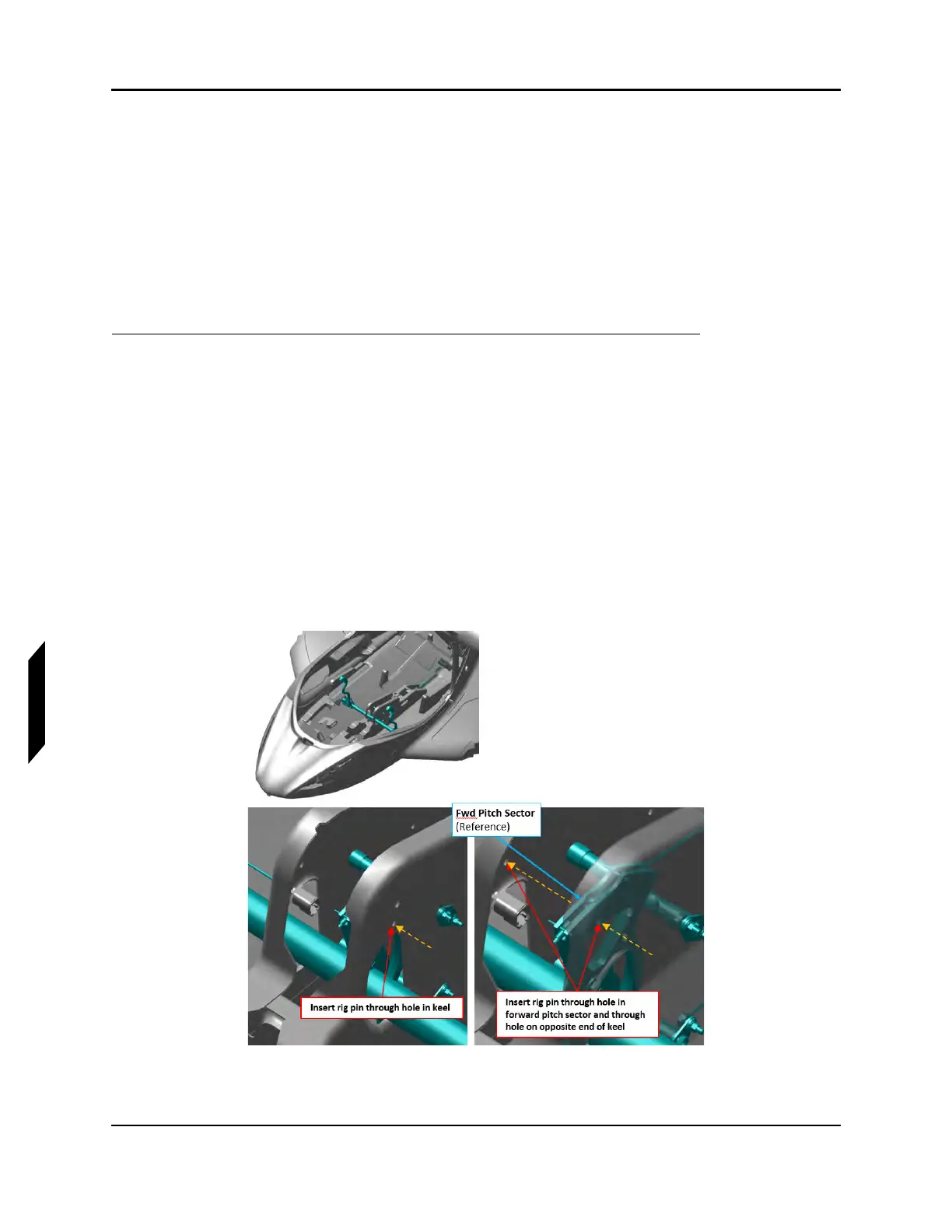
5. Install .250 in diameter rig pin through the center console and forward pitch sector. See Figure
9-9.
FIGURE 9-9
PITCH SECTOR RIG PIN LOCATION



 To Next Page