17-34 WING / WING LOCK
ICON A5 / MAINTENANCE MANUAL CHANGE C2
Parts Required
None
Aircraft System and Number
14—Wing
Consumables
None
1. Remove the wing lock handle. (See “Wing Lock Handle Removal” on page 17-28.)
2. Remove the wing lock switch mounting plate. (See “Wing Lock Switch Mounting Plate Removal”
on page 17-24.)
3. Remove the affected components from the wing lock switch mounting plate, discarding any
retaining clips.
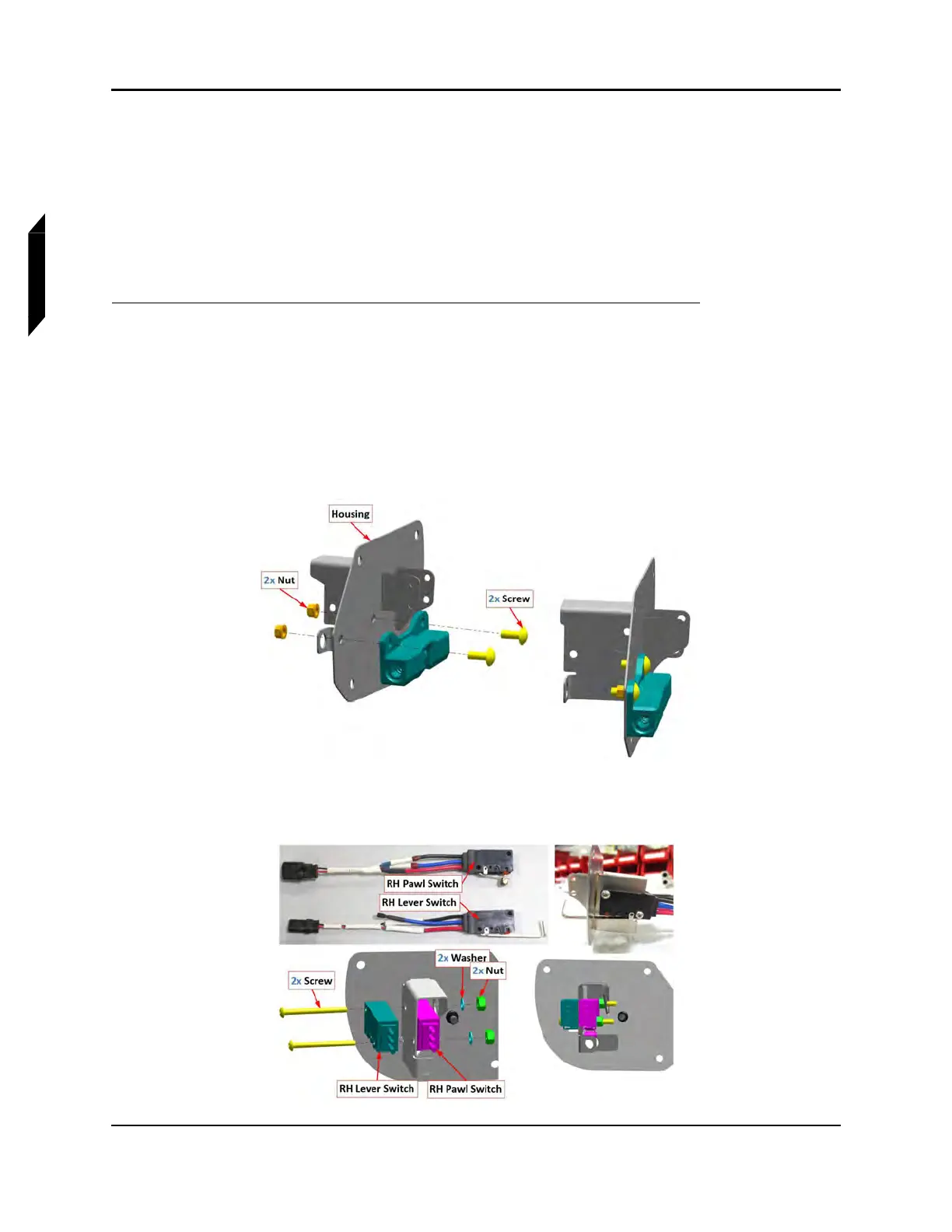
4. Install lock handle catch into lock mechanism housing ICA009260(R/H) and ICA009261(L/H),
using two 6C37MTT3 screws and MS21043-06 nuts.
5. Install lever switch ICA009633 (L/H), ICA009632 (R/H) and pawl switch ICA009635 (L/H),
ICA009634 (R/H) into the lock mechanism using two 92949A118 screws, 98019A309 washers,
and 90715A005 nuts.



 To Next Page