Loading
66 ProtoMat
®
S62
Defining the material height and z values
BoardMaster is factory-set with the following z values:
If you wish to use a thinner/thicker material or a different drilling underlay,
you will need to modify the values accordingly.
The moving-free height defines the distance between milling/drilling head
and material.
Defining the material height and z values
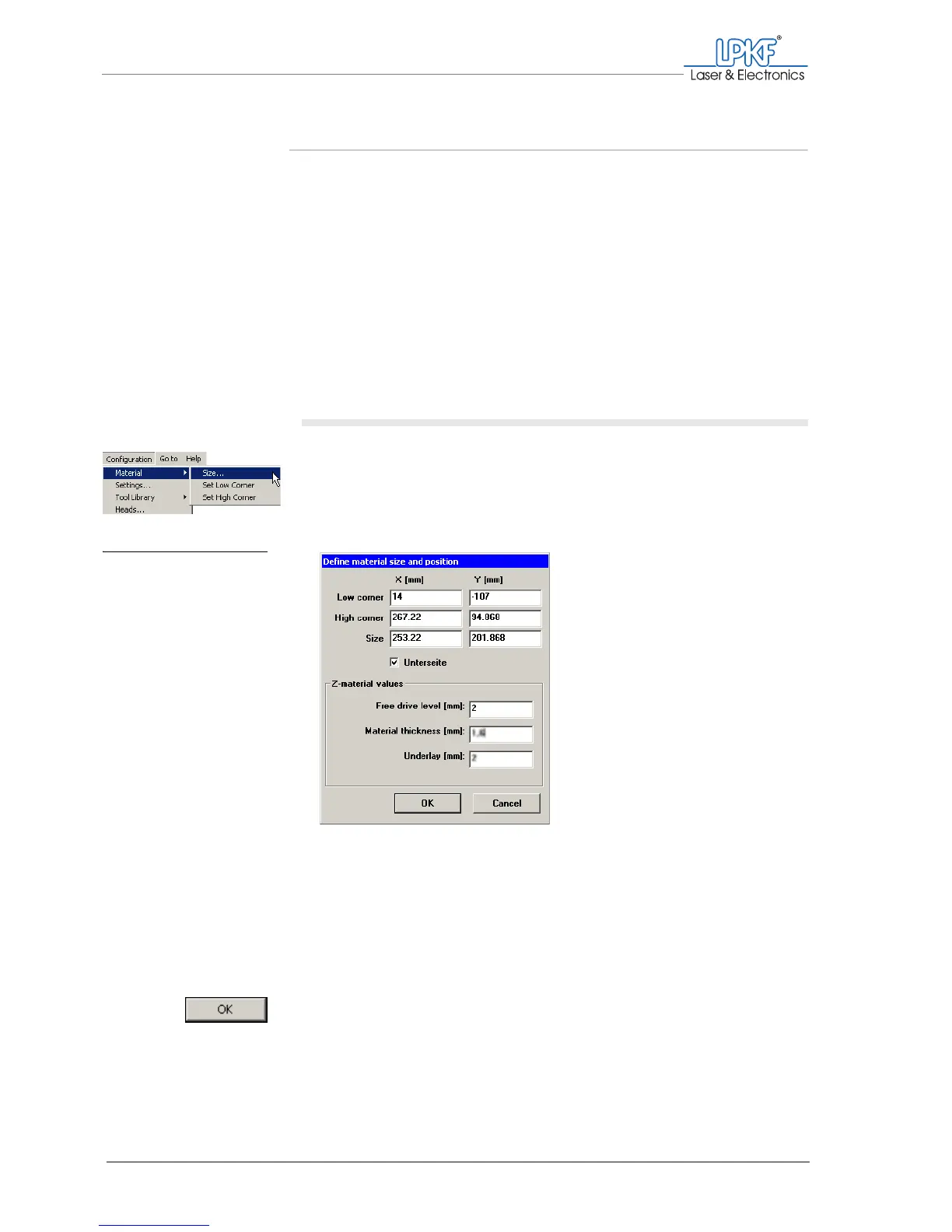
1. In the BoardMaster menu bar, click on Configuration > Material >
Size....
The Define material size and position window is opened.
The x and y values show the co-ordinates you have defined and the size
of the work area.
2. Enter the thickness of the material to be processed in mm in the
Material thickness [mm] input box.
3. Enter the thickness of the drilling underlay used in mm in the
Underlay [mm] input box.
4. Click on OK.
[ ] The work area is readily set up.
Material thickness: 1.60 mm
drilling underlay: 2 mm
Moving free height: 2 mm
Fig. 23: Defining the mate-
rial size and posi-
tion



 To Next Page