EasyManua.ls Logo

Ricoh A66 - Page 178

Ricoh A66
733 pages
Print Icon
To Next Page IconTo Next Page
To Previous Page IconTo Previous Page
Loading...
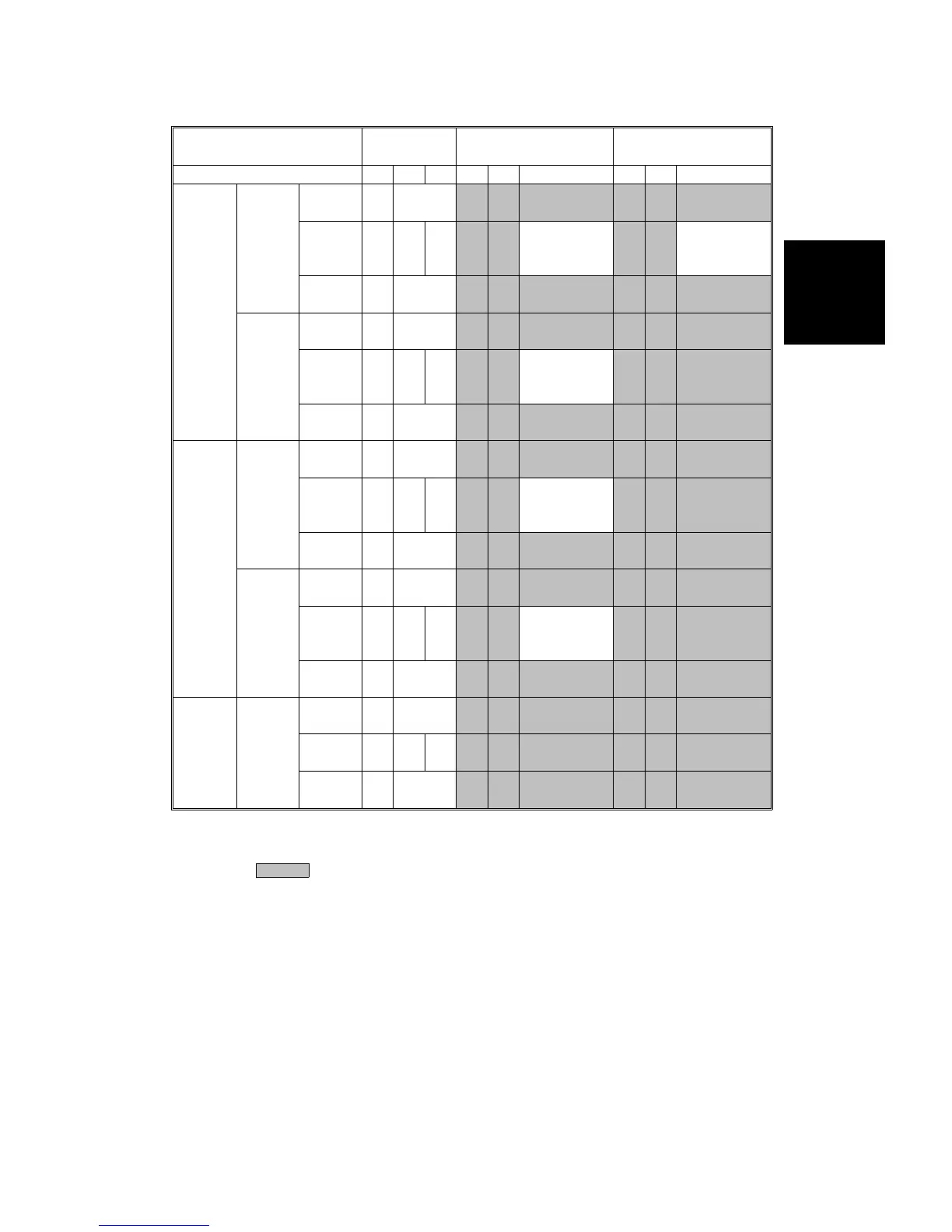
Normal
Condition
High Temperature &
High Humidity
Low Temperature &
Low Humidity
Mode 1C 2C 4C 1C 2C 4C 1C 2C 4C
Normal
Paper
Front
Leading
edge
200 300
Image
area
100 200 200
[Normal
Condition
Value]-50
[Normal
Condition
Value]+50
Trailing
edge
70 120
Back
Leading
edge
400 500
Image
area
150 250 250
[Normal
Condition
Value]-50
Trailing
edge
100 150
Thick
Paper
Front
Leading
edge
300 300
Image
area
100 200 200
[Normal
Condition
Value]-50
Trailing
edge
100 130
Back
Leading
edge
400 500
Image
area
150 200 250
[Normal
Condition
Value]-50
Trailing
edge
100 150
OHP Front
Leading
edge
300 300
Image
area
150 350 350
Trailing
edge
100 100
NOTE: 1) The normal condition defaults depend on SP modes 2-301-23 to
70, but they should not be adjusted in the field.
2) : The same as for "Normal Condition".
3) Units: µA
Detailed
Section
Descriptions
TRANSFER BELT UNIT
SM 2-109 A166/A187/A189

Table of Contents