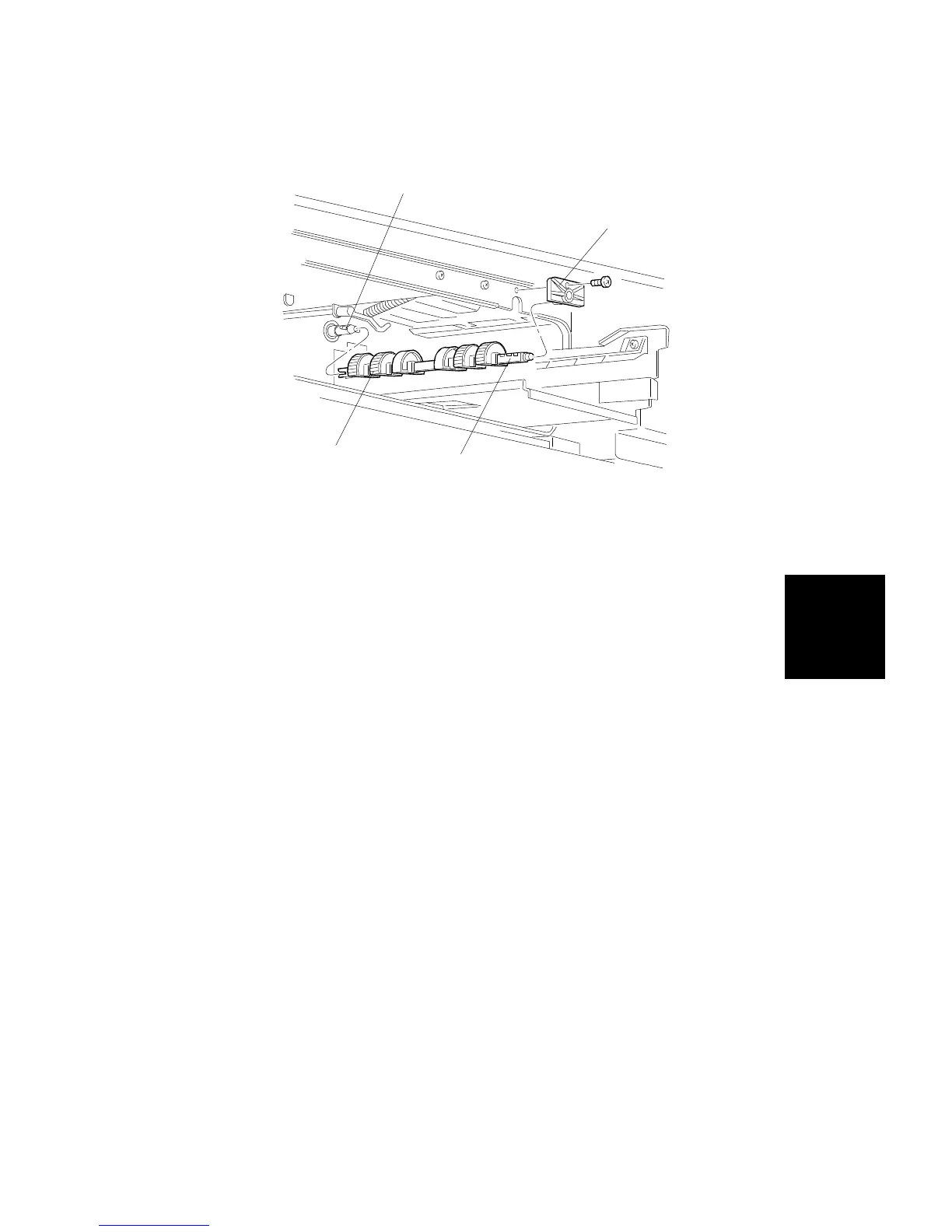
8.8 PAPER FEED ROLLER (SEMICIRCULAR ROLLER)
REPLACEMENT
1. Remove the front cover, the inner cover, and the used toner tank (see
procedures 1.2, 1.9 and 1.10).
2. Remove the paper feed tray (see procedure 8.7).
3. Remove the paper feed roller shaft holder [A] (1 screw).
4. Pull out the paper feed roller shaft [B].
5. Replace the 4 paper feed rollers [C].
NOTE: 1) Do not touch the paper feed rollers directly. This is to avoid
staining the roller’s surface with skin oils.
2) Be sure to orient the paper feed rollers correctly. Otherwise
the rollers will not align with the holes on the shaft.
3) The middle two rollers are made of plastic. Handle them with
care.
4) Ensure the pin [D] fits properly into the notch at the end of the
paper feed roller shaft. Install the paper feed roller shaft with
the flat side of the rollers facing down.
5) The paper feed roller shaft has three paper feed roller
mounting holes for each roller. The middle mounting hole is
the normal (factory) setting; the first for A size paper, and the
third for B size paper. The holes for A and B sizes can be
used as alternate holes when a paper jam occurs.
For example, the B size hole is used for DLT Jams.
[D]
[A]
[B]
[C]
Replacement
and
Adjustment
PAPER FEED AND REGISTRATION
SM 5-67 A166/A187/A189



 To Next Page