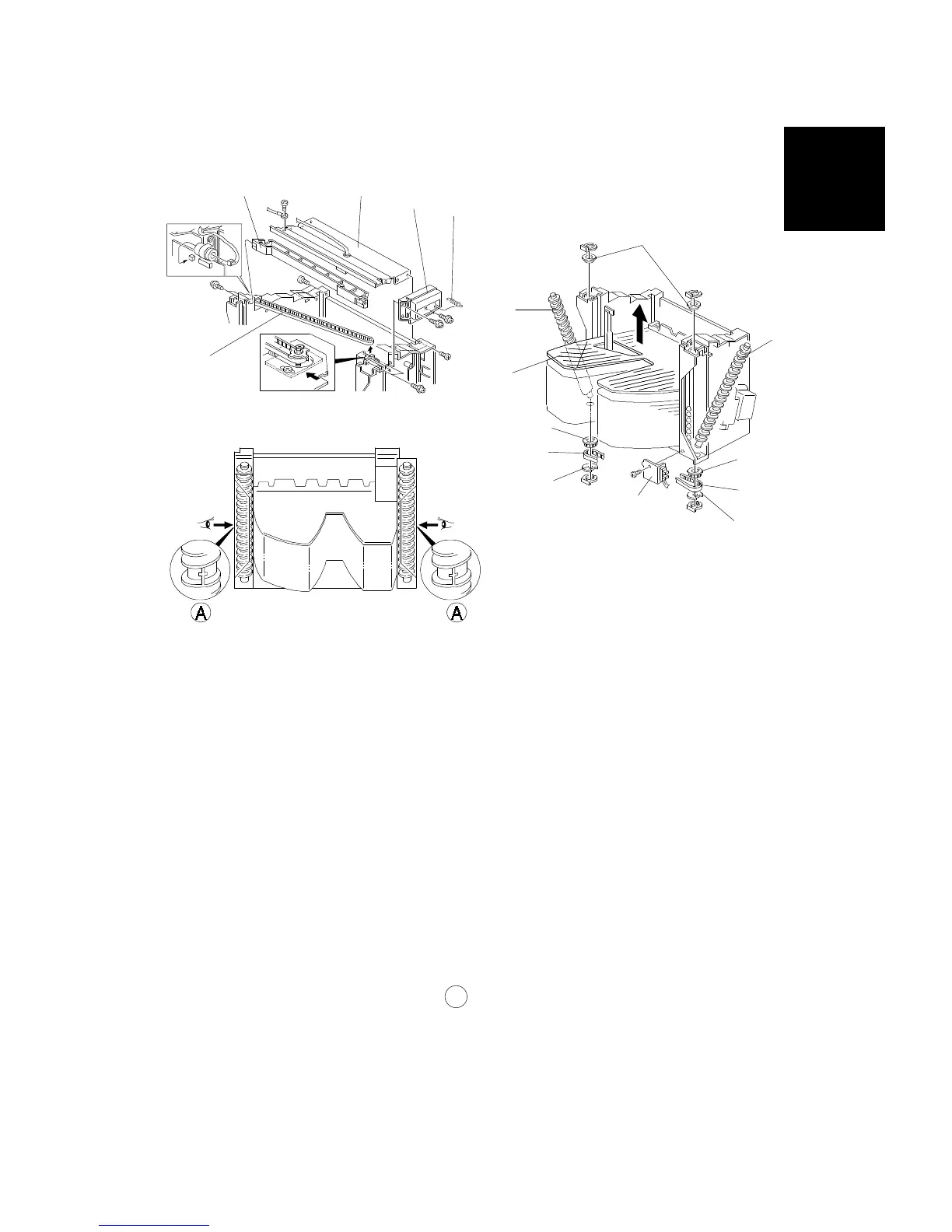
5.4 BIN REPLACEMENT
1. Remove the front, rear, and top covers (see Exterior Cover Removal in
this section).
2. Remove the spring [A] and the grip cover [B] (2 screws).
3. Remove the upper stay bracket [C] (6 screws, 1 grounding wire, 1
connector).
4. Remove the timing belt [D].
5. Remove the jogger guide plate [E] (4 screws).
6. Remove the wheel sensor bracket [F] (1 screw).
7. Remove the bushings [G] (1 clip each).
8. Remove the actuators [H], belts [I], and the gears [J] (1 clip on each side).
9. Remove the helical wheels [K].
10. Remove the bins [L].
NOTE: When putting back the helical wheels at both the front and rear of the
machine, the parts labeled A should be pointing directly away from
the machine.
[E]
[C]
[B]
[A]
[D]
[F]
[G]
[K]
[J]
[I]
[H]
[K]
[L]
[J]
[I]
[H]
10-Bin
Sorter Stapler
ST10 (A555)
REPLACEMENT AND ADJUSTMENT
SM 9-23 A166/A187/A189



 To Next Page