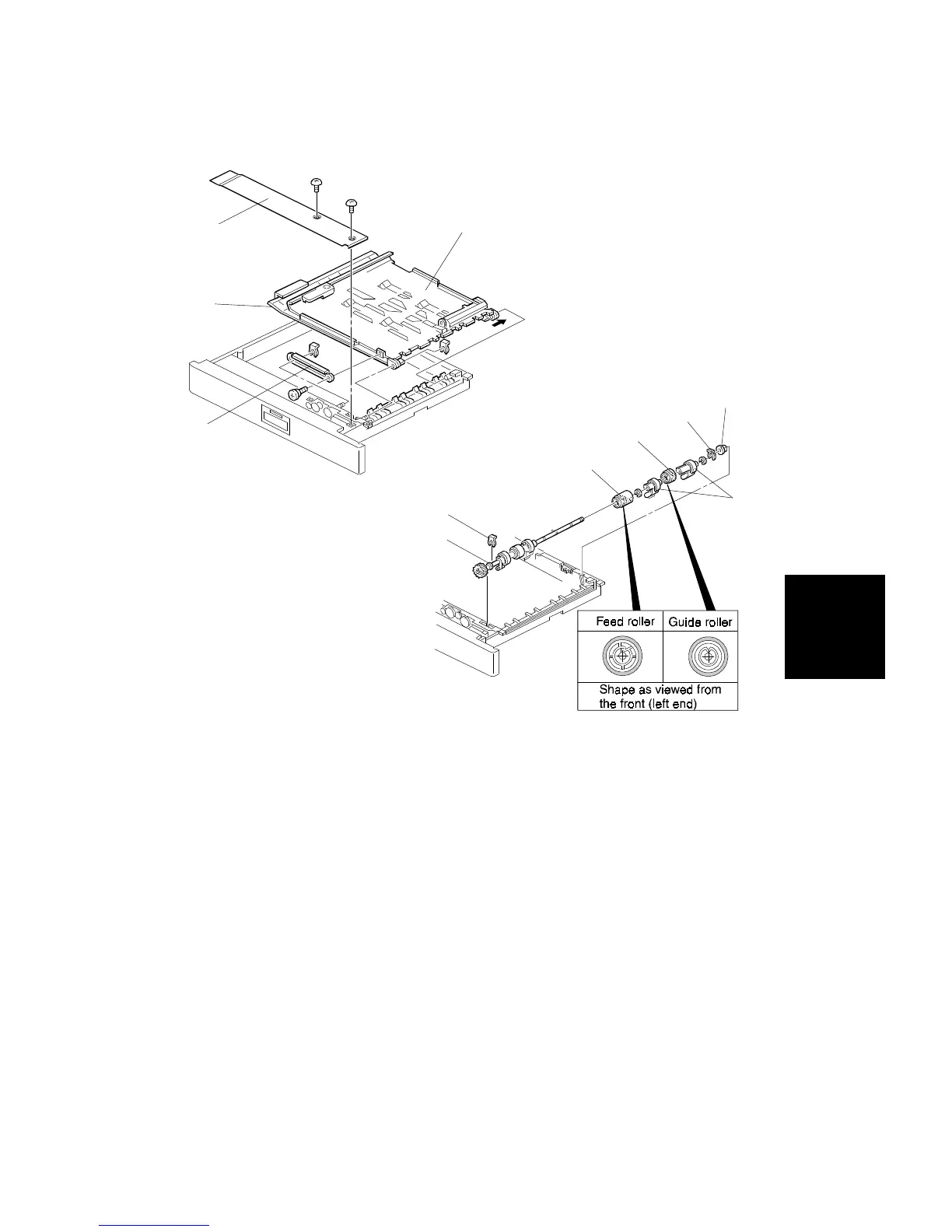
10.3 FEED ROLLER REPLACEMENT
1. Open the duplex unit.
2. Remove the guide rail [A] (1 screw and 1 snap-ring).
3. Remove the upper guide plate [B] and lower guide plate [C] (1 snap-ring).
4. Remove the inner cover [D] (2 screws).
5. Remove the 2 snap-rings [E] from the both ends of the feed roller shaft.
6. Slide the bearings [F] inward.
7. Replace the feed roller [G] (2 E-rings, 2 paper flatteners [H], and 1 guide
roller [I]).
NOTE: 1) Be sure to install the feed and guide rollers correctly.
2) The feed roller is made of silicone rubber and is not
compatible with the non-silicone rubber feed rollers used in
some previous models.
[D]
[B]
[C]
[A]
[F]
[E]
[G]
[I]
[H]
[E]
[F]
Replacement
and
Adjustment
DUPLEX UNIT
SM 5-89 A166/A187/A189



 To Next Page