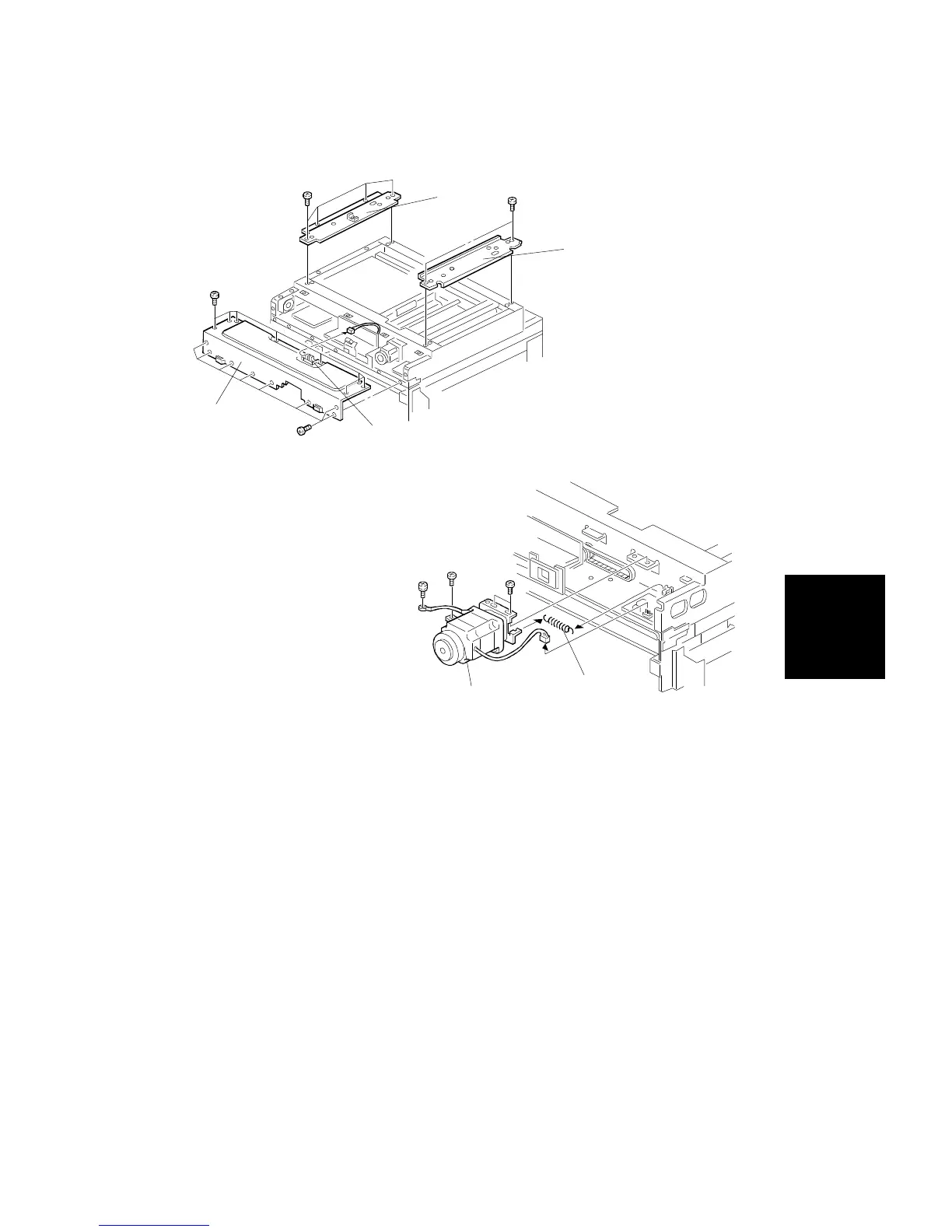
3.7 SCANNER WIRE REPLACEMENT
1. Remove the exposure glass and exterior covers (see procedures 1.1
through 1.9).
2. Remove the upper right stay [A] (4 screws) and the upper left stay [B] (2
screws) from the scanner unit.
3. Remove the two scanner frames, as shown:
1) Front wire: Remove the platen cover frame [D] (1 connector, 16
screws).
2) Rear wire: Remove the scanner bar frame (12 screws).
4. Remove the scanner motor [F] (2 connectors, 4 screws, 1 spring [E],
timing belt).
NOTE: When reinstalling the scanner motor, pull the timing belt taut with
the tension spring [E].
[A]
[B]
[D]
[C]
[E]
[F]
Replacement
and
Adjustment
SCANNER UNIT
SM 5-19 A166/A187/A189



 To Next Page