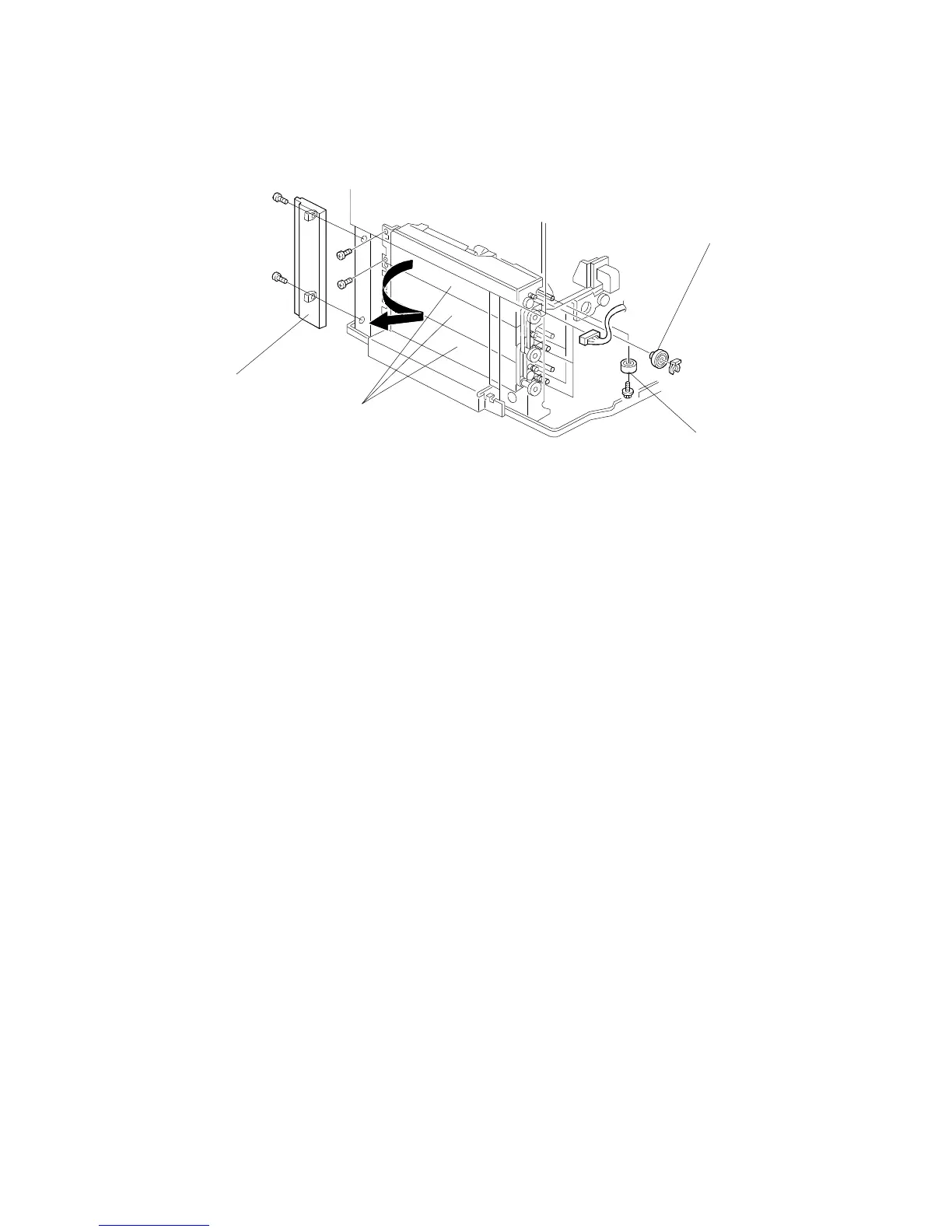
7.3 PAPER FEED UNIT REPLACEMENT
1. Remove the paper feed clutch (see Paper Feed Clutch Replacement).
2. Remove the paper feed roller gear [A].
3. Pull out all the trays.
4. Two-tray type only: Remove the front lower cover (see Exterior Cover
Removal).
5. Remove the front right cover [B] (2 screws).
6. Remove the paper feed unit [C] (2 screws for each unit).
NOTE: When removing the paper feed unit, do the following.
• When removing the paper feed roller gear, remove the rubber
foot [D].
• Remove the joint bracket.
After reinstalling the paper tray, perform the side-to side-registration
adjustment (see Removal and Adjustment in the manual for the
copier).
[A]
[D]
[C]
[B]
REPLACEMENT AND ADJUSTMENT
A166/A187/A189 8-12 SM



 To Next Page