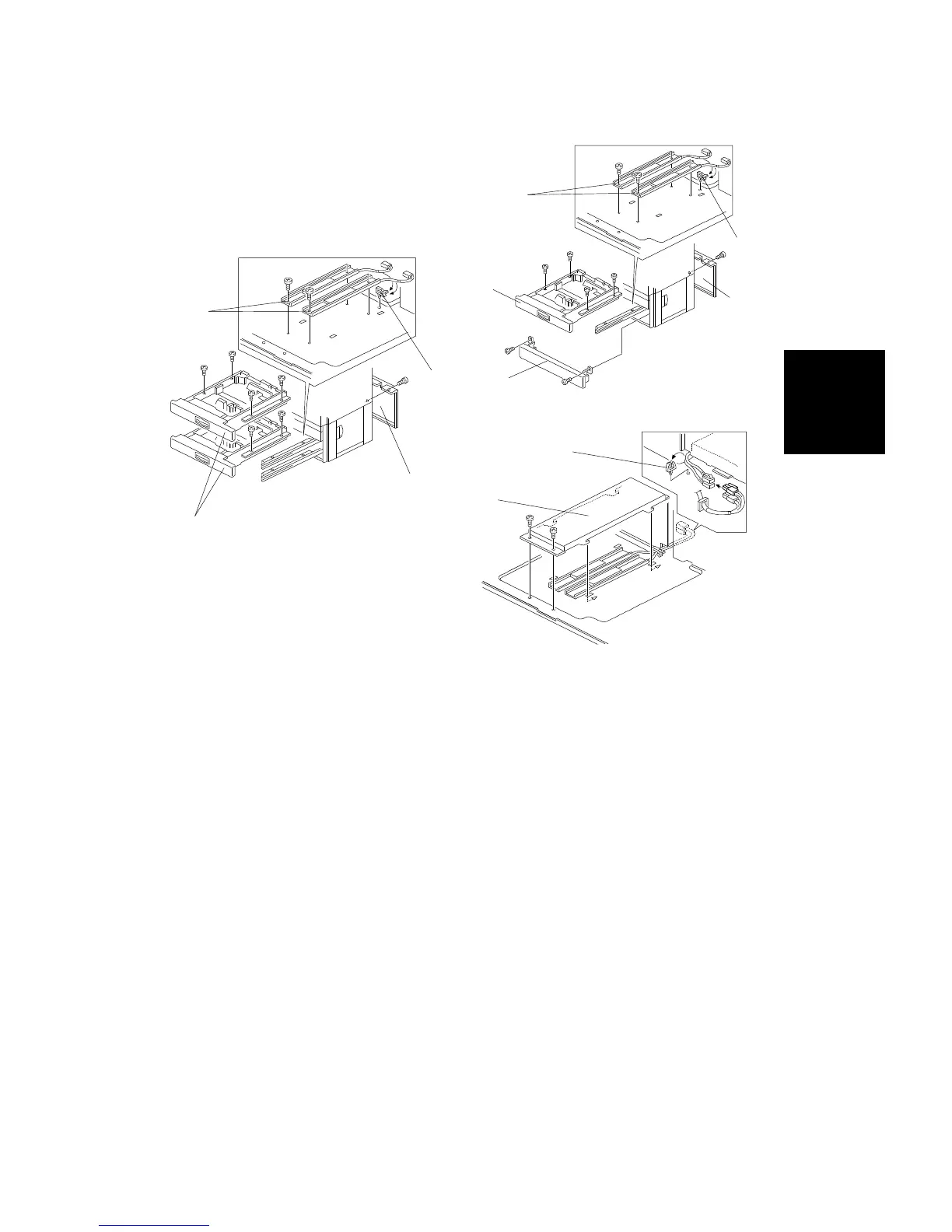
4.3 TRAY HEATER (OPTION)
1. Remove the rear cover [A].
2. Two-tray type: Remove the second paper tray [B] (4 screws) and the
lower front cover [C] (2 screws).
Three-tray type: Remove the second and third paper feed trays [D] (4
screws each).
3. Install the tray heaters [E] (2 screws each).
4. Install the clamper [F] and clamp the heater harnesses.
5. Install the heater bracket [G] (2 screws).
6. Connect the heater harnesses.
7. Install the clamper [H] and clamp the heater harnesses.
NOTE: After replacing the paper tray, perform the side-to-side registration
adjustment (see section 5, Replacement and Adjustment).
[E]
[F]
[A]
[D]
- Three-tray type -
[F]
[E]
[A]
[C]
[B]
- Two-tray type -
[G]
[H]
Installation
Procedure
PAPER TRAY UNIT (A549/A550) INSTALLATION
SM 3-43 A166/A187/A189



 To Next Page