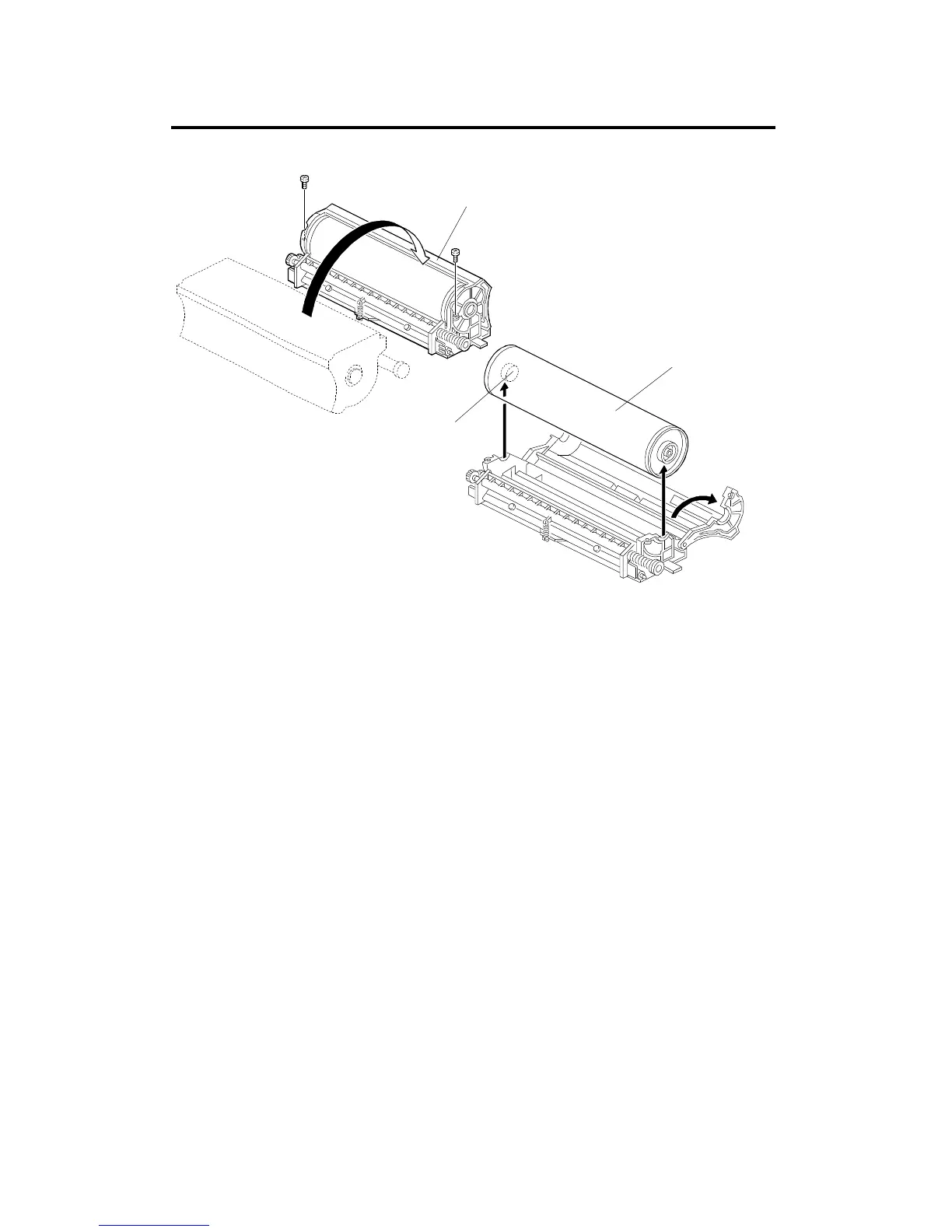
2. DRUM UNIT
NOTE: Place a mat on the floor to keep the floor clean before performing
this procedure.
2.1 DRUM REPLACEMENT
1. Remove the drum unit [A] (see chapter 3. COPIER INSTALLATION
PROCEDURE).
2. In the work area, rotate the drum unit into the position as shown. Then
remove the 2 screws.
NOTE: 1) When placing the drum unit in the work area, it is important to
turn it in the direction shown. This prevents toner spillage.
2) Do not hold the drum at hole [B]. Hole [B] contains a
conductive plate spring. If this spring is bent, the drum will not
contact the drum shaft correctly.
3. Open the drum unit and remove the drum [C].
4. Install the new drum [C].
[A]
A166R528.wmf
[B]
[C]
DRUM UNIT
A166/A187/A189 5-8 SM



 To Next Page