OfficeServ 7100 PROGRAMMING
TECHNICAL MANUAL PART 2 APRIL 2007
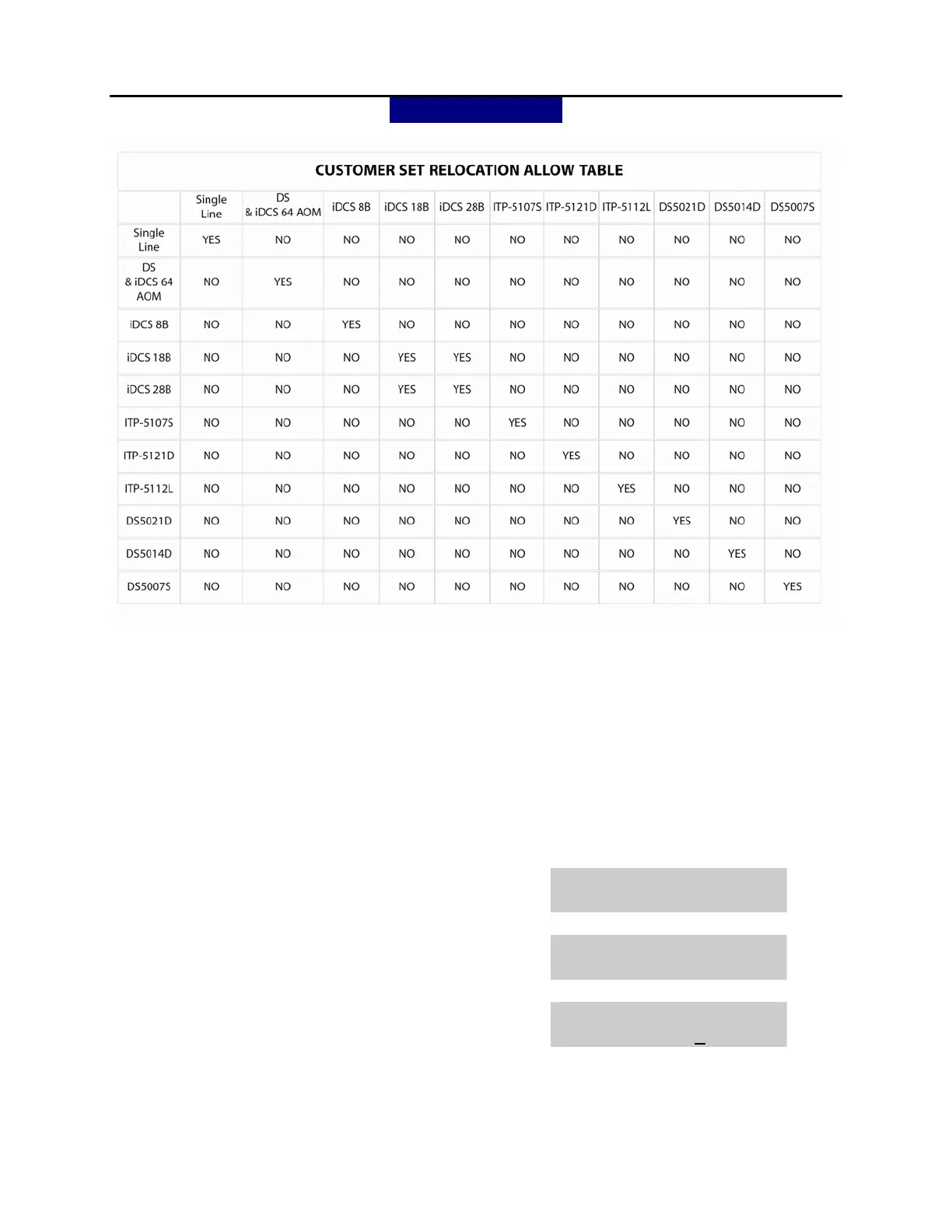
MMC: 315
PROGRAM KEYS
UP & DOWN Used to scroll through options
KEYPAD Used to enter selections
SOFT KEYS Move cursor left and right
SPEAKER Used to store data and advance to next MMC
HOLD Used to clear previous entry
ANS/RLS Used to select ALL
ACTION DISPLAY
1. Press TRANSFER 315
Display shows
SET RELOCATION
EXT _ EXT
2. Enter first station number (e.g.,202)
press RIGHT soft key to move cursor.
SET RELOCATION
EXT 202 EXT _
3. Enter second station number (e.g.,210)
Press RIGHT softkey to enter data.
SET RELOCATE
EXT 202 EXT 210















 To Next Page