OfficeServ 7100 PROGRAMMING
TECHNICAL MANUAL PART 2 SEPTEMBER 2008
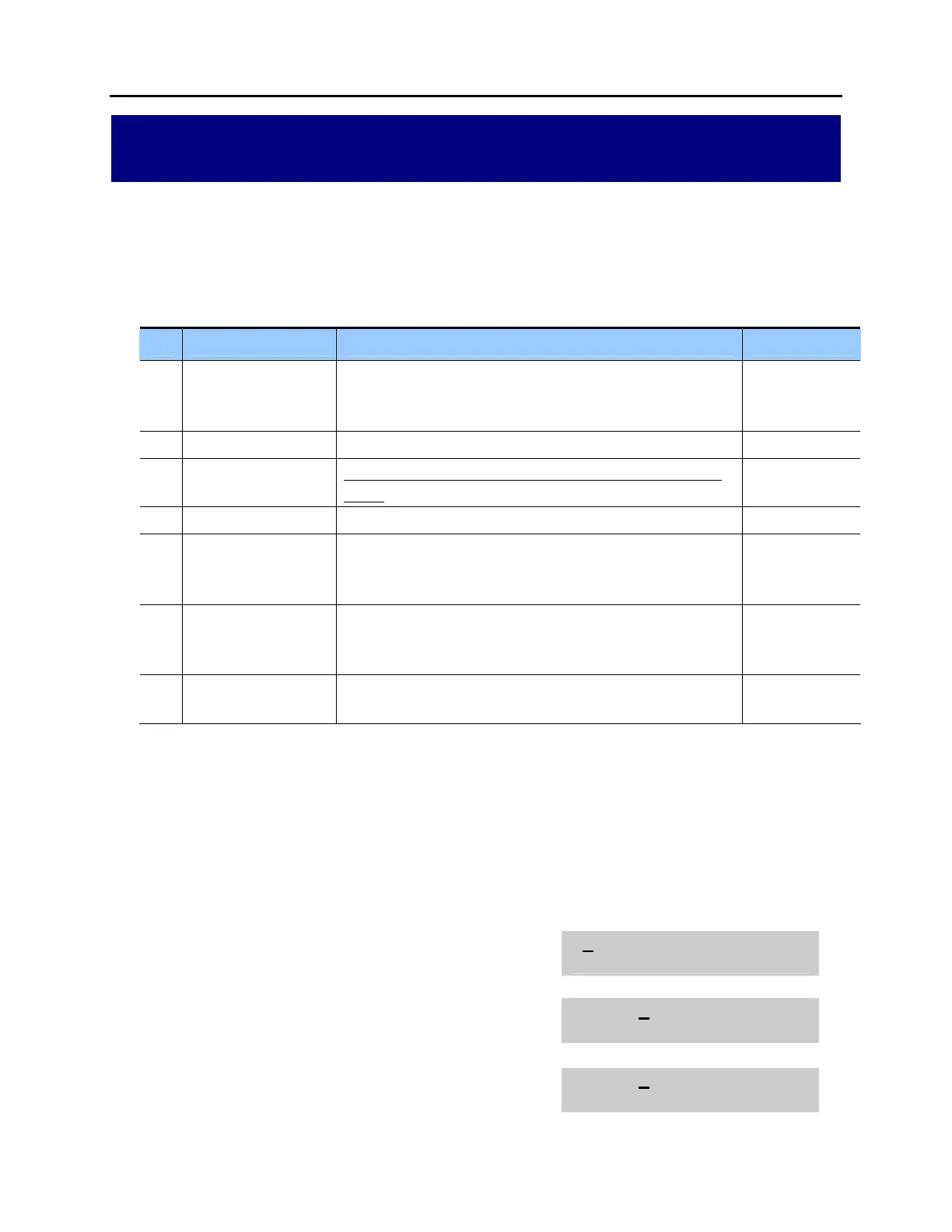
MMC: 842 SIP STATION INFO
DESCRIPTION:
This MMC provides various proprietary Samsung SIP integration options of non-
Samsung SIP terminals. The options set in this MMC are system-wide.
No Option Description Default
0 [3301] REGISTERED To indiicte if the SIP phone is registered to server or not (read
only).
Options: NO OR YES
NO
1 [3301] IP ADDRESS Sets SIP phone IP address (read only). 0.0.0.0
2 [3301] USER ID Enter User ID or SIP station number for registering to the SIP
server.
3301
3 [3301] PASSWORD Enter the password for registering to the SIP server. 0000
4 [3301] TONE SRV An option to provide the service tone from the SIP server or
the SIP phone.
Options: USE SYSTEM TONE OR USE PHONE TONE
USE SYS TEM
TONE
5 [3301] CALL WAIT To provide to disable call waiting tone for second call to SIP
phone.
Options: DISABLE OR ENABLE
DISABLE
6 [3301] PHONE TYPE To display the type of SIP phone registered (read only)
Options: DISCONNECTED OR CONNECTED
DISCONNECT
PROGRAM KEYS
UP & DOWN Used to scroll through options
KEYPAD Used to enter selections
SOFT KEYS Move cursor left and right
SPEAKER Used to store data and advance to next MMC
ACTION DISPLAY
1. Press TRANSFER 842.
Display shows the first available option.
[3301]REGISTRATION
NO
2. Press UP or DOWN key to select an station
OR press RIGHT soft key to move cursor.
[3302]REGISTRATION
NO
3. Press UP or DOWN key to select an option
OR press RIGHT soft key to move cursor.
[3302]IP ADDRESS
0.0.0.0















 To Next Page