OfficeServ 7100 PROGRAMMING
TECHNICAL MANUAL PART 7 APRIL 2007
7.3.4
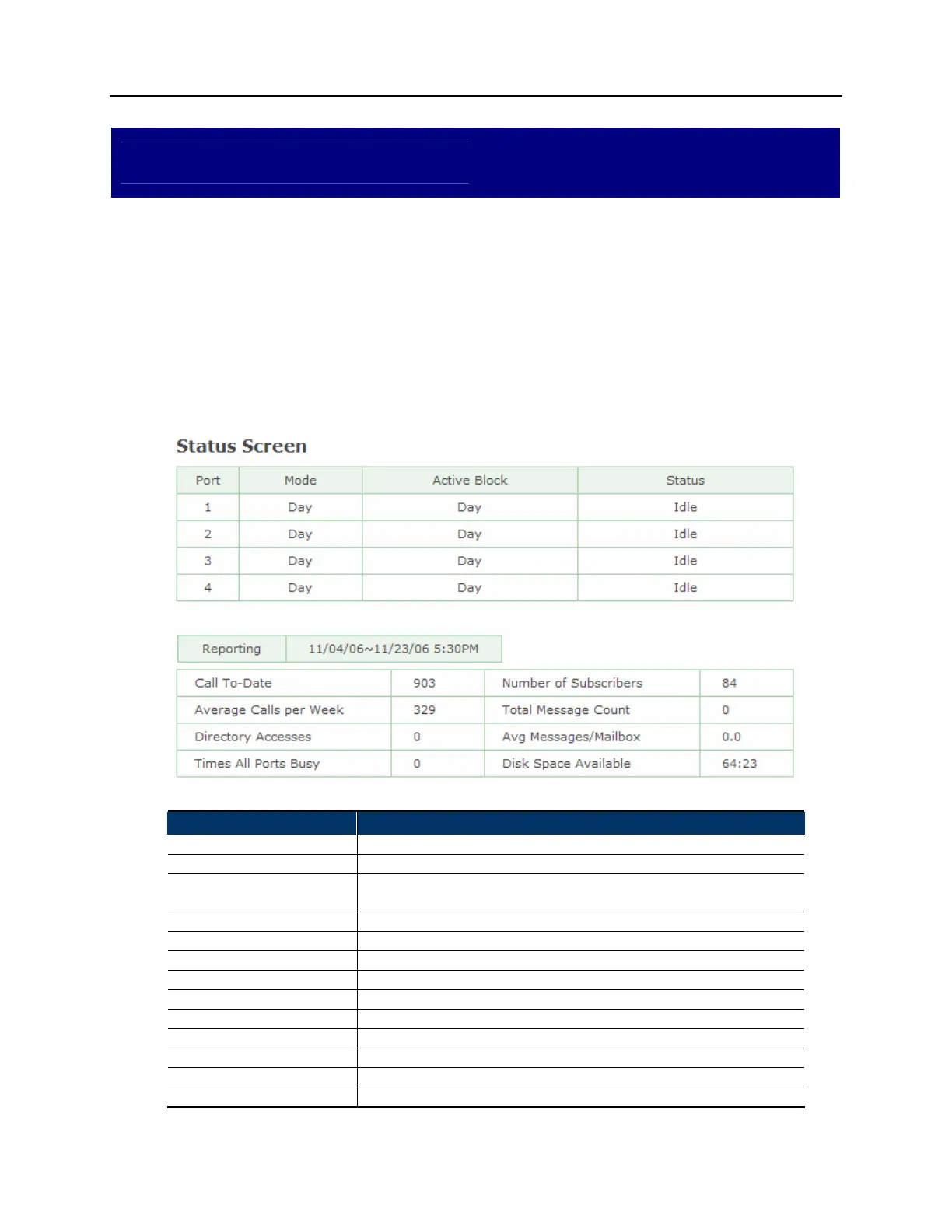
Status Screen
DESCRIPTION:
The Status Screen is the default screen that is loaded when logging into the
voicemail. It is a read-only screen, displaying various real time statistics about
the voicemail.
MAIN SCREEN:
Field Name Description
Port The voicemail port number for the port.
Mode The current scheduled mode of operation of the port.
Active Block The current program block, if any, being processed by the
port. (Day Main Menu, etc.)
Status The current call status of each port. (Processing, Idle, etc.)
Reporting The period of time the system has been recording statistics.
Call To-Date The total number of calls processed by the system.
Average Calls Per Week The average number of calls made to the voicemail per week.
Directory Accesses Number of times the system directory has been consulted.
Times All Ports Busy Total number of times all voicemail ports have been busy.
Number of Subscribers Total number of voicemail boxes in the system.
Total Message Count Total number of voicemail messages in the system.
Avg Messages/Mailbox The average number of messages per mailbox.
Disk Space Available The approximate amount of recording time left.















 To Next Page