OfficeServ 7100 PROGRAMMING
TECHNICAL MANUAL PART 2 APRIL 2007
MMC: 804
STOP BIT
Dial 1 1 bit
Dial 2 2 bit
WAIT: 0030 sec (0000-99900)
DSR CHECK: OFF
Dial 0: OFF
Dial 1: ON
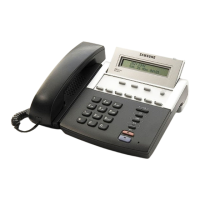
PROGRAM KEYS
UP & DOWN Used to scroll through options
KEYPAD Used to enter selections
SOFT KEYS Move cursor left and right
SPEAKER Used to store data and advance to next MMC
HOLD Used to clear entry (when valid)
ACTION DISPLAY
1. Press TRANSFER 804.
Display shows.
SYS I/O PORT :1
SERVICE:NOT USE
2. Enter parameter desired via dial keypad
(e.g., 1) from the above option list
SYS I/O PORT :1
SERVICE:PCMMC
OR
Press UP or DOWN key to make selection.
Press RIGHT soft key to move cursor.
3. Press TRANSFER to store and exit
OR
Press SPEAKER to store and advance to
next MMC.
DEFAULT DATA: SERVICE PORT 1 NOT USE
BAUD RATE 19200 BPS
CHAR LENGTH 8 BITS
PARITY NONE
RETRY COUNT 03
STOP BIT 1 BIT
WAIT TIME 0030 MSEC
DSR CHK OFF
RELATED ITEMS: MMC 725 SMDR OPTIONS








 To Next Page