OfficeServ 7100 PROGRAMMING
TECHNICAL MANUAL PART 7 APRIL 2007
7.3.45
Field Name Description
Press'0' for a new name The prompt used to let the caller know they can search again
Press '*' to exit The prompt to let the caller know how to escape the directory
Press one The prompt to tell the caller to press one
Press two The prompt to tell the caller to press two
Press three The prompt to tell the caller to press three
Press four The prompt to tell the caller to press four
Press five The prompt to tell the caller to press five
Press six The prompt to tell the caller to press six
Press seven The prompt to tell the caller to press seven
Press eight The prompt to tell the caller to press eight
Accessed The number of callers to access this directory
Target Found The number of times a matching subscriber was found
Escape The number of callers who pressed * to exit the directory
No response The number of callers who did not enter a search
Disconnect The number of callers who hung up while in the directory
None Found The number of times a search returned no matches
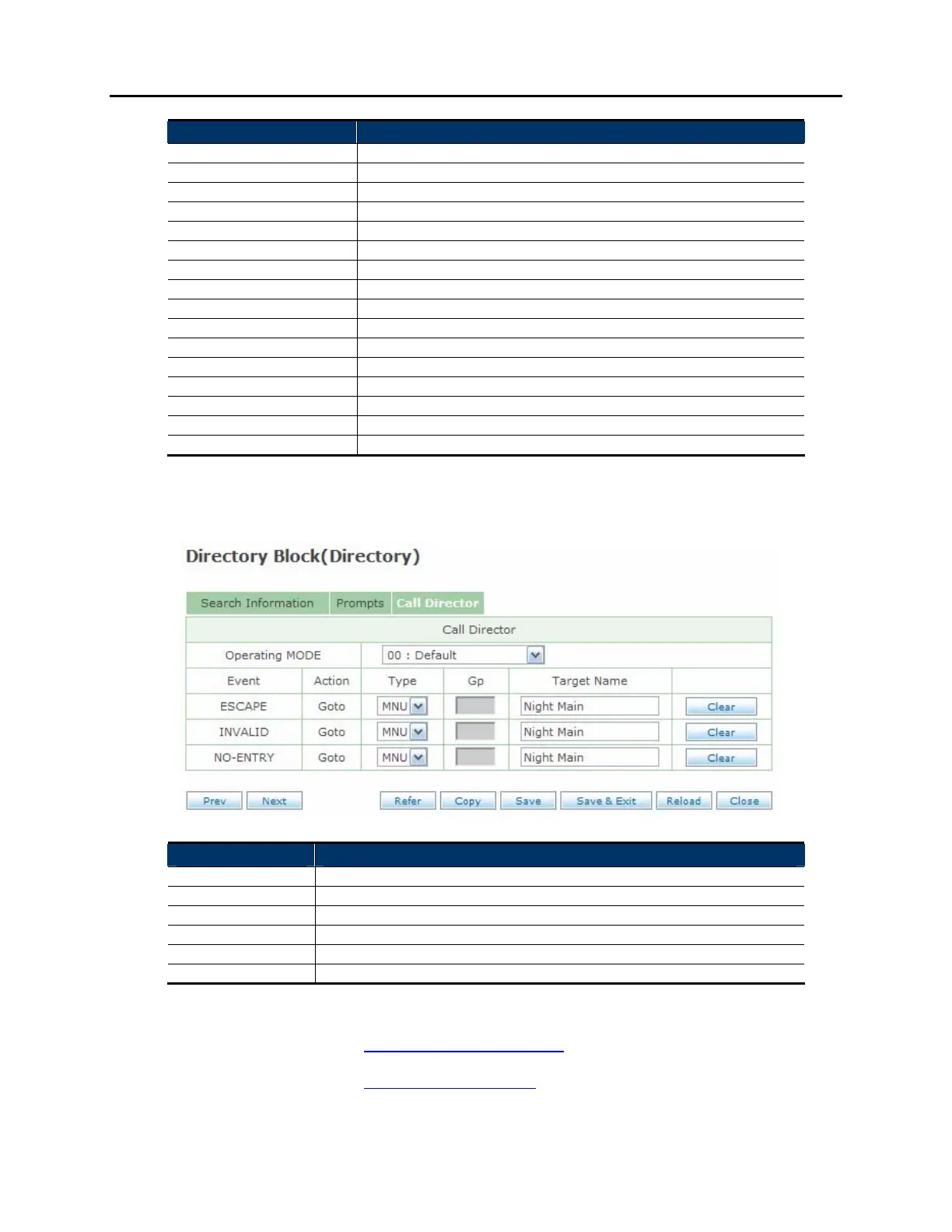
CALL DIRECTOR SCREEN:
Field Name Description
Operating MODE Choose the operating mode to assign event actions for
Event The event pointer being detailed
Action The action to take for this event pointer
Type The type of programming block to use for this action
Gp The tenant group to use for the chosen block type
Target Name The programming block to use for the chosen block type
RELATED ITEMS: EXTENSION BLOCK
MAILBOX BLOCK















 To Next Page