5.13
Date Code 20080213 Instruction Manual SEL-351A Relay
Trip and Target Logic
Front-Panel Target LEDS
Other Applications for the {TARGET RESET/LAMP TEST} Function
Refer to the bottom of Figure 5.1. The combination of the {TARGET RESET}
pushbutton and the TAR R (Target Reset) serial port command is available as
Relay Word bit TRGTR. Relay Word bit TRGTR pulses to logical 1 for one
processing interval when either the {TARGET RESET} pushbutton is pushed or the
TAR R (Target Reset) serial port command is executed.
Relay Word bit TRGTR can be used to unlatch logic. For example, refer to the
breaker failure logic in Figure 7.25. If a breaker failure trip occurs (SV7T
asserts), the occurrence can be displayed on the front panel with seal-in logic
and a rotating default display (see Rotating Default Display (Only on Models
With LCD) on page 7.34 and Rotating Default Display on page 11.12):
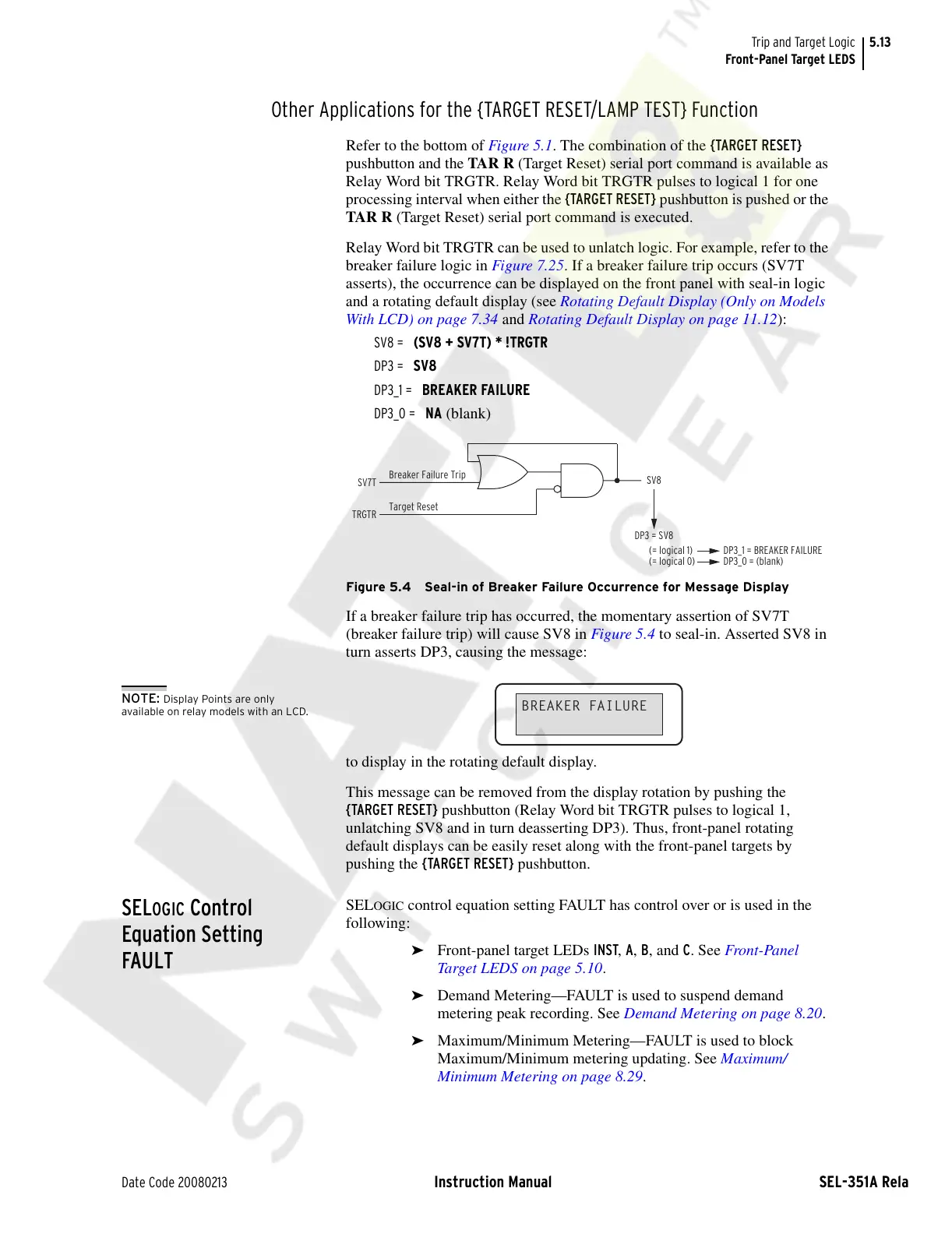
SV8 = (SV8 + SV7T) * !TRGTR
DP3 = SV8
DP3_1 = BREAKER FAILURE
DP3_0 = NA (blank)
Figure 5.4 Seal-in of Breaker Failure Occurrence for Message Display
If a breaker failure trip has occurred, the momentary assertion of SV7T
(breaker failure trip) will cause SV8 in Figure 5.4 to seal-in. Asserted SV8 in
turn asserts DP3, causing the message:
to display in the rotating default display.
This message can be removed from the display rotation by pushing the
{TARGET RESET} pushbutton (Relay Word bit TRGTR pulses to logical 1,
unlatching SV8 and in turn deasserting DP3). Thus, front-panel rotating
default displays can be easily reset along with the front-panel targets by
pushing the {TARGET RESET} pushbutton.
SELOGIC Control
Equation Setting
FAULT
SELOGIC control equation setting FAULT has control over or is used in the
following:
➤ Front-panel target LEDs INST, A, B, and C. See Front-Panel
Target LEDS on page 5.10.
➤ Demand Metering—FAULT is used to suspend demand
metering peak recording. See Demand Metering on page 8.20.
➤ Maximum/Minimum Metering—FAULT is used to block
Maximum/Minimum metering updating. See Maximum/
Minimum Metering on page 8.29.
SV7T
Breaker Failure Trip
(= logical 1)
(= logical 0)
Target Reset
TRGTR
SV8
DP3 = SV8
DP3_1 = BREAKER FAILURE
DP3_0 = (blank)
BREAKER FAILURE
NOTE: Display Points are only
available on relay models with an LCD.
Courtesy of NationalSwitchgear.com



 To Next Page