7.35
Date Code 20080213 Instruction Manual SEL-351A Relay
Inputs, Outputs, Timers, and Other Control Logic
Rotating Default Display (Only on Models With LCD)
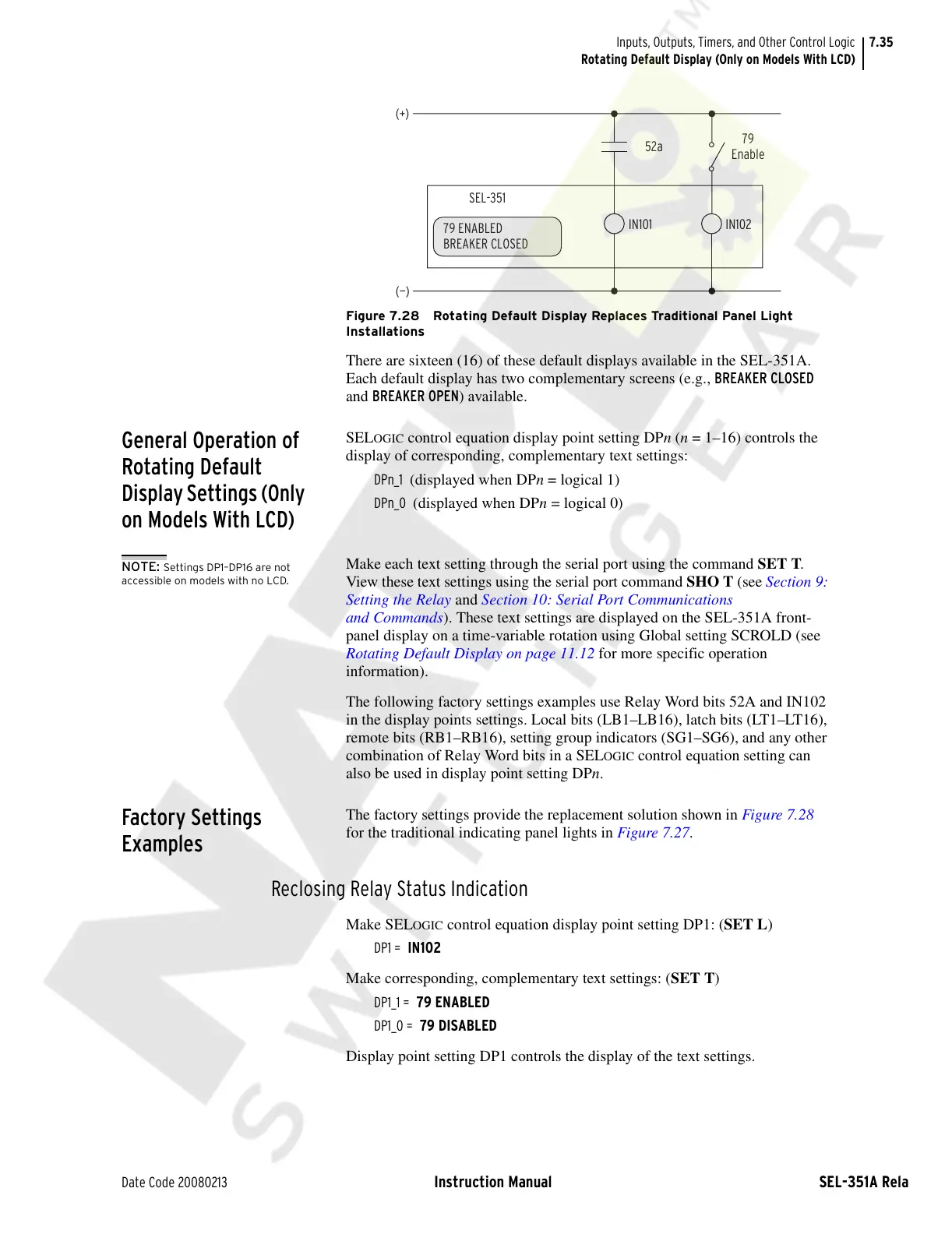
Figure 7.28 Rotating Default Display Replaces Traditional Panel Light
Installations
There are sixteen (16) of these default displays available in the SEL-351A.
Each default display has two complementary screens (e.g., BREAKER CLOSED
and BREAKER OPEN) available.
General Operation of
Rotating Default
Display Settings (Only
on Models With LCD)
SELOGIC control equation display point setting DPn (n = 1–16) controls the
display of corresponding, complementary text settings:
DPn_1 (displayed when DPn = logical 1)
DPn_0 (displayed when DPn = logical 0)
Make each text setting through the serial port using the command SET T.
View these text settings using the serial port command SHO T (see Section 9:
Setting the Relay and Section 10: Serial Port Communications
and Commands). These text settings are displayed on the SEL-351A front-
panel display on a time-variable rotation using Global setting SCROLD (see
Rotating Default Display on page 11.12 for more specific operation
information).
The following factory settings examples use Relay Word bits 52A and IN102
in the display points settings. Local bits (LB1–LB16), latch bits (LT1–LT16),
remote bits (RB1–RB16), setting group indicators (SG1–SG6), and any other
combination of Relay Word bits in a SEL
OGIC control equation setting can
also be used in display point setting DPn.
Factory Settings
Examples
The factory settings provide the replacement solution shown in Figure 7.28
for the traditional indicating panel lights in Figure 7.27.
Reclosing Relay Status Indication
Make SELOGIC control equation display point setting DP1: (SET L)
DP1 = IN102
Make corresponding, complementary text settings: (SET T)
DP1_1 = 79 ENABLED
DP1_0 = 79 DISABLED
Display point setting DP1 controls the display of the text settings.
79
Enable
52a
SEL-351
(+)
IN102
(—)
IN101
79 ENABLED
BREAKER CLOSED
NOTE: Settings DP1–DP16 are not
accessible on models with no LCD.
Courtesy of NationalSwitchgear.com



 To Next Page