1.9
Date Code 20080213 Instruction Manual SEL-351A Relay
Introduction and Specifications
Communications Connections
Communications Connections
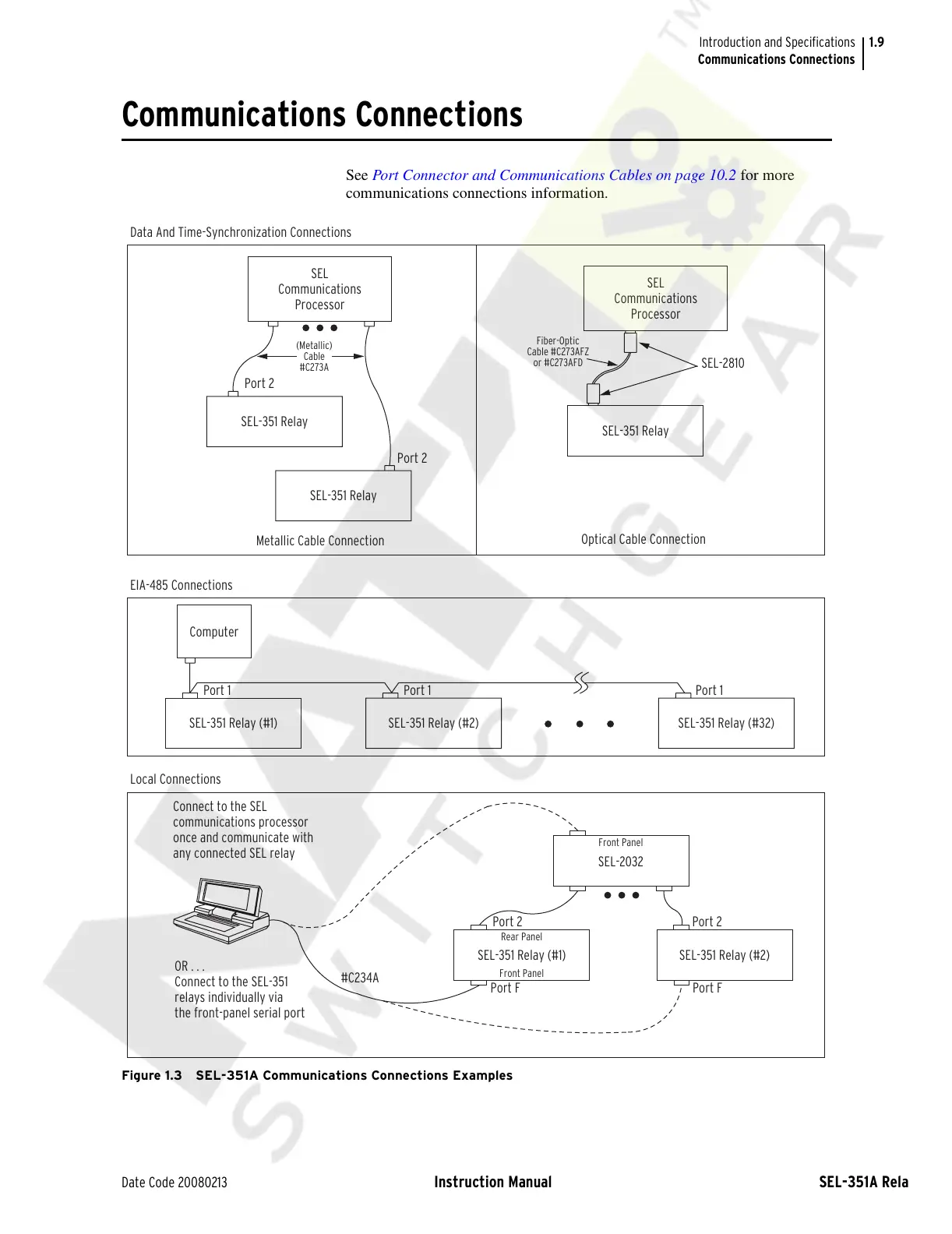
See Port Connector and Communications Cables on page 10.2 for more
communications connections information.
Figure 1.3 SEL-351A Communications Connections Examples
SEL-351 Relay (#1)
OR . . .
Connect to the SEL-351
relays individually via
the front-panel serial port
Connect to the SEL
communications processor
once and communicate with
any connected SEL relay
Data And Time-Synchronization Connections
Local Connections
EIA-485 Connections
Port FPort F
Port 2
Port 2
Front Panel
Rear Panel
Front Panel
SEL-2032
SEL-351 Relay (#1)
Optical Cable Connection
Metallic Cable Connection
Port 1Port 1
Computer
Port 1
Fiber-Optic
Cable #C273AFZ
or #C273AFD
SEL-2810
Port 2
Port 2
(Metallic)
Cable
#C273A
SEL-351 Relay
SEL-351 Relay
SEL-351 Relay
SEL
Communications
Processor
SEL
Communications
Processor
#C234A
SEL-351 Relay (#2) SEL-351 Relay (#32)
SEL-351 Relay (#2)
Courtesy of NationalSwitchgear.com



 To Next Page