13.5
Date Code 20080213 Instruction Manual SEL-351A Relay
Testing and Troubleshooting
Testing Methods and Tools
Testing Methods and Tools
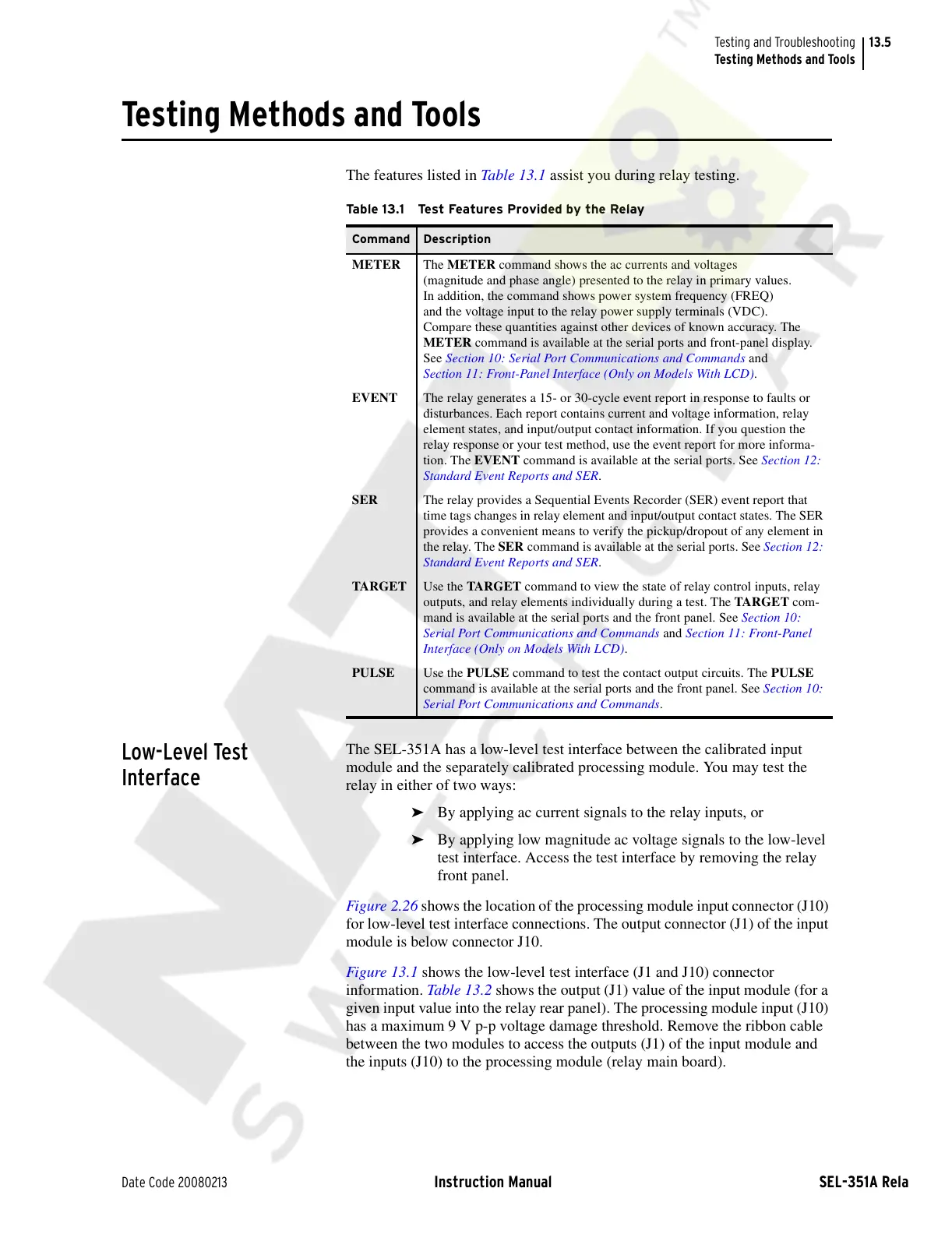
The features listed in Table 13.1 assist you during relay testing.
Low-Level Test
Interface
The SEL-351A has a low-level test interface between the calibrated input
module and the separately calibrated processing module. You may test the
relay in either of two ways:
➤ By applying ac current signals to the relay inputs, or
➤ By applying low magnitude ac voltage signals to the low-level
test interface. Access the test interface by removing the relay
front panel.
Figure 2.26 shows the location of the processing module input connector (J10)
for low-level test interface connections. The output connector (J1) of the input
module is below connector J10.
Figure 13.1 shows the low-level test interface (J1 and J10) connector
information. Table 13.2 shows the output (J1) value of the input module (for a
given input value into the relay rear panel). The processing module input (J10)
has a maximum 9 V p-p voltage damage threshold. Remove the ribbon cable
between the two modules to access the outputs (J1) of the input module and
the inputs (J10) to the processing module (relay main board).
Table 13.1 Test Features Provided by the Relay
Command Description
METER The METER command shows the ac currents and voltages
(magnitude and phase angle) presented to the relay in primary values.
In addition, the command shows power system frequency (FREQ)
and the voltage input to the relay power supply terminals (VDC).
Compare these quantities against other devices of known accuracy. The
METER command is available at the serial ports and front-panel display.
See Section 10: Serial Port Communications and Commands and
Section 11: Front-Panel Interface (Only on Models With LCD).
EVENT The relay generates a 15- or 30-cycle event report in response to faults or
disturbances. Each report contains current and voltage information, relay
element states, and input/output contact information. If you question the
relay response or your test method, use the event report for more informa-
tion. The EVENT command is available at the serial ports. See Section 12:
Standard Event Reports and SER.
SER The relay provides a Sequential Events Recorder (SER) event report that
time tags changes in relay element and input/output contact states. The SER
provides a convenient means to verify the pickup/dropout of any element in
the relay. The SER command is available at the serial ports. See Section 12:
Standard Event Reports and SER.
TARGET Use the TARGET command to view the state of relay control inputs, relay
outputs, and relay elements individually during a test. The TARGET com-
mand is available at the serial ports and the front panel. See Section 10:
Serial Port Communications and Commands and Section 11: Front-Panel
Interface (Only on Models With LCD).
PULSE Use the PULSE command to test the contact output circuits. The PULSE
command is available at the serial ports and the front panel. See Section 10:
Serial Port Communications and Commands.
Courtesy of NationalSwitchgear.com



 To Next Page