Chapter 7 — Importing and Exporting Cartridges Importing into a Storage or Cleaning Partition
November 2016 User Guide—Spectra T950 Library
231
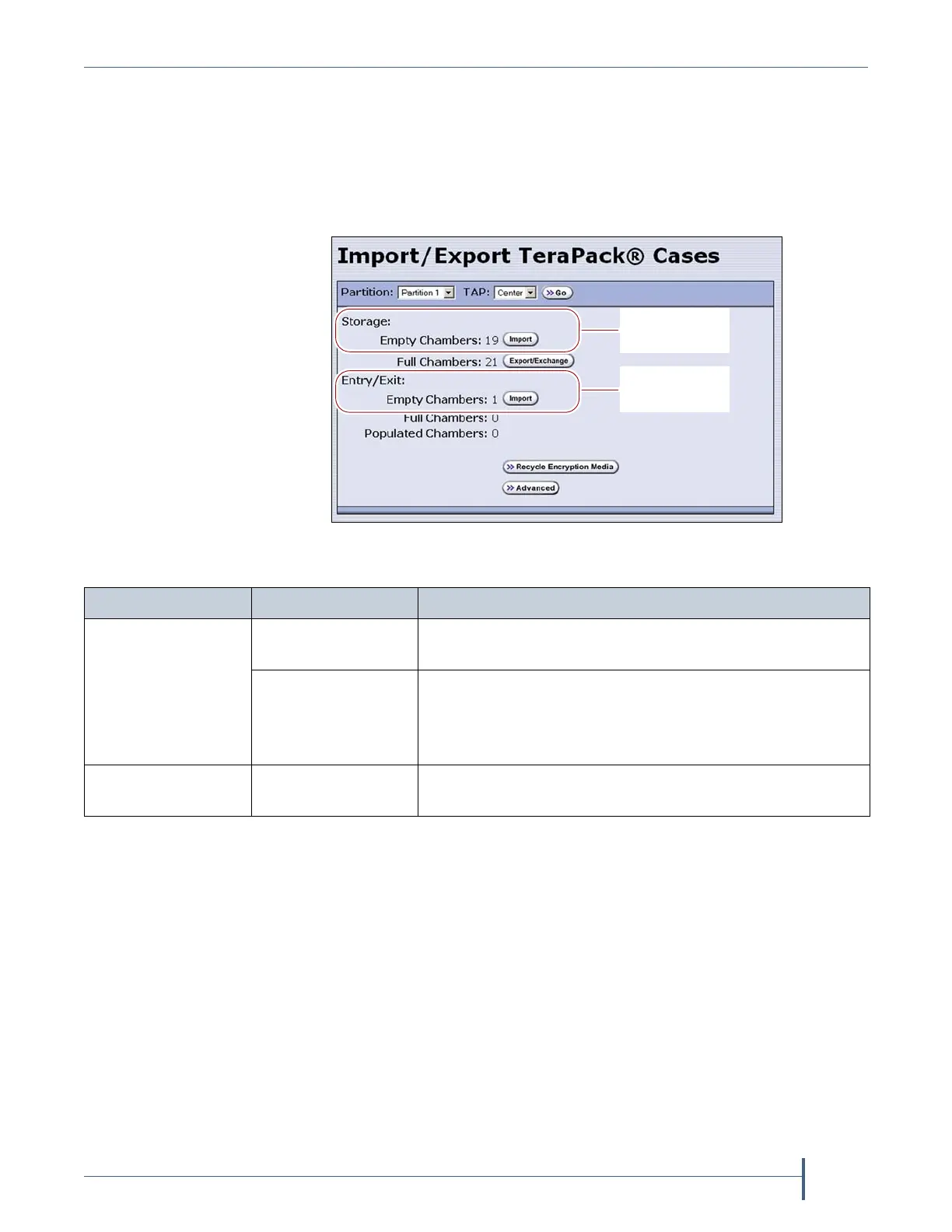
4. ClicktheappropriateImportbuttontoselectthedestination(the
storagepoolorentry/exitpoolforastoragepartitionorcleaningfora
cleaningpartition)fortheimportedmagazines.
Note: Iftherearenoemptychambersintheselectedpool,theImport
buttonisnotpresent.Exportoneormoremagazinestomake
spaceforthenewmagazines.
Figure 146 Click Import for the desired destination
(storage partition shown).
Import into the
Entry/Exit pool
Import into the
Storage pool
For a... Select Import for.... If you want to import...
Storage partition Storage: Empty
Chambers
Magazinesintothestoragepool.
Entry/Exit: Empty
Chambers
Magazinesintotheentry/exitpool.
Note: Importingintotheentry/exitpoolisthe
recommendedmethod(see
ImportandExportOverview
onpage224).
Cleaning partition Cleaning: Empty
Chambers
Maintenancemagazinesintothecleaningpartition.



 To Next Page