VM15 User Manual ARRHYTHMIA REVIEWECG Monitoring
101
16. ARRHYTHMIA REVIEW
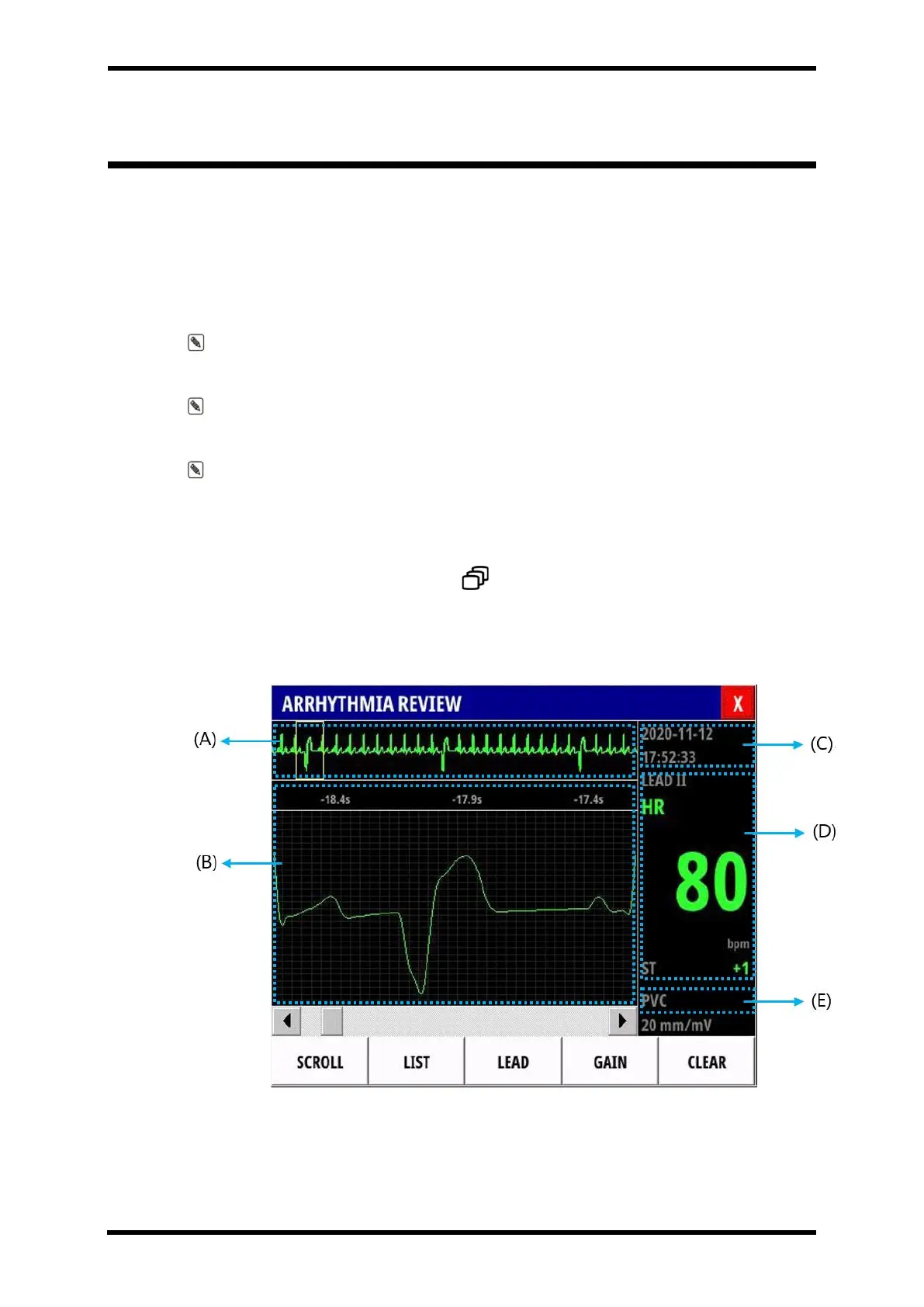
Arrhythmia review function saves and displays data independently when an Arrhythmia event
occurs.
Through the Arrhythmia review window, you can see when and what kind of Arrhythmia
occurred.
And you can check the ECG wave, HR, and ST values for each lead at the time of occurrence.
Note : Arrhythmia review can store up to 100 review data, and the most recent event is
updated from the top row of the list.
Note : After up to 100 review data are saved, the number 100 review data is
automatically deleted and the next event is saved.
Note : As for Arrhythmia review data, wave data for a total of 20 seconds (10 seconds
before, 10 seconds after) are stored based on the time when Arrhythmia occurs, and data at
the time of occurrence is stored for numerical data.
To have Arrhythmia review popup screen.
⚫ Select SCREEN smart button ( ) → ARRHYTHMIA REVIEW.
Screen Layout
Figure 16-1. ARRHYTHMIA REVIEW popup screen layout



 To Next Page