VM15 User Manual TM (Transport Module)
224
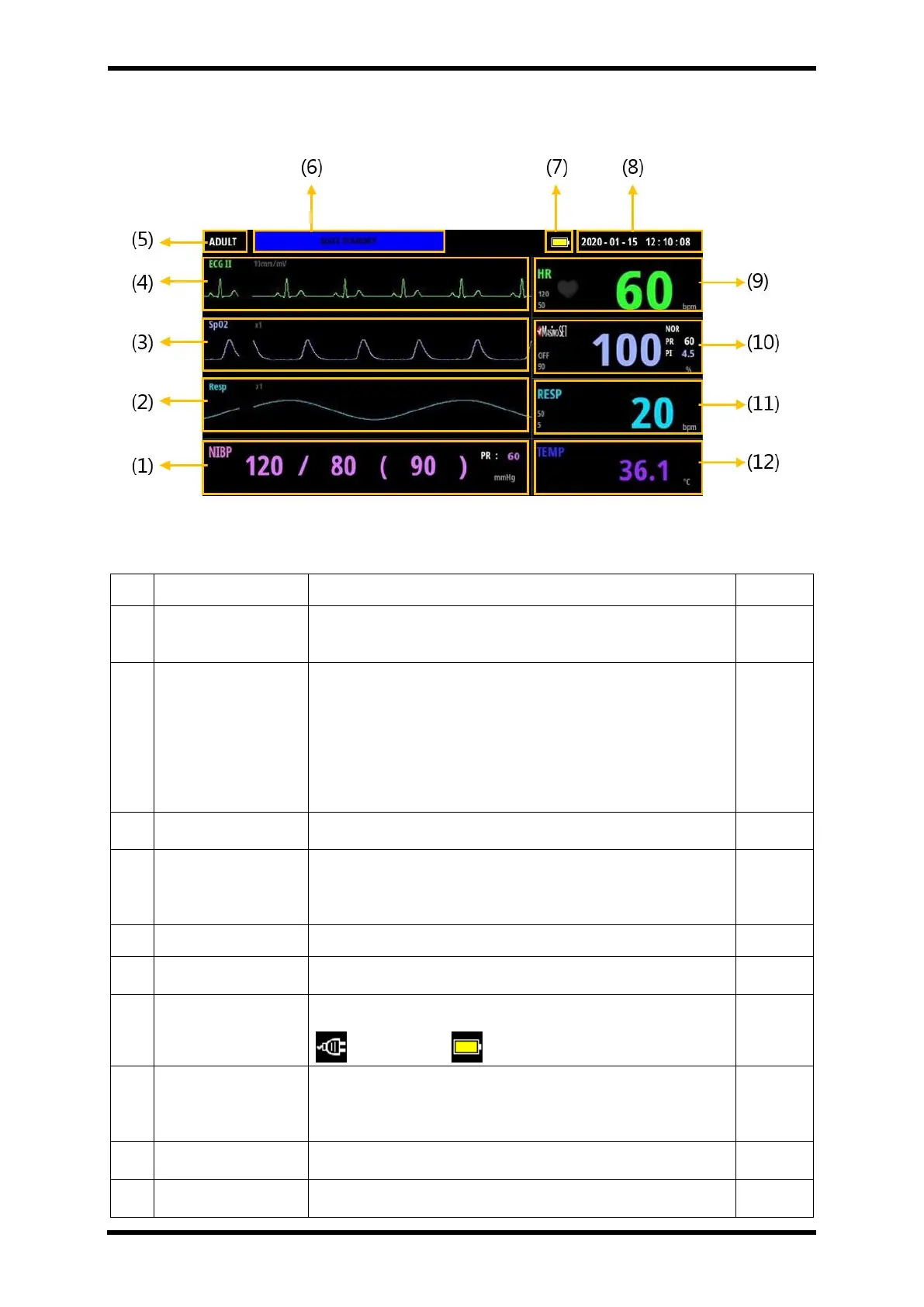
TM screen configuration
Figure 33-2. TM Screen Display Layout
Table 33-2. TM Screen Layout Description
Display the patient's blood pressure.
Systolic, Diastolic, Mean, NIBP PR
Shows the patient's breathing waveform in real time.
TM is connected to the main body –
When EtCO2 module or Multi-gas module is connected, CO2
waveform is displayed.
TM is separated from the main body
Resp waveform is displayed.
Oxygen Saturation
Waveform
It shows the oxygen saturation waveform of the patient in real
time.
Shows the patient's ECG waveform in real time.
The waveform corresponding to the lead set by the main body is
displayed.
Patient category, either Adult, Pediatric, or Neonatal
Information alarm
Message bar
Shows the Information alarm content
Displays the current power status.
AC in use Battery in use
Displays the current date and time.
The date and time are synchronized with the main body when
connected to the main body.
Shows the patient's heart rate.
Shows the patient's SpO2 numeric data.



 To Next Page