VM15 User Manual Explanation of ICO (Option)
160
IV. Flush System use
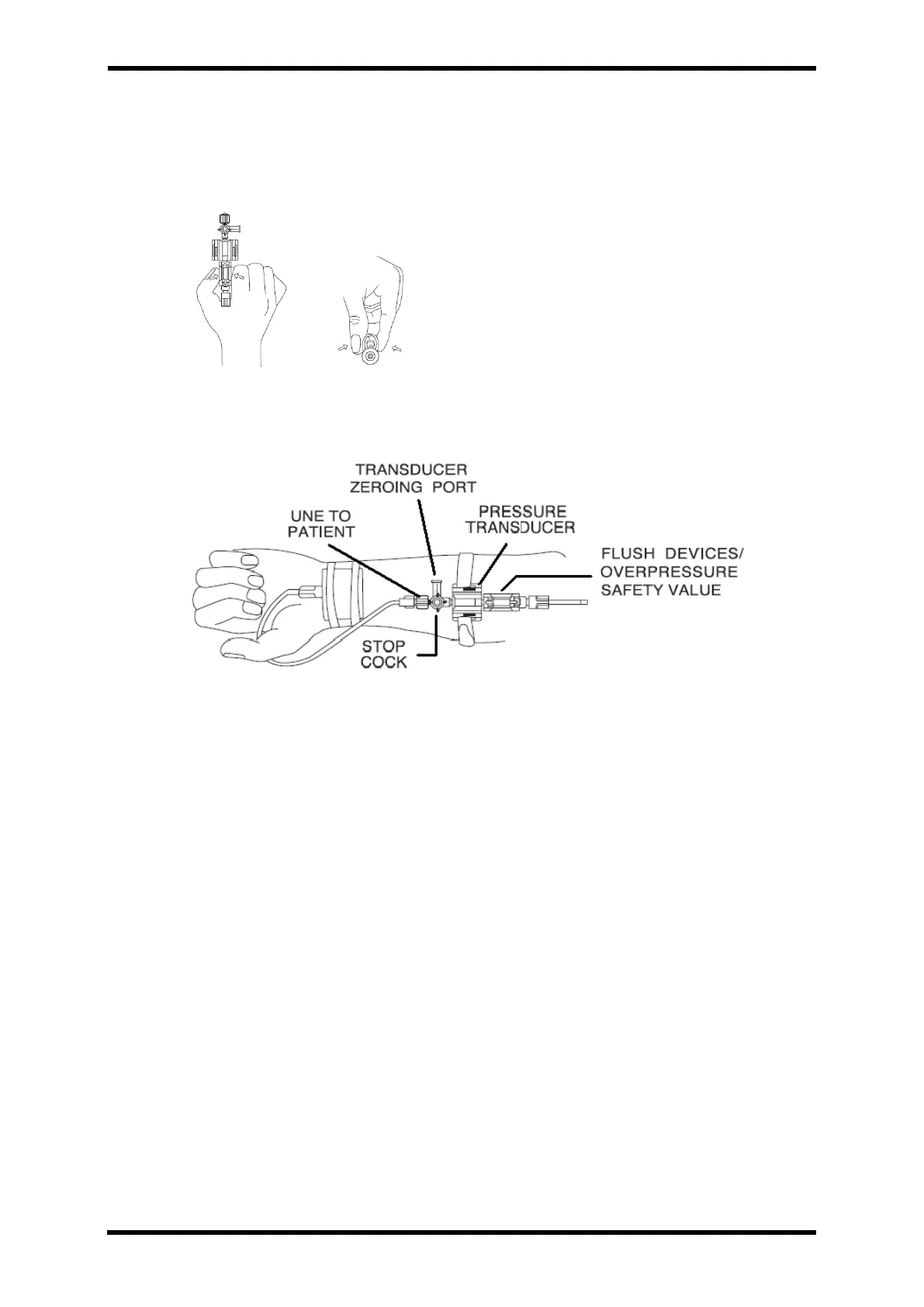
⚫ Hold the both side of Flush operator and pull it to upper side slightly.
⚫ Be sure not to turn the Flush operator. Do press with even power.
Figure 23-6. Use Flush Device
V. How to Connect with patient
Figure 23-7. Connection to Patient
I. Twist the sterilized solution bag slightly with trip chamber spike.
II. Remove all air inside of the bag with the input set or gage needle inserted injection
port of the bag to protect the air flow into the patient.
III. Fill a little up the Drip Chamber by pressing both sides before injecting the liquid
into input set.
IV. Begin the flush system. Fill the liquid from the bottom because the air is moving
upper side.
V. Do frame the side port of Stop Cock of Transducer 0 point and cover by using door
lock f plug.
VI. Top it softly to check the bubble of Pressure Transducer.
VII. Put the pressure into the system till 300mmhg using C-fusor or clear cuff.
VIII. Flush the system for 2 ~3 seconds and Check the air bubble.
IX. The system is ready for zeroing and measurement. Put the stop cock at 90 degree
to be off status.



 To Next Page