Loading Sheets in the Top Paper Feed Slot
Important
• One sheet of paper can be loaded at a time. Do not load multiple sheets. This may cause paper jams.
• Before feeding paper or printing, make sure the sheet is flat against the Paper Tray Cover. The sheet may jam if it curls
before feeding or printing and the trailing edge drops toward the front.
• Paper that is wrinkled or warped may jam. If necessary, straighten the paper and reload it.
• Load the paper straight. Loading paper askew will cause an error. (See "Paper loaded askew..") ➔ P.907
Note
• The loading method for a printer with a Spectrophotometer Unit (option) is the same as for a printer with no Spectropho-
tometer Unit (option). If it is difficult to perform operations from the front of the printer, lower the Up-down Unit. (See
"Lowering the Up-down Unit of the Spectrophotometer Unit (option) Manually.") ➔ P.494
• Store unused paper in the original package, away from high temperature, humidity, and direct sunlight.
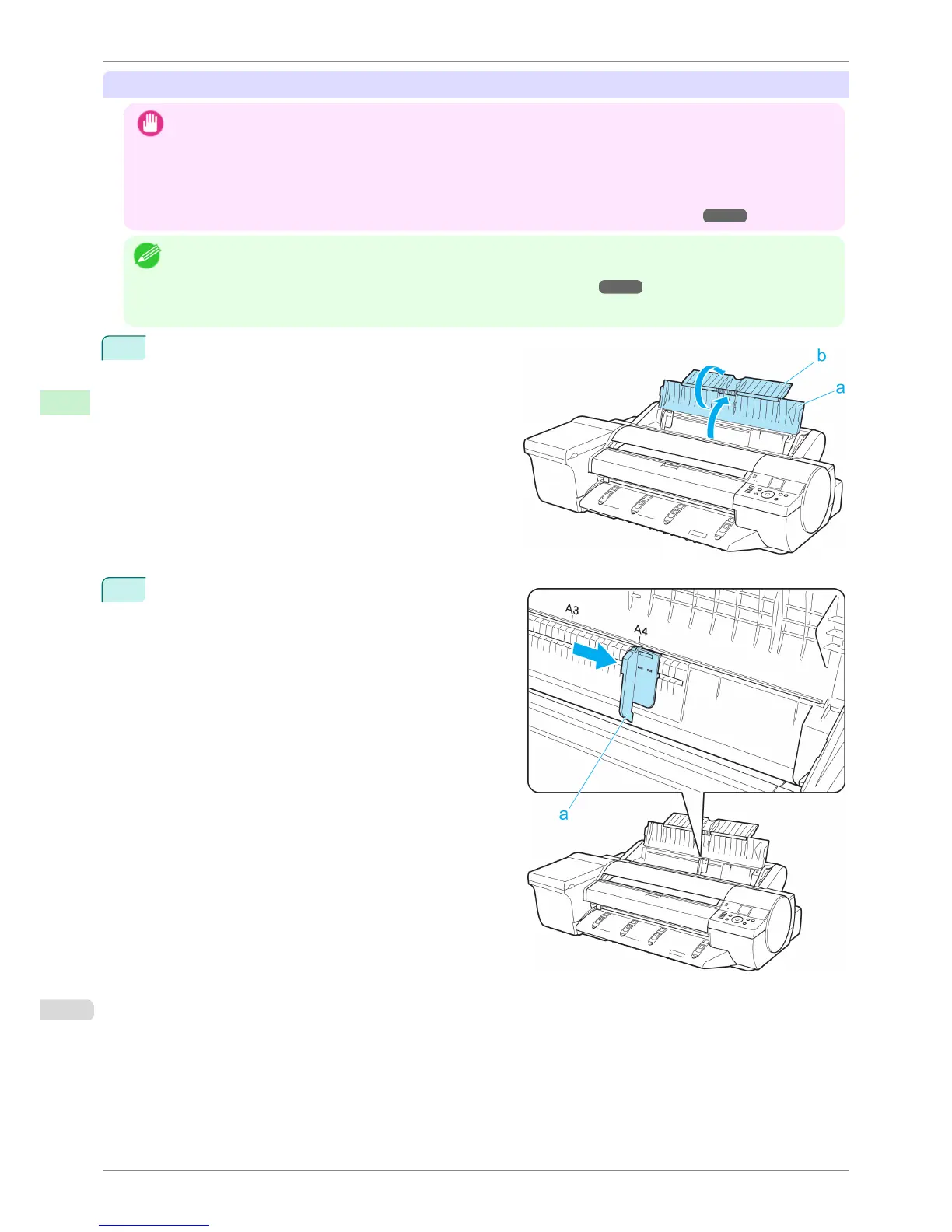
1
Open the Paper Tray Cover (a), and then open the
Tray Extension (b).
2
Slide the Width Guide (a) to align it with the mark for
the size of paper you will load.
Loading Sheets in the Feed Slot
iPF6400S
User's Guide
Handling and Use of Paper Handling sheets
496













 To Next Page