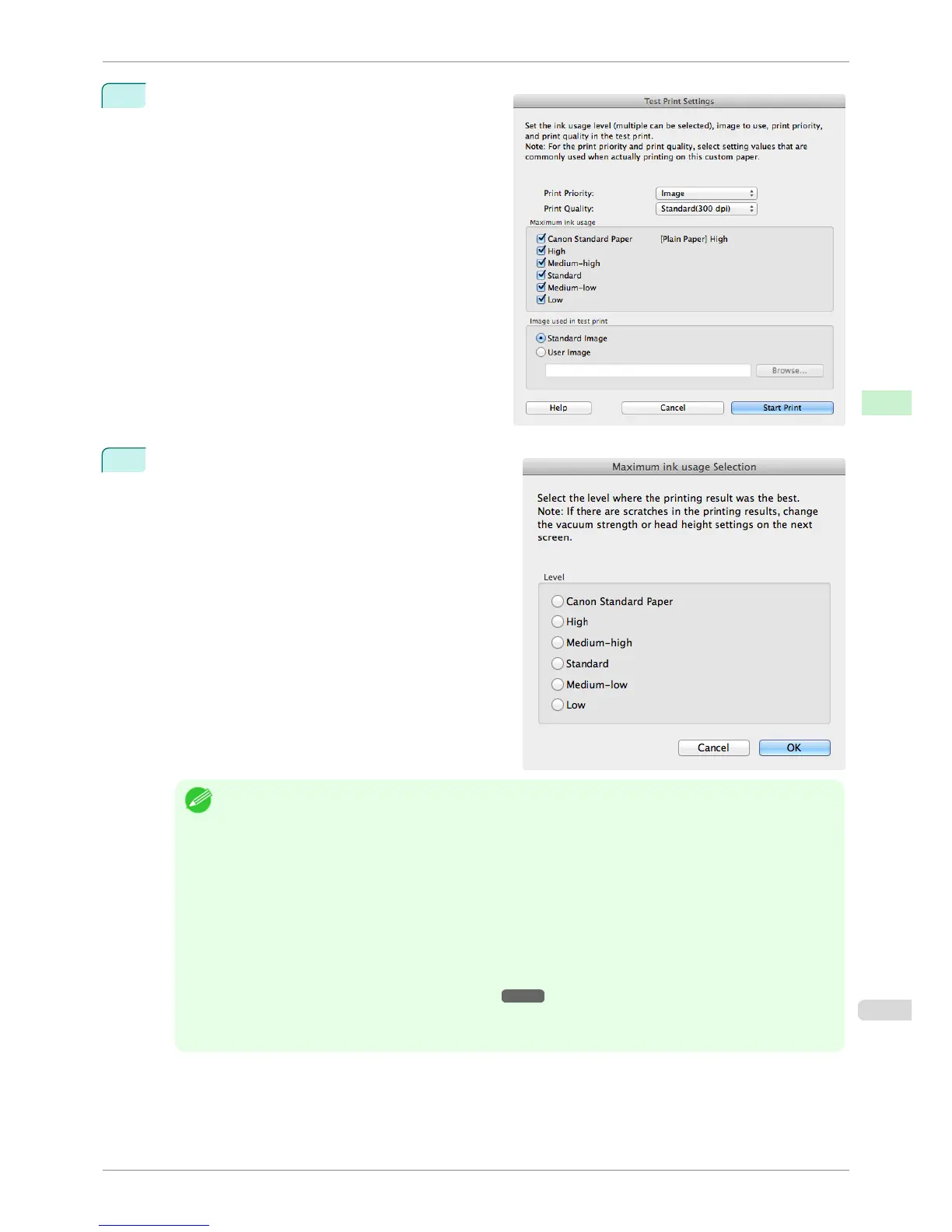
11
The Test Print Settings dialog box is displayed.
Select the print priority and print quality of the test
print using Print Priority and Print Quality.
Set the level to test print using Maximum ink usage
and the image to use using Image used in test
print, and then click the Start Print button.
12
Determine and set the ink level that is thought to give
the best visual test print results with no bleeding or
scraping of ink.
Note
• Select the optimal ink level by referring to the help.
• If you cannot obtain sufficiently high quality printing no matter which maximum ink usage level you select, use
the Step 1: Select the standard paper dialog box to change the paper that is the basis of the custom paper to
another paper.
• Because this settings imposes an upper limit on the amount of ink used during printing, the printing result might
not change even if the level is changed depending on the image.
• The color tone cannot be configured using the Media Configuration Tool. Although the color tone may change
when the maximum ink usage is changed, at this point you should select the optimal level by only focusing on
bleeding and scraping of ink. If the color tone needs to be adjusted, provide an ICC color profile that matches
the paper you are using, and select that ICC color profile in your software. For details on how to specify the ICC
profile in the printer driver, see "Matching Sheet ." ➔ P.165
• Depending on the maximum ink usage setting, some of the print qualities in the printer driver may become un-
selectable.
iPF6400S
Add Custom Paper
User's Guide
Handling and Use of Paper Media Configuration Tool (Mac OS)
559













 To Next Page