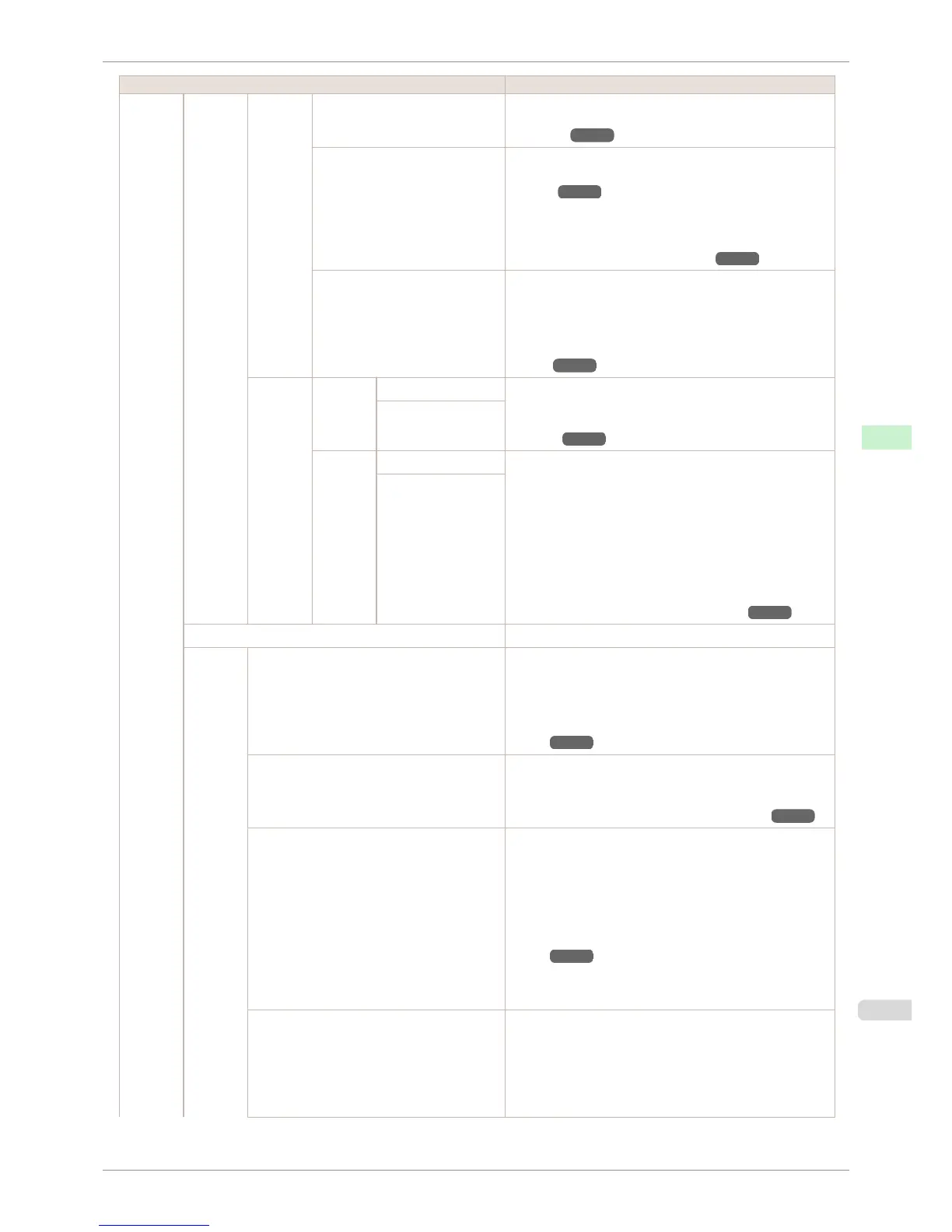
Setting Item Description, Instructions
Adjust
Printer
Feed
Priority
Adj.
Quality
Auto(GenuinePpr) The printer prints and reads a test pattern for automatic ad-
justment of the feed amount. (See "Automatic Banding Ad-
justment.") ➔ P.715
Auto(OtherPaper) Specify this mode with paper not in the Paper Reference
Guide. (See "Displaying the Paper Reference
Guide.") ➔ P.464
The printer prints and reads a test pattern for automatic ad-
justment of the feed amount. Note that this function takes
more time and consumes more ink than Auto(GenuinePpr).
(See "Automatic Banding Adjustment.") ➔ P.715
Manual Use this mode with highly transparent media or other paper
for which Auto(GenuinePpr) or Auto(OtherPaper) cannot
be used.
Print a test pattern for adjustment of the feed amount based
on the type of paper. (See "Manual Banding Adjust-
ment.") ➔ P.716
Adjust
Length
Adjust-
ment-
Print
A:High Print a test pattern for particular types of paper to compen-
sate for paper stretching or shrinkage, after which you enter
the amount of adjustment. (See "Adjusting Line
Length.") ➔ P.718
B:Standard/Draft
Change
Settings
A:High Displayed when you have selected Feed Priority > Adj. Pri-
ority > Print Length.
Adjustment relative to the amount of stretching or shrinkage
of the current paper.
Enter either the adjustment results from AdjustmentPrint or
the discrepancy that you measured (as a percentage).
For paper that tends to stretch, increase the feed amount by
choosing a higher adjustment value. For paper that tends to
shrink, decrease the feed amount by choosing a lower ad-
justment value. (See "Adjusting Line Length.") ➔ P.718
B:Standard/Draft
Adj Far Ed Feed Choose Yes to adjust the feed amount for the trailing edge.
Calibra-
tion
AutoAdjst(HiPrc) (*2) Perform color calibration using the optional Spectrophotome-
ter Unit.
A test pattern for color calibration is printed and the adjust-
ment values are set automatically.
(See "Color Calibration Using the Spectrophotometer Unit (op-
tion).") ➔ P.742
Auto Adjust Execute color calibration using the printer sensor.
A test pattern for color calibration is printed and the adjust-
ment values are set automatically.
(See "Color Calibration Using the Printer Sensor.") ➔ P.736
ColorCheck Print (*2) Perform a printer color check using the optional Spectropho-
tometer Unit.
Color check is a function that prints and automatically meas-
ures the colors of a test pattern, and calculates the color dif-
ference from a calibration target (standard color values regis-
tered in the printer).
(See "Color Checks Using the Spectrophotometer Unit (op-
tion).") ➔ P.745
The same as ColorCheck Print in the hierarchy under Test
Print.
Pattern Size (*2) Select the size of the adjustment pattern printed during color
calibration using the optional Spectrophotometer Unit and
during ColorCheck Print.
Normally, set to Standard.
We recommend that you set it to Large if you want to priori-
tize measurement accuracy.
iPF6400S
Menu Settings
User's Guide
Control Panel Printer Menu
591













 To Next Page