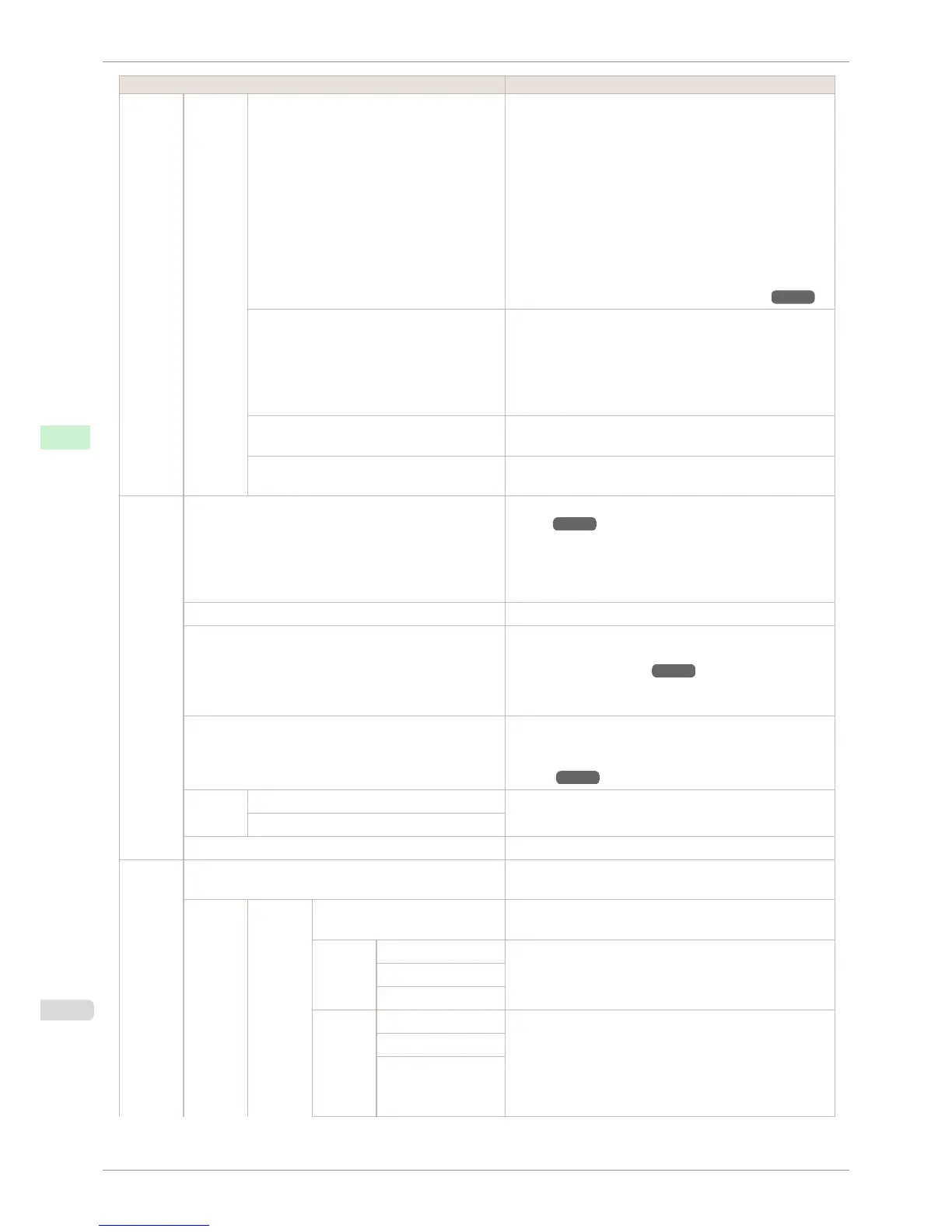
Setting Item Description, Instructions
Adjust
Printer
Calibra-
tion
Calibration Log The Date, Paper Type, and Adjustment Type for which col-
or calibration was executed are displayed on the Display
Screen where you can confirm them.
Common calibration and unique calibration are the Adjust-
ment Type of color calibration.
When paper is set in the printer, the history of effective color
calibration for the set paper is displayed.
When paper is not set in the printer, the latest history among
common calibration or unique calibration is displayed.
Also, a hyphen (-) is displayed when there are no execution
results.
(See "Color Calibration Using the Printer Sensor.") ➔ P.736
Use Adj. Value Choose Disabled > OK if you prefer not to apply the color
calibration adjustment value in print jobs. However, printer
driver settings are given priority.
Choose Enabled > OK to apply the color calibration adjust-
ment value in print jobs. However, printer driver settings are
given priority.
Set Exec. Guide If you select On, a message is displayed on the control panel
at the timing recommended for executing color calibration.
Return Defaults Clear the color calibration adjustment value and the execu-
tion log.
Mainte-
nance
Head Cleaning Clean the Printhead. (See "Cleaning the Print-
head.") ➔ P.825
Choose Head Cleaning A if printing is faint, oddly colored, or
contains foreign substances.
Choose Head Cleaning B if no ink is printed at all, or if print-
ing is not improved by Head Cleaning A.
Nozzle Check Print a test pattern to check the nozzles.
Replace P.head Execute when replacing the Printhead. Follow the instruc-
tions displayed to complete the required procedure. (See
"Replacing the Printhead.") ➔ P.826
Not displayed during a warning message that the remaining
Maintenance Cartridge capacity is low.
Repl. maint cart Execute when replacing the Maintenance Cartridge. Follow
the instructions displayed to complete the required proce-
dure. (See "Replacing the Maintenance Car-
tridge.") ➔ P.832
Head In-
fo
Printhead L Indicates information about the printhead.
Printhead R
Clean Platen Move the Carriage in preparation for cleaning the Platen.
Interface
Setup
EOP Timer Specify the timeout period before cancellation of print jobs
that cannot be received by the printer.
TCP/IP IPv4 IPv4 Mode Choose whether the printer IP address is configured auto-
matically or a static IP address is entered manually.
Protocol DHCP Specify the protocol used to configure the IP address auto-
matically.
BOOTP
RARP
IPv4
Settings
IP Address Specify the printer network information when using a static IP
address.
Enter the IP address assigned to the printer, as well as the
network subnet mask and default gateway.
The value that was automatically configured is displayed if
you have set IPv4 Mode to Automatic.
Subnet Mask
Default G/W
Menu Settings
iPF6400S
User's Guide
Control Panel Printer Menu
592













 To Next Page