6
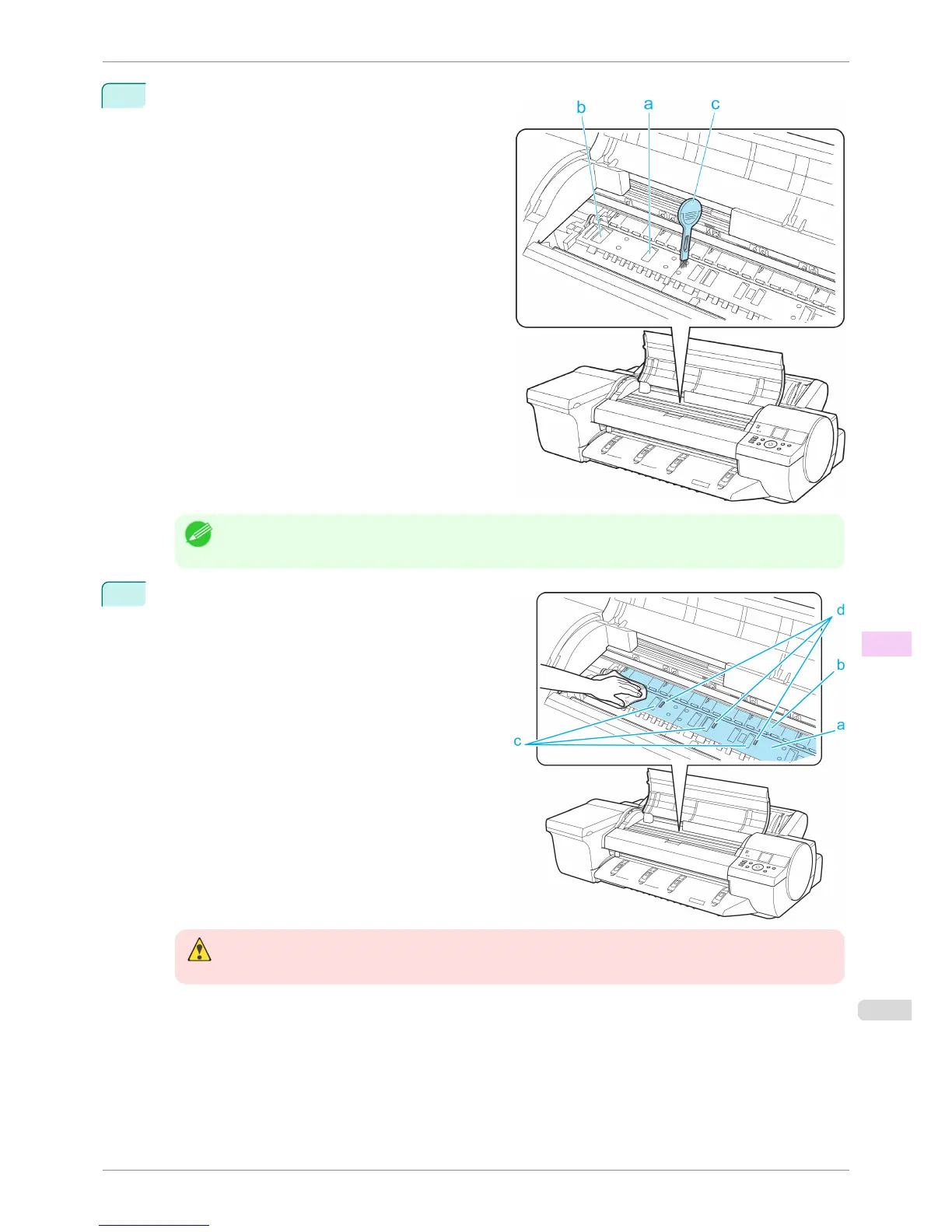
If paper dust has accumulated in the Vacuum holes
(a) on the Platen or in the Borderless Printing Ink
Grooves (b), use the Cleaning Brush (c), provided
with the printer, to wipe it away.
Note
• If the Cleaning Brush is dirty, rinse it in water.
7
Using a damp cloth that you have wrung out com-
pletely, wipe inside the Top Cover to clean it. Wipe
away any ink residue on the Platen(a) as a whole, on
the Paper Retainer(b), Borderless Printing Ink
Grooves(c), and blue Switch(d).
Warning
• Never use flammable solvents such as alcohol, benzene, or thinner. If these substances come into contact with
electrical components inside the printer, there is a risk of fire or electrical shock.
iPF6400S
Cleaning Inside the Top Cover
User's Guide
Maintenance and Consumables Cleaning the Printer
841













 To Next Page