9. Utility/Counter Mode Field Service Ver. 1.0 Aug. 2005
136
bizhub 200/250/350
Adjustment / Setting
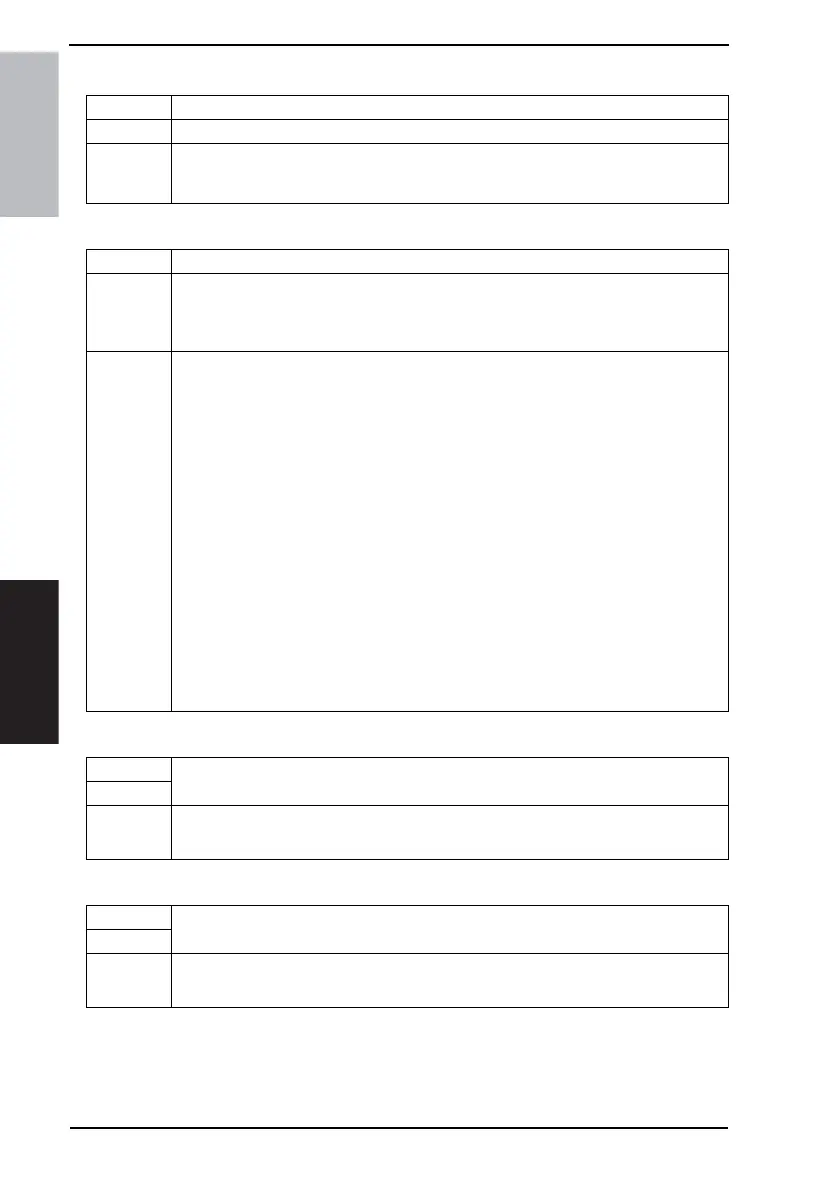
(3) Search Base
(4) Authentication Setting
(5) Maximum number of search
(6) Connection time out
Functions • To set the starting point of LDAP search.
Use • To enter the starting point of LDAP search.
Setting/
Procedure
1. Touch the [Search Base].
2. Enter the starting point from the 10-Key Pad or the keyboard on the screen and then
touch [Enter].
Functions • To make settings for authentication.
Use
• General Settings: Use to select the LDAP authentication method.
• Login name: Use to set the logon name for authentication.
• Password: Use to set the password for authentication.
• Domain Name: Use to set the domain name for authentication by GSS-SPNEGO.
Setting/
Procedure
<General Settings>
• The default setting is “Anonymous”.
“Anonymous” Simple Digest-MD5/CRAM-MD5
GSS-SPNEGO
<Login name>
1. Touch the [Login name].
2. Enter the logon name from the 10-Key Pad or the keyboard on the screen and then
touch [Enter].
<Password>
1. Touch the [Password].
2. Touch [New Password], enter the password, and then touch [Enter].
3. Touch [Confirm New Password], enter the password once again, and then touch
[Enter].
<Domain Name>
1. Touch the [Domain Name].
2. Enter the domain name from the 10-Key Pad or the keyboard on the screen and then
touch [Enter].
Functions
• To change the maximum number of search items for LDAP search.
Use
Setting/
Procedure
• The default setting is “100”.
5 to 100
Functions
• To change the connection timeout for the LDAP server.
Use
Setting/
Procedure
• The default setting is “60 sec”.
5 to 300




 To Next Page