Field Service Ver. 1.0 Aug. 2005 11. Tech. Rep. Mode
191
bizhub 200/250/350Adjustment / Setting
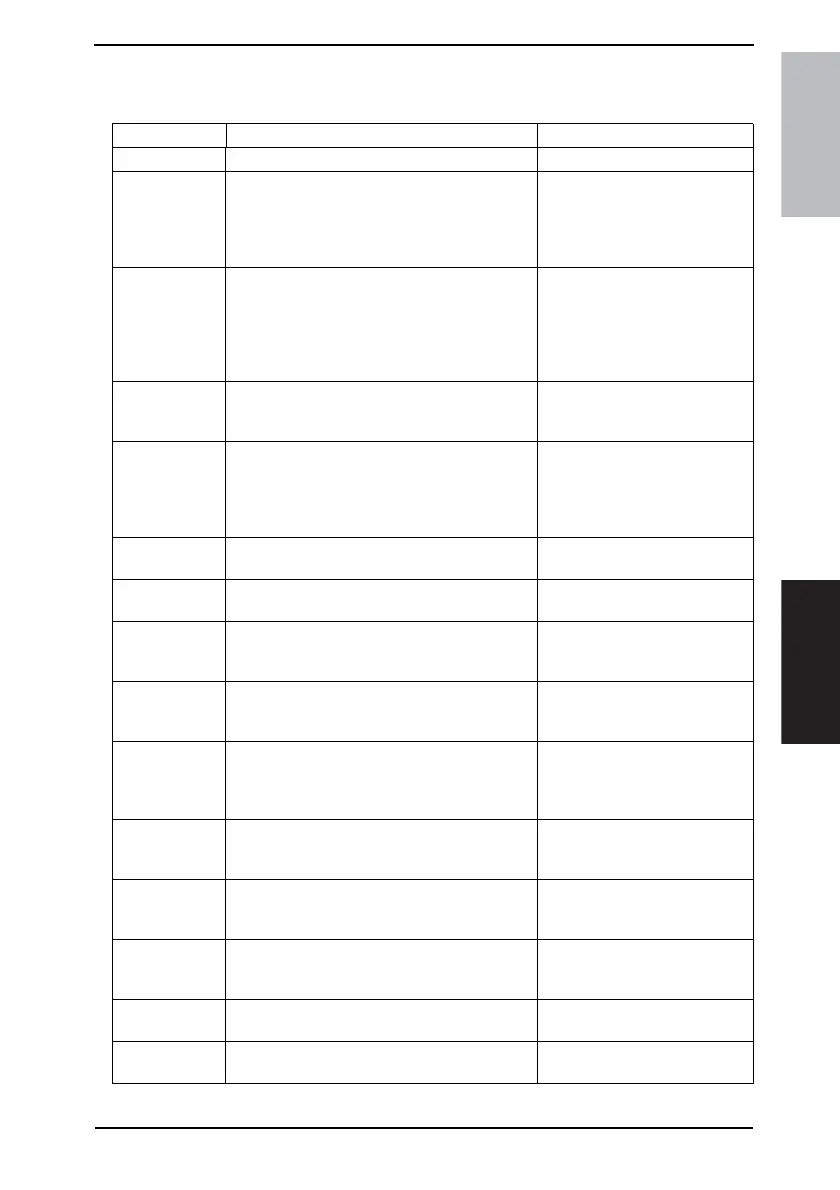
11.11.9 List of the CS Remote Care error code
A. For telephone line modem
Error code Error Solution
0001 The line is busy (Busy detection) • Transmit again manually.
0002 Failure of the Modem default setting at transmit-
ting (When the transmission completes with
modem initial setting failed)
• Check if the power of the
modem is ON.
• Check the connecting condition
between the modem and the
main unit.
0003 Timeout of CONNECT at transmitting
(No response to ATD)
• Transmit again manually
• Check if the power of the
modem is ON.
• Check the connecting condition
between the modem and the
main unit.
0004 Timeout of Incoming request response
(No response to incoming (starting) request
MSG)
• Contact responsible person of
KONICA MINOLTA.
0005 Timeout of CONNECT at receiving
(No response to ATA)
• Check if the power of the
modem is ON.
• Check the connecting condition
between the modem and the
main unit.
0006 Shut down of the data modem line (Host)
(Carrier OFF is detected)
• No solution, because the line is
shut down at the host side.
0007 Shut down of the data modem line (Main unit)
(Line is shut down forcibly due to event)
• Contact responsible person of
KONICA MINOLTA.
0008 Timeout of start request telegram delivery
(Start request telegram is not delivered after line
connection)
• Transmit again manually.
0009 Timeout of finish request telegram delivery
(Finish request telegram is not delivered (Start of
shut down).)
• Transmit again manually.
000A Receiving rejection
(Receiving is made when the main unit is set to
reject receiving.)
• Check the setting condition of
the host side.
• Check the setting condition of
the main unit side.
000B RS232C Driver Over Run
(When the modem detects Over Run.)
• If the same error is detected
several times, turn the modem
power OFF and ON.
000C If the same error is detected several times, turn
the modem power OFF and ON.
• If the same error is detected
several times, turn the modem
power OFF and ON.
000D Break Interrupt (BI) Indicator
(When the modem detects Break Interrupt (BI)
Indicator.)
• If the same error is detected
several times, turn the modem
power OFF and ON.
000E Receiving RING Buffer Full
(When the Receiving RING Buffer is full.)
• Contact responsible person of
KONICA MINOLTA.
000F Transmitting RING Buffer Full
(When the Transmitting RING Buffer is full.)
• Contact responsible person of
KONICA MINOLTA.











 To Next Page