Field Service Ver. 1.0 Aug. 2005 11. Tech. Rep. Mode
195
bizhub 200/250/350Adjustment / Setting
11.11.10 Troubleshooting for CS Remote Care
If communication is not done properly during use of the modem, check the condition by fol-
lowing the procedures shown below.
1. Shift the screen in the order of [Tech. Rep. Mode] → [CS Remote Care] → [Detail Set-
ting].
At this time, in the cases of
initial transmission / Call Remote Center / Maintenance Start
transmitting / Maintenance is completed., the communication result will be displayed at
the top of the screen.
* For the communication result, the following message will be displayed based on its suc-
cess or failure.
4104 SMTP channel not ready
• Wait for some while and then
retry.
4105 POP3 channel not ready
• Wait for some while and then
retry.
4106 Not ready in conditions other than above
• Wait for some while and then
retry.
5***
MIO has detected an error while transmission of
attached file is being processed.
***: Error code detected by MIO
6***
MIO has detected an error during main transmis-
sion sequence.
***: Error code detected by MIO
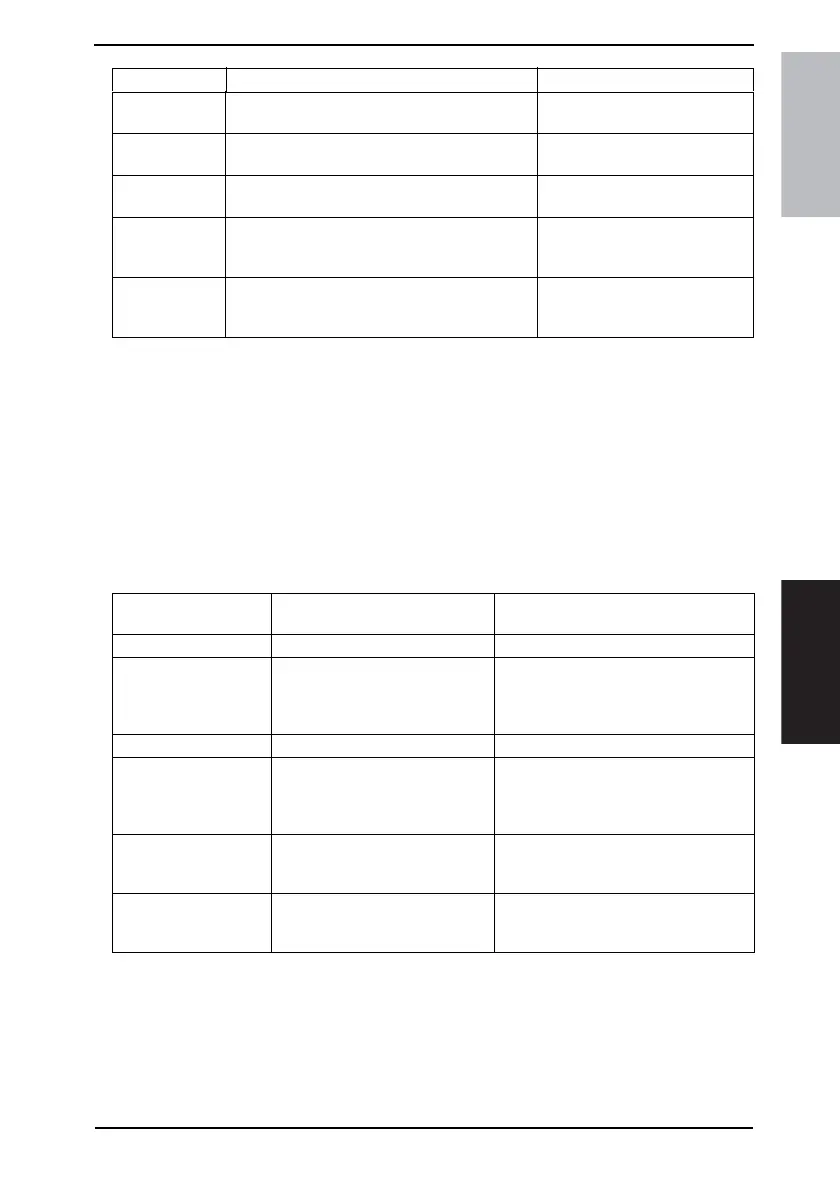
Error code Error Solution
Display of
Communication result
Cause Solution
Communicating
Communication trouble
with the Center
Although the machine tries to com-
municate with the Center, there is
any trouble and the communica-
tion completes unsuccessfully.
• See the list of error message and con-
firm the corresponding point.
☞ 261
Complete successfully
Modem trouble Although the machine tries to com-
municate with the Center, there is
any trouble in the modem.
• Check if the Power of modem in ON.
• Check if there is any problem in con-
nection between the modem and the
main unit.
Busy line Although the machine tries to com-
municate with the Center, the line
to the Center is busy.
• Communicate with the Center again.
No response Although the machine tries to com-
municate with the Center, there is
no response from the Center.
• Communicate with the Center again.
• Check the communication environ-
ment of the Center side.











 To Next Page