15. Initial Mode Field Service Ver. 1.0 Aug. 2005
210
bizhub 200/250/350
Adjustment / Setting
15.3.2 Touch Panel Adjustment
15.3.3 Marketing Area
15.3.4 Image Data Clear
Functions • To adjust the position of the Touch Panel display
Use
• Make this adjustment if the Touch Panel is slow to respond to a pressing action.
• When the control panel is replaced.
Adjustment
Procedure
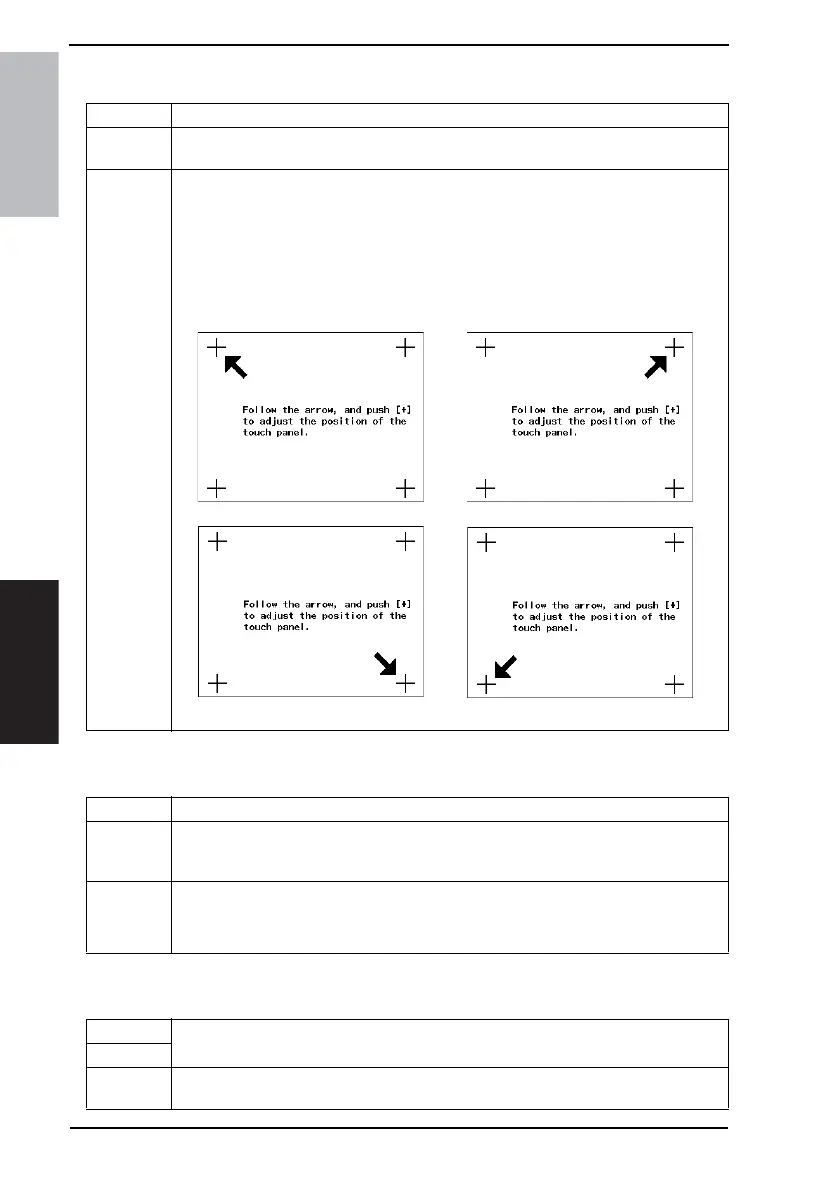
1. Touch [Touch Panel Adjustment] from the Initial mode screen.
2. Following the arrow mark, touch the four points (+) sequentially on the screen using a
pen.
NOTE
• Be sure to touch the very center of each point.
• Use care not to damage the screen surface with the tip of the pen.
12
34
4040F3E557DA
Functions • To specify the marketing region.
Use
• When the marketing area is changed.
• Fixed zoom ratios shown on the screen, the default values for Total Clear, and related
items are changed according to the setting.
Setting/
Procedure
1. Touch [Marketing Area] from the Initial mode screen.
2. Select the appropriate marketing area and touch [END].
Japan U.S. Europe Others
Functions
• To clear all image data stored on the memory of the MFBS Board.
Use
Setting/
Procedure
1. Touch [Image Data Clear] from the Initial mode screen.
2. Select [Yes] and touch [Enter].











 To Next Page