Field Service Ver. 1.0 Aug. 2005 11. Soft Switch List
55
FK-503Adjustment / Setting
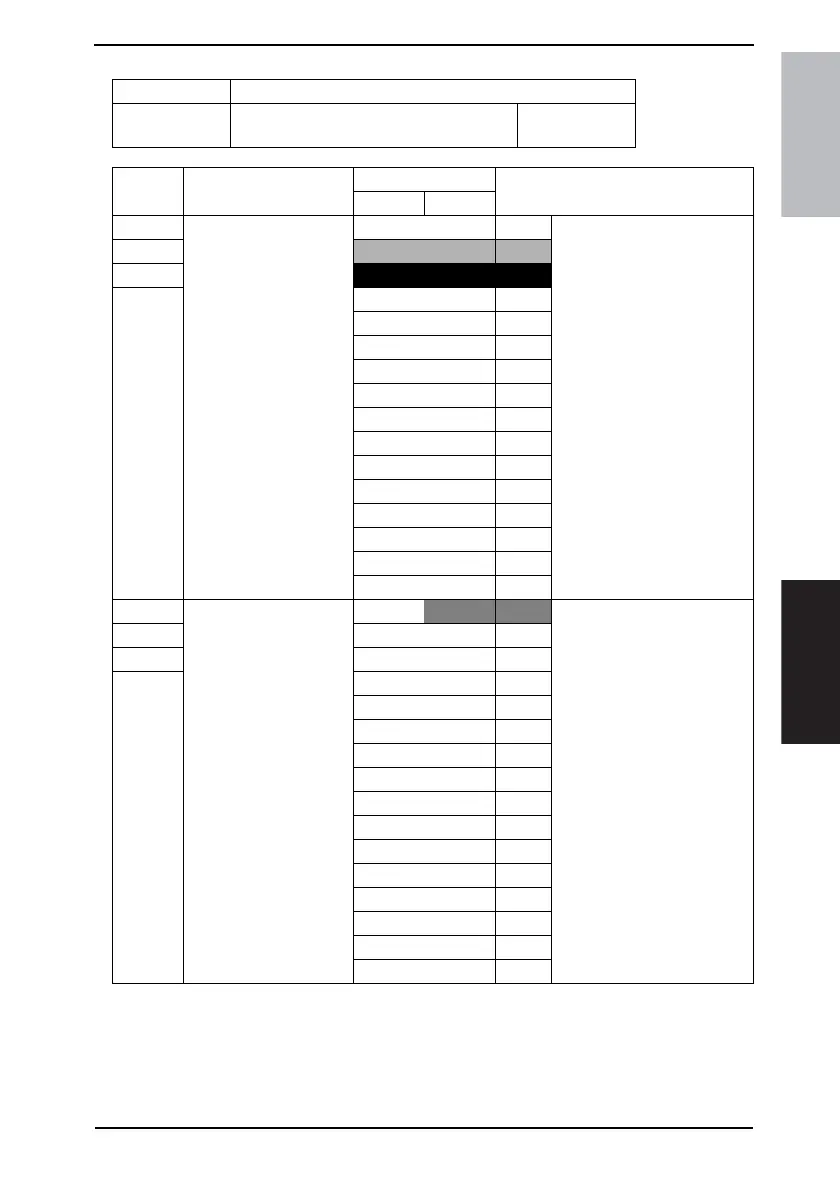
NOTE
• The features with (*) are settable by users. *: Screen setting <*>: Soft switch setting
• If the first stage has been set [0000], the system proceeds to the second stage
after 10 minutes without carrying out the first stage.
• If the first and the second stages have been set [0000], the auto redialing process
will not be is carried out.
MODE Factory setting bit
005
Bit: 7654 3210
0101 0000
HEX:10
Bit Feature
Logic
Description
01
7 Select number of redialing
1.
(Number of auto redialing
at 1st stage) *
Bit 7-4: 0000 0 Specifies the number of redial-
ing with the interval specified
by “Select redialing interval 1
(MODE 042 Bit 7-4).”
6
0001 1
5
0010 2
4 0011 3
0100 4
0101 5
0110 6
0111 7
1000 8
1001 9
1010 10
1011 11
1100 12
1101 13
1110 14
1111 15
3 Select number of redialing
2.
(Number of auto redialing
at the 2nd stage) *
Bit 3-0:
0000 0 Once redialing set by “Select
number of redialing 1 (MODE
005 Bit 7-4)”, the system redi-
als the number of times speci-
fied by this soft switch.
Redialing interval follows
“Select redialing interval 2
(MODE 042 Bit 3-0)” at the first
time and then follows “Select
redialing interval 1 (MODE 042
Bit 7-4)” from the second time.
2 0001 1
1 0010 2
0 0011 3
0100 4
0101 5
0110 6
0111 7
1000 8
1001 9
1010 10
1011 11
1100 12
1101 13
1110 14
1111 15











 To Next Page