11. Soft Switch List Field Service Ver. 1.0 Aug. 2005
56
FK-503
Adjustment / Setting
NOTE
• The features with (*) are settable by users. *: Screen setting <*>: Soft switch setting
The feature with [**] (Bit 1) is available only in a system with a multi-port option.
• For PSTN2, see mode 011.
MODE Factory setting bit
006
Bit: 7654 3210
0101 0010
HEX:32
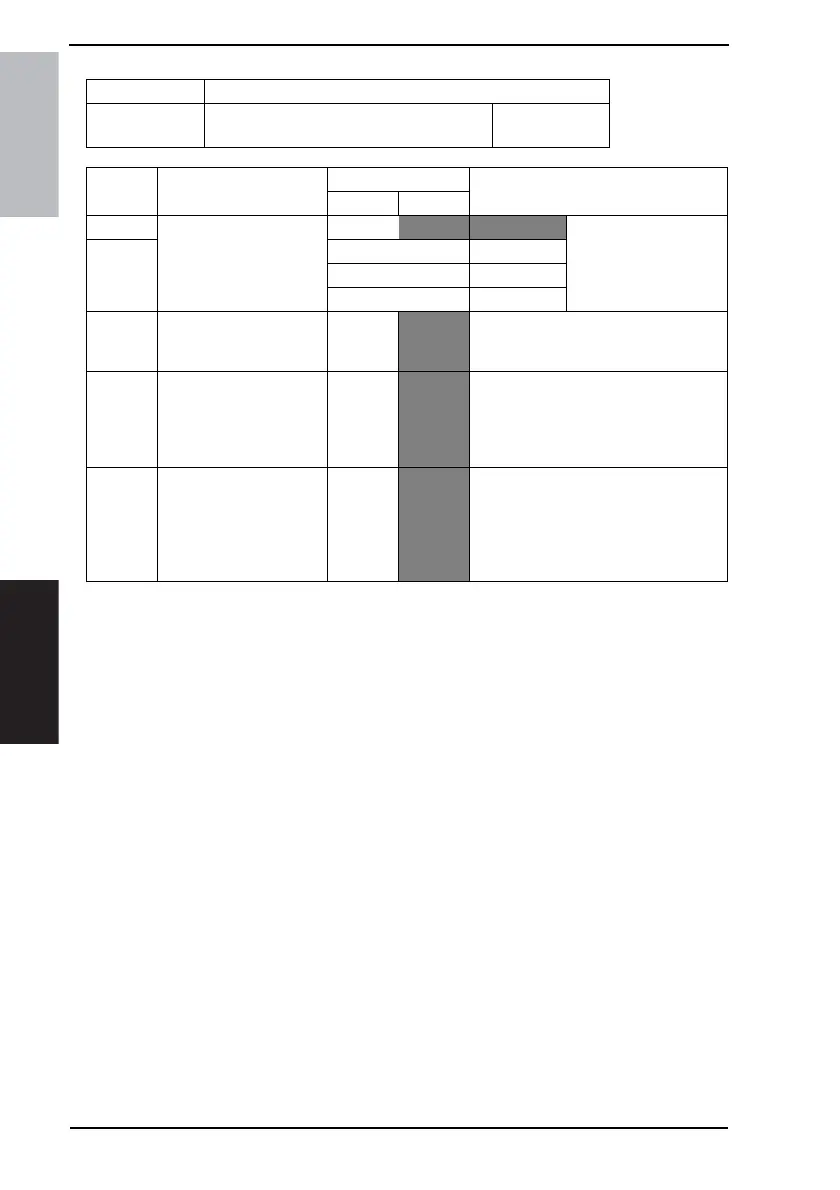
Bit Feature
Logic
Description
01
7 Select dial line speed (DP
speed). (PSTN1) *
Bit 7-6:
00 10 pps This is valid only when
“Switch PB/DP (MODE
006 Bit5)” sets DP.
16 pps is unavailable to
users.
6 01 20 pps
10 16 pps
11 Not available
5 Select a line type (tone or
pulse) for calling (Switch
PB/DP). (PSTN1) *
DP
PB DP : pulse
PB : tone
4 Select standard phone
line connected with the
system (Extension / Exter-
nal line connection).
(PSTN1) *
Exten-
sion con-
nection
External
line con-
nection
1 Select PSTN port auto-
matically:
Specify how to dial stan-
dard phone lines. <**>
No
Yes • When the system has 2 PSTN lines
and one of them is used, you can use
the other line by selecting “Yes.”
If you have only 1 PSTN line or wish to
use 2 lines for the extension and the
external lines separately, select “No.”











 To Next Page